

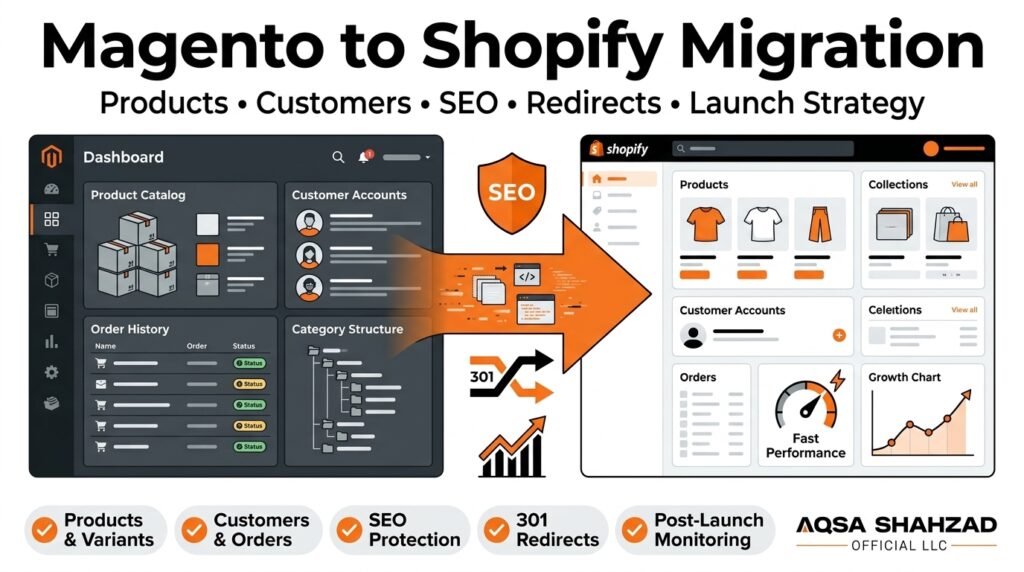
Most Magento store owners who decide to move to Shopify start with the same question: “How do I get my products across?” It’s a fair place to start, but it’s also where many migrations go wrong. Products are only one layer of a store. Behind them sit years of URLs that Google has indexed, customer accounts, order history, category structures, custom extensions, payment and shipping rules, and the internal links that hold your site architecture together.
A successful Magento to Shopify migration moves all of that in a controlled way. It covers data, URLs, SEO, customers, orders, integrations, functionality, testing, and post-launch monitoring. If you treat it as a simple import, you can end up with a clean new storefront and a quiet drop in organic traffic, broken customer logins, or missing order records that your support team needs every day.
This guide walks through the full process as it looks in 2026: what migration actually involves, what changes between the two platforms, how to move products and data, how to protect your search visibility, how to diagnose problems after launch, and how to decide whether to handle it in-house or bring in help.
Key Takeaways
- Definition: Magento to Shopify migration is the process of moving a store’s products, customers, orders, content, URLs, and SEO signals from Magento (or Adobe Commerce) to Shopify, while keeping the customer experience and search visibility intact.
- It’s more than a product import: A complete migration also covers customer accounts, order history, redirects, metadata, integrations, custom functionality, and testing. Product data is usually the easiest part.
- Redirects protect rankings: Every Magento URL that has traffic, backlinks, or indexed value should be 301-redirected to its closest matching Shopify URL. Redirecting everything to the homepage wastes that value.
- URL structures change: Shopify uses fixed path prefixes such as /products/, /collections/, /pages/, and /blogs/, so most Magento URLs will change and need mapping.
- Some traffic movement is normal: Rankings can fluctuate for several weeks after launch while Google recrawls the site. A sustained drop usually points to fixable issues such as missing redirects, noindex tags, or lost content.
- Cost depends on scope: A simple data transfer can be relatively inexpensive, while a full migration with custom development, integrations, SEO migration, and testing is a larger project priced on complexity.
- Monitoring is part of the project: The first 4 to 12 weeks after launch are when most migration issues surface, so Search Console, analytics, and redirect checks should be reviewed regularly during that window.
What Is Magento to Shopify Migration?
Magento to Shopify migration is the process of moving an online store from Magento Open Source or Adobe Commerce to Shopify, including its catalog, customer records, order history, content, URLs, and the SEO signals attached to them. The goal is a working Shopify store that customers and search engines recognize as the same business, not a new site starting from zero.
In practice, a migration usually includes products and variants, categories (which become collections), customer accounts, historical orders, CMS pages, blog posts, product reviews, images, and metadata such as page titles and meta descriptions. It also includes the less visible work: rebuilding functionality that a Magento extension used to provide, reconnecting your ERP, inventory, or shipping tools, and setting up redirects from every old URL to its new home.
That last part is why migration is more than a product import. Google has spent years crawling and ranking your Magento URLs. When those URLs change and nothing tells search engines where the content went, the pages that earned your organic traffic effectively disappear. URL preservation and redirect mapping are what carry that history over to the new store.
Why Move From Magento to Shopify?
Businesses usually move from Magento to Shopify to reduce the technical overhead of running their store. Magento is powerful and highly customizable, but that flexibility comes with responsibilities that many merchants would rather hand off.
Platform management and infrastructure. Magento Open Source is self-hosted, so you are responsible for hosting, server performance, caching, security patches, and version upgrades. Shopify is a hosted SaaS platform, so infrastructure, security updates, and core platform upgrades are handled for you.
Development requirements. Many Magento stores depend on developers for routine changes, extension conflicts, and upgrade work. Moving between major Magento versions has historically required significant development time. On Shopify, more day-to-day changes can be made by non-developers through the theme editor and admin.
Store administration. Shopify’s admin is generally simpler for marketing and operations teams to work in. Launching a collection, editing a landing page, or setting up a discount often doesn’t need a ticket to a developer.
App ecosystem. Shopify’s app store covers most common needs, including reviews, subscriptions, loyalty, email and SMS marketing, and ERP connectors. Apps can replace many Magento extensions, although each one adds a monthly cost and should be chosen carefully.
Scalability. Shopify handles traffic spikes on its own infrastructure, which matters for brands that run large promotions or seasonal peaks. Shopify Plus adds features aimed at higher-volume merchants, such as checkout extensibility and automation tools, which is why many larger Magento and Adobe Commerce stores move straight to Shopify Plus development rather than a standard plan.
That said, Shopify is not automatically the better choice for every business. Merchants with very complex B2B pricing, heavily customized checkout logic, deep multi-store setups, or unusual product configuration requirements should map those needs against Shopify’s capabilities before committing. Some requirements can be met with apps or custom development; a few may need a different approach entirely. A good migration starts by confirming the move makes sense, not by assuming it does.
Magento vs. Shopify: What Changes After Migration?
The biggest adjustment after migration is that Shopify is more structured than Magento. You trade some flexibility for simplicity, and several things you’re used to in Magento work differently. Understanding these differences early prevents surprises during the build.
Product structure. Magento supports several product types, including simple, configurable, grouped, bundle, virtual, and downloadable products, plus custom attribute sets. Shopify uses a single product model with variants built from up to three options (for example, size, color, and material). Configurable products usually map cleanly to Shopify products with variants, but bundles and grouped products often need an app or a different setup. Extra attributes are typically stored as metafields.
Categories vs. collections. Magento uses a nested category tree. Shopify uses collections, which can be manual or automated (built from rules such as tags, vendor, or price). Collections are flat by default, so a deep Magento hierarchy is usually recreated through navigation menus and collection structure rather than a true parent-child tree.
Customization and themes. Magento themes can be modified at almost any level. Shopify themes are built on Liquid and Online Store 2.0 sections, which are flexible but work within the platform’s conventions. Custom features that lived in Magento’s code may need to be rebuilt as theme customizations, custom Shopify apps, or replaced with third-party apps.
Checkout. Magento’s checkout can be heavily customized. Shopify’s checkout is standardized and hosted by Shopify, with customization available through checkout extensibility (more extensive on Shopify Plus). Any custom checkout logic needs to be reviewed for what can be replicated.
Integrations. ERPs, warehouse systems, accounting tools, and marketing platforms that connected to Magento will need new Shopify connections. Some vendors offer native Shopify apps; others need middleware or custom integration work.
URLs and SEO. This is where many merchants are caught off guard. Shopify uses fixed URL prefixes: products live under /products/, collections under /collections/, pages under /pages/, and blog posts under /blogs/[blog-name]/. Magento URLs are usually flatter and often end in .html. That means nearly every URL on your store will change, and every important one needs a redirect. Shopify also generates the XML sitemap and robots.txt automatically, and handles canonical tags at the theme level.
Store management. Day-to-day work like editing products, managing orders, and running promotions moves to the Shopify admin. Your team will need some time to adapt workflows, especially around inventory, fulfillment, and reporting.
Magento to Shopify Migration Checklist
A Magento to Shopify migration checklist works best when it starts with an audit, not an export. Before anything moves, you need a clear picture of what your Magento store contains, what is actually worth keeping, and what drives revenue and organic traffic today.
Start with a store audit. List every active extension and what it does, every integration (ERP, PIM, 3PL, accounting, email, reviews), and every custom feature your developers have built. Many stores carry extensions that were installed years ago and no longer matter; others quietly power key processes, such as tiered pricing or custom shipping rules, that will break if no one notices them.
Next, build a data inventory. Count your products, variants, categories, customers, orders, CMS pages, and blog posts. Note where the data is messy: duplicate SKUs, disabled products that still have URLs, missing images, inconsistent attribute values. Migration is the best chance you will get to clean this up, and the worst time to discover it.
Then do the SEO baseline. Crawl the live Magento site and export every indexable URL along with its title, meta description, H1, canonical, and status code. Pull organic landing pages and their traffic from Google Analytics, top queries and pages from Google Search Console, and your most-linked pages from a backlink tool. This baseline becomes your redirect map and your benchmark after launch. If you don’t have one, a Shopify SEO audit before and after the move gives you both sides of the comparison.
Finally, document operational settings that are easy to forget: payment methods, tax rules, shipping zones and rates, transactional email templates, analytics and ad-platform tracking, and any customer-group pricing. Each of these needs an equivalent on Shopify before launch.
Here is the core checklist that comes out of that audit:
- Magento store audit: extensions, custom code, integrations, and store views
- Data inventory: products, variants, categories, customers, orders, pages, blog posts, reviews
- Product inventory: SKUs, stock levels, attributes, and product types that need special handling
- Customer data: accounts, addresses, marketing consent, customer groups
- Orders: how much history to migrate and in what format
- Categories: plan how the category tree maps to Shopify collections and menus
- URLs: full crawl of indexable URLs, plus URLs from analytics, Search Console, and backlinks
- SEO metadata: titles, meta descriptions, H1s, alt text, structured data
- Images: product, category, and content images with file names and alt text
- Blog and content: CMS pages, blog posts, and internal links within them
- Integrations: ERP, inventory, fulfillment, email/SMS, reviews, accounting
- Payment methods: gateways, wallets, and any buy-now-pay-later providers
- Shipping: zones, rates, carriers, and free-shipping rules
- Analytics: GA4, Search Console, ad pixels, and conversion tracking
- Redirects: one-to-one 301 redirect map for every URL that matters
- Testing: data accuracy, checkout, redirects, integrations, and mobile
- Launch: DNS cutover plan, timing, and rollback plan
- Post-launch monitoring: Search Console, rankings, traffic, conversions, and errors
How to Migrate Products From Magento to Shopify
To migrate products from Magento to Shopify, you export your Magento catalog, transform it to match Shopify’s product structure, import it through a CSV file, an API-based migration tool, or a custom script, and then validate the results. The transformation step is where most of the work and most of the errors happen, because the two platforms don’t store product data the same way.
Titles, descriptions, and SKUs. These usually move over directly. Watch for Magento descriptions that contain hard-coded links to old URLs, inline styles, or widget shortcodes that Shopify won’t render. SKUs should be checked for duplicates before import, since duplicates cause problems with inventory sync and integrations.
Prices. Regular prices map to Shopify’s price field, and Magento special prices typically map to the “compare-at” price structure. Tiered pricing, customer-group pricing, and scheduled sale prices don’t have a direct one-to-one equivalent and usually need Shopify B2B features, an app, or a different approach.
Inventory. Stock quantities need to be migrated close to launch, or synced continuously, so they are accurate on day one. If you use multiple warehouses in Magento, map them to Shopify locations.
Variants. A Magento configurable product with child simple products becomes a single Shopify product with variants. Shopify allows up to three options per product and, as of 2025, up to 2,048 variants per product. Products that use more than three configurable attributes need to be restructured, for example by combining attributes or splitting products.
Images. Images need to be transferred with their correct order, variant assignments, and alt text. Image alt text is easy to lose in a migration and matters for both accessibility and image search.
Categories and attributes. Category assignments become collection memberships, often handled through tags or automated collection rules. Custom attributes such as material, fit, or technical specifications are usually stored as Shopify metafields so they can be displayed on product pages and used in filtering.
Product URLs and SEO metadata. Each product’s URL handle, page title, and meta description should be carried over deliberately. Keeping the same slug where possible makes redirect mapping simpler, for example /blue-running-shoe.html becoming /products/blue-running-shoe. Meta titles and descriptions that already rank should be preserved rather than regenerated.
For small, simple catalogs, Shopify’s product CSV import can be enough. Larger catalogs, or catalogs with many variants, metafields, and images, are usually better handled with an API-based tool or a scripted migration that can be rerun and validated.
Magento to Shopify Data Migration
Magento to Shopify data migration covers everything your store needs to operate, not only the catalog. Products are the most visible piece, but the data your customers and support team rely on is just as important.
A complete migration typically includes:
- Products and variants, with prices, inventory, images, and metafields
- Customers, with names, email addresses, addresses, tags, and marketing consent status
- Orders, including line items, totals, dates, and statuses for historical reference
- Categories, rebuilt as collections and navigation
- Images, for products, collections, pages, and blog posts
- Pages and blog posts, with their content, metadata, and internal links
- Reviews, usually moved through the review app you plan to use on Shopify
- Discounts and gift cards, where active codes need to keep working
- SEO information, including titles, meta descriptions, alt text, and URL handles
- Redirects, imported in bulk from your URL map
Customer data migration has an important limitation: customer passwords can’t be transferred, because Magento stores them in hashed form. Customers will need to set up their account on Shopify, either by activating it through an invitation or by signing in with a one-time code if you use Shopify’s newer customer accounts. Plan a clear email to customers explaining this, and make sure marketing consent is migrated accurately so you stay compliant with email and SMS rules. Shopify’s documentation covers importing customers by CSV.
Order migration is mainly about history. Imported orders let customers see past purchases and help your team handle returns and support questions. Decide how many years of history you actually need, and make sure imported orders don’t trigger notifications or affect inventory or financial reporting.
Validation is not optional. After every import, compare record counts between Magento and Shopify, spot-check a sample of products, variants, customers, and orders field by field, and look for encoding problems, missing images, and broken HTML. A migration that moves 99% of records correctly can still leave hundreds of broken product pages on a large store. Running at least one full test migration before the final one is the most reliable way to find these issues early.
How to Protect SEO During Magento to Shopify Migration
You protect SEO during a Magento to Shopify migration by keeping the content that ranks, mapping every valuable old URL to its closest new equivalent with a 301 redirect, preserving metadata and internal links, and confirming that Google can crawl and index the new store from day one. Google treats a platform change with new URLs as a site move with URL changes, and it has to rediscover and reassess every page.
SEO is affected during migration because rankings are tied to specific URLs and the signals attached to them: content, internal links, backlinks, and user history. When URLs change, those signals only carry over if search engines can follow a clear path from old to new. When content is rewritten, templates change, or pages are dropped, Google is also evaluating partly different pages. The more that changes at once, the more uncertainty you introduce.
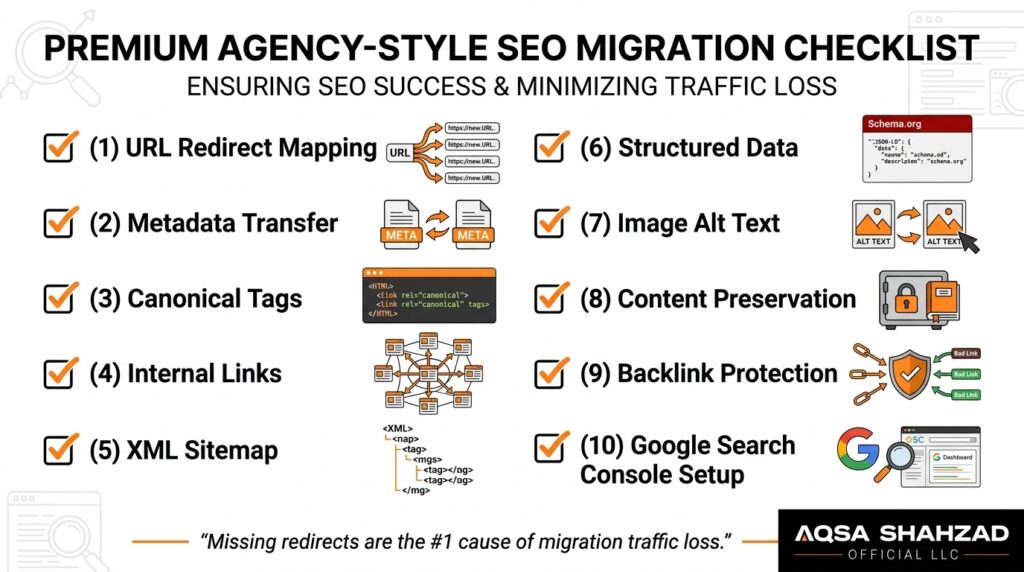
The work breaks down into a few areas:
- URL mapping and 301 redirects: every indexed or linked Magento URL points to a relevant Shopify URL.
- Metadata: titles, meta descriptions, and H1s are carried over, not regenerated by default templates.
- Canonical tags: Shopify themes set canonicals automatically, but check them on products reachable through multiple collection paths, and on paginated or filtered pages.
- Internal links: navigation, breadcrumbs, and links inside content point directly to new URLs.
- Indexability: no stray noindex tags, password protection, or robots.txt blocks on the live store.
- XML sitemap: Shopify generates /sitemap.xml automatically; submit it in Search Console at launch.
- Structured data: product, review, breadcrumb, and organization markup are present and valid on the new theme.
- Image SEO: file names and alt text are preserved, and important images are not replaced with generic ones.
- Content preservation: ranking category copy, product descriptions, and blog posts are moved, not trimmed.
- Backlinks: linked pages get exact redirects, and your most valuable referring links are checked after launch.
- Google Search Console: verify the domain before launch, then monitor indexing, crawl errors, and performance.
Preserve Magento URLs With 301 Redirects
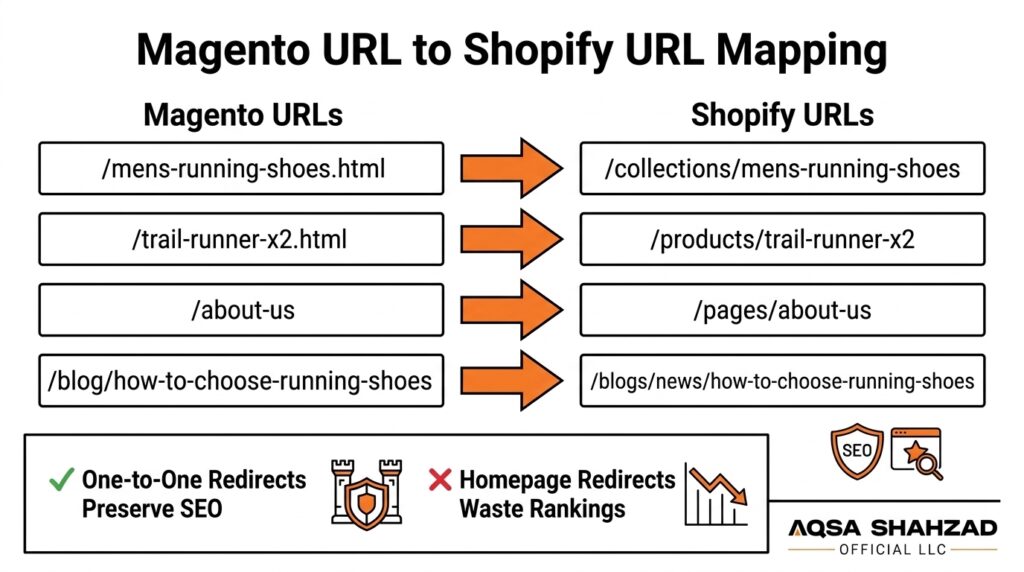
A 301 redirect tells browsers and search engines that a page has moved permanently, and Google uses it as a strong signal to transfer the old URL’s ranking signals to the new one (Google’s guidance on redirects). URL mapping is the process of pairing each old Magento URL with the most relevant Shopify URL before launch.
Here is what a typical mapping looks like:
| Old Magento URL | New Shopify URL | Redirect |
|---|---|---|
| /mens-running-shoes.html | /collections/mens-running-shoes | 301 |
| /trail-runner-x2.html | /products/trail-runner-x2 | 301 |
| /mens/shoes/trail-runner-x2.html | /products/trail-runner-x2 | 301 |
| /about-us | /pages/about-us | 301 |
| /blog/how-to-choose-running-shoes | /blogs/news/how-to-choose-running-shoes | 301 |
| /discontinued-runner-v1.html | /products/trail-runner-x2 (closest replacement) | 301 |
Notice the third row. Magento often creates multiple URLs for the same product, such as category-path versions. Each of those variations should be found and redirected, not just the primary one. Also check Magento’s URL rewrite table, query-string URLs, and old URLs that were already redirecting within Magento, so you don’t create redirect chains.
Shopify lets you add redirects one by one or import them in bulk by CSV. Keep in mind that Shopify redirects only fire when the old path returns a 404 on Shopify, and some paths, such as /products and /collections/all, can’t be used as redirect sources.
Why redirecting everything to the homepage is a mistake: a mass redirect to the homepage sends users looking for a specific product to a page that doesn’t answer their need, and Google often treats irrelevant redirects like this as soft 404s. That means the ranking signals of the old page are likely lost rather than passed on. Redirect each URL to the most relevant equivalent: the same product, its replacement, or the closest collection. Only pages with no reasonable equivalent should be left to return a 404 or 410.
Preserve Internal Linking
Internal links tell search engines which pages matter and how your store is organized. When URLs change, every internal link that pointed to an old Magento URL either breaks or relies on a redirect.
Check these areas specifically:
- Navigation: main menu and footer links should point to the new collection and page URLs, and keep the same priority pages visible.
- Breadcrumbs: Shopify themes handle breadcrumbs differently; make sure they reflect a logical hierarchy.
- Product links: related products, upsells, and cross-sells need to be rebuilt, often through an app or metafields.
- Collection links: links between category pages and subcategory pages should survive the move from a nested tree to collections.
- Blog links: posts often link to products and categories using old URLs.
- Contextual links: links written inside product descriptions, CMS pages, and category copy.
Redirects will catch broken internal links, but internal links should be updated to point directly at the final URL. Redirect hops slow crawling and make your site structure harder for search engines to read.
Preserve Important Backlinks and Landing Pages
Not every URL is equally valuable. Pages that earn organic traffic, rank for commercial keywords, or have backlinks from other sites deserve extra attention. Before launch, build a priority list from your Search Console top pages, analytics organic landing pages, and backlink data.
For these pages, check that the redirect goes to a true equivalent, the content is preserved (or improved), the metadata is carried over, and the new page is linked from navigation or related content. A category page that brings in a large share of organic revenue shouldn’t land on a thin new collection with no description. For your most valuable backlinks, it can also be worth asking the linking site to update the URL directly.
Shopify Migration Traffic Drop: What to Check
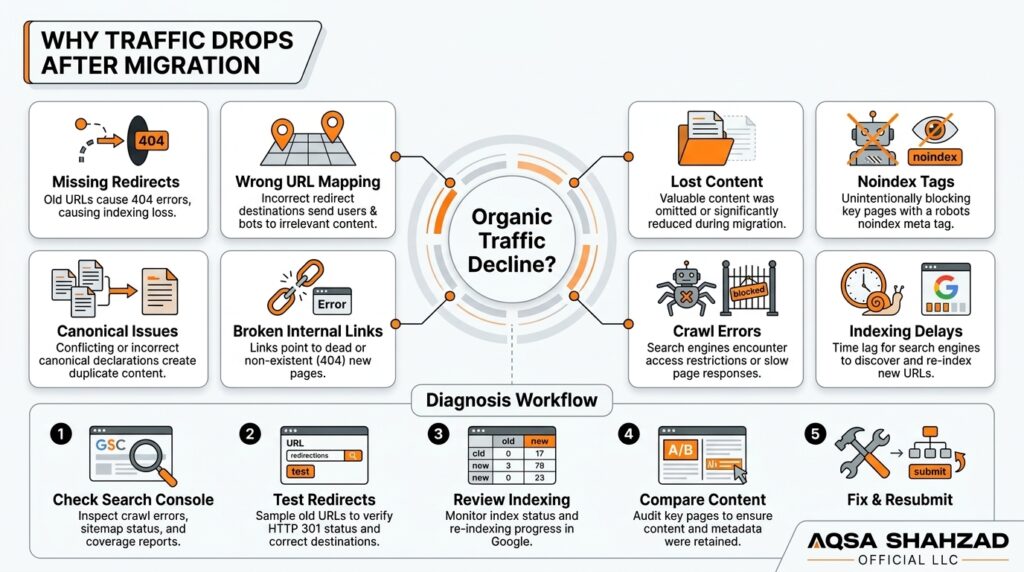
A Shopify migration traffic drop is usually caused by a technical issue that can be found and fixed, though some fluctuation is normal while Google recrawls the new URLs. A short dip in the first few weeks is common. A drop that keeps getting worse, or that hits specific page types hard, needs investigation.
The most common causes are:
- Broken or missing redirects: old URLs return 404s instead of redirecting.
- Incorrect URL mapping: redirects point to irrelevant pages, the homepage, or redirect chains.
- Missing content: category descriptions, FAQ copy, or blog posts weren’t migrated.
- Noindex tags: a staging setting, app, or theme setting is blocking indexing.
- Canonical problems: canonicals point to the wrong URL or to the staging domain.
- Broken internal links: navigation and content still link to old URLs.
- Crawl errors: server errors, blocked resources, or robots.txt rules.
- Indexing delays: Google hasn’t yet processed the new URLs.
- Changed site architecture: important pages are buried deeper or removed from navigation.
- Metadata changes: titles and descriptions were replaced by theme defaults.
- Ranking changes: pages are indexed but ranking lower because content or relevance changed.
A practical diagnostic process:
- Confirm the drop is real. Compare organic sessions and Search Console clicks with the same period last year, and rule out seasonality, tracking problems, or a missing analytics tag on the new store.
- Find where it happened. Compare Search Console performance by page before and after launch. Is the loss concentrated in products, collections, or blog posts?
- Test the old URLs. Run your list of top old Magento URLs through a crawler or redirect checker. Each should return a single 301 to the right page, ending in a 200.
- Check indexing. Use Search Console’s Page indexing report and the URL Inspection tool to look for “Excluded by noindex,” “Not found (404),” “Duplicate without user-selected canonical,” and “Crawled – currently not indexed.”
- Compare the pages themselves. For pages that lost rankings, compare old and new versions: title, H1, body content, internal links, and structured data.
- Crawl the new site. Look for broken internal links, redirect chains, missing metadata, and orphan pages.
- Fix, resubmit, and track. Correct issues, request indexing for key pages, resubmit the sitemap, and track recovery page by page rather than only at site level.
Magento to Shopify Migration Partner vs. DIY Migration
DIY migration can work for small, simple stores, while a Shopify migration partner makes more sense when the store has significant SEO value, custom functionality, complex data, or integrations that the business depends on. The right choice depends less on budget alone and more on how much risk the store can absorb.
A DIY approach is often reasonable when you have a few hundred products with simple variants, limited custom Magento functionality, few integrations, modest organic traffic, and someone on the team who is comfortable with CSV files, Shopify settings, and basic SEO checks. Automated migration tools can move products, customers, and orders reasonably well in these cases. Their limitation is that they move data; they don’t decide how your URLs should be mapped, which custom features need rebuilding, or whether your category content survives the new theme.
Professional support becomes more valuable as these factors increase:
- Number of products and variants: large catalogs magnify every small data error.
- Number of URLs: thousands of indexed URLs need careful mapping and testing.
- Custom Magento functionality: custom pricing, product builders, or checkout logic need to be rebuilt.
- Integrations: ERP, inventory, and fulfillment connections have to work on day one.
- Customer data: account activation, consent, and customer groups need careful handling.
- Order history: imports must not trigger emails or distort reporting.
- SEO value: stores that rely on organic traffic have the most to lose from mistakes.
- International stores: multiple Magento store views, languages, and currencies need a Shopify Markets plan and hreflang setup.
- Technical complexity: multi-store setups, headless front ends, or heavy custom code.
When evaluating a Shopify migration partner, ask how they handle URL mapping, how many test migrations they run, how they validate data, what their launch and rollback plan looks like, and what monitoring they provide after launch. A partner who only talks about moving products is offering a data transfer, not a full migration. Our Shopify platform migration services cover data, redirects, SEO, integrations, and post-launch monitoring as one project, and our case studies show how we approach Shopify builds end to end.
Get a Magento to Shopify Migration Plan →
How to Perform a Magento to Shopify Migration
A Magento to Shopify migration is best run in nine stages, from audit to post-launch monitoring. Skipping the early planning stages is the most common reason migrations run late or launch with problems.
- Discovery and audit. Review the Magento store’s extensions, custom code, integrations, data quality, and SEO performance. Define what must be migrated, what can be retired, and what success looks like after launch.
- Data planning. Map every Magento data field to its Shopify equivalent: product types to variants, attributes to metafields, categories to collections, customer groups to tags or B2B settings. Decide how much order history to bring over.
- Shopify architecture. Plan collections, navigation, URL handles, theme, apps, and Shopify plan. This is where you decide how the store will be organized, not just how it will look.
- Data migration. Run a test migration into a development store, validate it, fix the mapping, and repeat. The final migration happens close to launch, with a delta migration for any new orders and customers created in the meantime.
- SEO migration. Build the full redirect map, carry over metadata and content, set up structured data, check canonicals and indexability, and prepare Search Console and analytics.
- Development and customization. Build the theme, rebuild any custom features, configure apps, and connect integrations such as ERP, fulfillment, email, and reviews.
- Testing. Test checkout with every payment method, shipping and tax calculations, customer account access, integrations, redirects, mobile layouts, and page speed. App-heavy migrations often slow a new theme down, so Shopify speed optimization belongs in this stage, not after launch. Test with real scenarios, such as a returning customer placing an order with a discount code.
- Launch. Choose a low-traffic window, freeze changes on Magento, run the final data sync, point the domain to Shopify, import redirects, remove storefront password protection, and submit the sitemap. Keep the Magento store and database available as a backup.
- Post-launch monitoring. Watch Search Console, analytics, redirect logs, orders, and integrations daily at first, then weekly. Fix issues as they appear rather than waiting for a monthly report. Many brands keep a Shopify support and maintenance retainer in place for the first few months for exactly this reason.
How Much Does Magento to Shopify Migration Cost?
There is no universal price for a Magento to Shopify migration, because cost depends on the size and complexity of the store and on how much of the work goes beyond moving data. A small catalog moved with an automated tool can cost relatively little; a full migration with custom development, integrations, and SEO migration is a much larger project.
The main factors that affect cost are:
- Store size and product count: more products, variants, and images mean more data mapping and validation.
- Data complexity: messy attributes, multiple store views, or unusual product types take longer to transform.
- Custom development: features built into Magento may need custom Shopify apps or theme work.
- Integrations: each ERP, PIM, or warehouse connection adds setup and testing time.
- SEO migration: redirect mapping, metadata transfer, and content preservation scale with the number of URLs.
- Design: a new custom theme costs more than adapting an existing one.
- International stores: multiple languages, currencies, and domains add configuration and SEO work.
- Testing: thorough testing takes time but is far cheaper than fixing problems after launch.
- Ongoing support: post-launch monitoring and fixes are often priced separately.
Also budget for ongoing Shopify costs: the subscription plan, paid apps that replace Magento extensions, and payment processing fees.
The key distinction is between a simple data migration and a complete ecommerce migration project. A data migration moves products, customers, and orders from one database to another. A complete migration also covers architecture, design, custom functionality, integrations, SEO preservation, testing, launch, and monitoring. Comparing quotes only makes sense when you know which of the two you’re being offered.
Magento to Shopify Migration vs. Other Platform Migrations
Every ecommerce platform migration has the same goal, but the work changes depending on where you’re coming from. URL structures, data models, and SEO considerations differ between source platforms.
Magento migrations tend to be among the more involved because Magento stores are often large, heavily customized, and built over many years, with complex product types, multiple store views, and URL rewrite tables full of historical paths. A WooCommerce migration usually involves WordPress content and plugin-driven features. A Wix to Shopify migration is typically smaller in catalog size, but it brings its own challenges: Wix uses its own URL patterns for product and blog pages, and some stores rely on Wix-specific apps that have no direct equivalent. An Amazon to Shopify move is different again, because it’s about building a direct-to-consumer store and customer base rather than moving existing URLs.
The principles stay the same across all of them: audit first, map data carefully, redirect every valuable URL to its closest match, test thoroughly, and monitor after launch. What changes is the specific mapping and the amount of custom work involved. You can find more platform-specific advice in our Shopify migration guides.
What Happens to SEO After Moving From Magento to Shopify?
SEO does not transfer automatically when you move from Magento to Shopify. Importing products moves the data, but rankings depend on URLs, redirects, content, internal links, and how search engines recrawl the new site. If those are handled well, most stores keep their visibility after a period of fluctuation. If they are not, organic traffic can decline and take months to recover.
After launch, Google starts finding your new Shopify URLs through redirects, the XML sitemap, and internal links. It crawls the old Magento URLs, follows the 301 redirects, and gradually replaces old URLs with new ones in its index. During this time, rankings for individual pages may move up and down. For most well-planned migrations, things settle within several weeks, although large stores can take longer to be fully reprocessed.
What determines the outcome:
- Redirects: each valuable old URL must lead to a relevant new page in one hop.
- Content: the pages that ranked must still contain the content that made them relevant.
- Internal links: the new site should link to important pages as strongly as the old one did.
- Canonicalization: each page should declare itself, or the correct primary version, as canonical.
- Crawlability: Google must be able to reach pages through links and the sitemap without being blocked.
- Indexability: pages must not carry noindex tags or return error codes.
- Rankings and organic traffic: these should be tracked by page type and key URL, not only as a site-wide total.
- Monitoring: problems found in week one are far cheaper to fix than problems found in month three.
No migration can promise zero ranking movement. What a careful migration can do is remove the avoidable causes of loss and give the new store the best chance to retain, and over time improve, its search performance.
Post-Migration SEO Monitoring
The first 4 to 12 weeks after launch are the most important period of a migration, because this is when Google reprocesses your site and when most technical issues become visible. Monitoring should be scheduled in advance, with clear owners and a clear process for fixing what comes up.
Track these areas:
- Google Search Console: check the Page indexing report for new errors, and use URL Inspection on key pages.
- Organic clicks and impressions: compare daily and weekly trends against the pre-launch baseline and the same period last year.
- Rankings: monitor your priority keywords and the pages that rank for them.
- Indexed pages: watch new Shopify URLs being indexed and old Magento URLs dropping out.
- Crawl errors: look for 404s, server errors, and redirect errors, then add or fix redirects.
- Redirects: re-crawl your old URL list to confirm every redirect still resolves correctly.
- Organic landing pages: compare top landing pages before and after launch to spot specific losses.
- Conversions and revenue: confirm GA4 and ad platforms are tracking purchases accurately on Shopify.
- User behavior: check engagement, bounce patterns, and site search for signs that visitors can’t find what they need.
It helps to keep a simple migration log of every change made after launch, with the date. If traffic moves, you’ll be able to connect it to a specific fix, theme update, or content change rather than guessing.
Migration is also a good moment to look at retention. Your customer list, email flows, and loyalty programs move to new tools, so check that welcome, abandoned cart, and post-purchase flows are firing correctly on Shopify. If those need rebuilding, Shopify email and SMS marketing support can help keep repeat revenue steady through the transition.
Magento to Shopify Migration: Common Mistakes
Most migration problems come from a small set of avoidable mistakes. Here are the ones that cause the most damage, and why.
Migrating without an SEO audit. Without a crawl and traffic baseline, you don’t know which URLs matter, which pages drive revenue, or what “normal” looks like after launch. Every later SEO decision becomes a guess.
Forgetting URL redirects. This is the single most common cause of post-migration traffic loss. Even stores that set up product redirects often forget category-path URLs, blog posts, CMS pages, image URLs, and old URLs that were already redirecting inside Magento.
Copying bad data. Duplicate SKUs, outdated products, broken HTML in descriptions, and inconsistent attributes all come across if you migrate without cleaning. The new store inherits the old store’s problems, now on a platform your team is still learning.
Ignoring custom functionality. Features that a Magento extension handled quietly, such as tiered pricing, product configurators, gift wrapping, or custom shipping rules, can disappear at launch if no one documented them. Catch these in the audit, not after customers complain.
Failing to test checkout. Checkout is where revenue happens. Every payment method, shipping option, tax scenario, and discount type should be tested with real orders before launch, including on mobile.
Forgetting analytics. Missing GA4 tags, broken conversion tracking, or duplicate purchase events make it impossible to judge whether the migration worked. They can also disrupt ad campaigns that rely on conversion data.
Ignoring customer accounts. Customers who can’t log in, or who don’t understand why their password stopped working, create support tickets and lost orders. Plan account activation and communication in advance.
Changing too many things simultaneously. Launching a new platform, new design, new URL structure, new product copy, and new navigation all at once makes it hard to tell what caused any drop in traffic or conversion. Where possible, keep content and structure stable during migration and make bigger changes afterwards.
Failing to monitor after launch. Many issues, such as a missed redirect pattern or an app adding noindex tags, only show up in Search Console data days or weeks later. Without regular checks, small problems turn into lasting losses.
Practical 2026 Magento to Shopify Migration Checklist
Use this as a working project checklist. Each item should have an owner and a date.
Before Migration
- Confirm Shopify (and the right Shopify plan) fits your business requirements
- Audit Magento extensions, custom code, integrations, and store views
- Crawl the Magento site and export all indexable URLs with metadata
- Export top organic pages and queries from Google Search Console
- Export organic landing pages, conversions, and revenue from analytics
- Identify pages with valuable backlinks
- Clean product data: duplicates, missing images, inconsistent attributes
- Map Magento fields to Shopify products, variants, metafields, and collections
- Decide how much order history and which customer data to migrate
- Choose apps to replace essential Magento extensions
During Migration
- Set up the Shopify development store, theme, and navigation
- Run a test migration of products, customers, and orders
- Validate record counts and spot-check data field by field
- Build the full old-URL-to-new-URL redirect map
- Carry over titles, meta descriptions, H1s, alt text, and content
- Rebuild internal links in navigation, breadcrumbs, and content
- Rebuild custom features and connect integrations
- Configure payments, shipping, taxes, and notification emails
- Install GA4, Search Console verification, and ad pixels
Before Launch
- Test checkout with every payment method, discount type, and shipping zone
- Test customer account activation and login
- Test integrations with real orders (ERP, fulfillment, email/SMS)
- Check structured data, canonicals, and indexability on key templates
- Run the final delta migration of new orders, customers, and inventory
- Import redirects and test a sample of old URLs
- Plan DNS cutover timing, and keep a Magento backup available
- Prepare customer communication about accounts and the new store
After Launch
- Remove storefront password protection and confirm no noindex tags
- Submit the XML sitemap in Google Search Console
- Crawl old URL list and confirm one-hop 301 redirects
- Monitor Page indexing, crawl errors, and 404s daily for the first two weeks
- Compare organic clicks, rankings, and landing pages against the baseline weekly
- Verify conversion and revenue tracking
- Log every post-launch change with its date
- Review performance at 30, 60, and 90 days
FAQs
How long does a Magento to Shopify migration take?
A small store with a simple catalog can often be migrated in a few weeks. Larger stores with custom functionality, integrations, multiple store views, and thousands of URLs commonly take two to four months or more, including planning, test migrations, development, and testing. The timeline depends mostly on scope and on how quickly decisions are made, not on the import itself.
Will I lose my SEO rankings when I migrate from Magento to Shopify?
You don’t have to, but some temporary fluctuation is normal while Google recrawls the new URLs. Lasting losses are usually caused by missing or incorrect redirects, missing content, noindex tags, or major structural changes. A complete URL map with one-to-one 301 redirects, preserved metadata and content, and close monitoring after launch gives you the best chance of keeping your visibility.
Can I migrate customers, orders, and reviews, or only products?
You can migrate customers, orders, and reviews as well as products. Customer records, addresses, and marketing consent can be imported, but passwords can’t, so customers will need to activate their accounts or sign in with a one-time code. Order history can be imported for reference, and reviews are usually moved through the review app you use on Shopify.
How much does it cost to migrate from Magento to Shopify?
Cost depends on scope. A basic data transfer for a small catalog using an automated tool can be inexpensive, while a complete migration with custom theme work, rebuilt functionality, integrations, SEO migration, and testing is a larger project. Ask for quotes that clearly separate data migration, development, SEO, and post-launch support so you can compare them fairly.
Do I need a Magento to Shopify migration service, or can I do it myself?
You can do it yourself if the store is small, the data is clean, there’s little custom functionality, and organic traffic isn’t a major revenue source. A Magento to Shopify migration service is worth considering when the store has a large catalog, significant SEO value, important integrations, international store views, or custom features, because the cost of mistakes in those cases is usually higher than the cost of expert help.
Conclusion
A Magento to Shopify migration is a business, technical, and SEO project, not a data import. Moving products is the easy part. The outcome depends on planning the new store’s structure, keeping data accurate, mapping every valuable URL to its new home, preserving the content and signals that earned your rankings, testing every path a customer takes, and watching closely in the weeks after launch.
Stores that treat migration as a structured project usually come out with a simpler platform, a team that can move faster, and search visibility that holds steady through the change. Stores that rush it often spend the following months repairing redirects and chasing lost traffic.
If you’re planning a move and want experienced eyes on your URL mapping, data, and launch plan, our Magento to Shopify migration service is a good place to start the conversation. Either way, use the checklist above, start with the audit, and give the post-launch period the attention it deserves.





