


If your Shopify Plus store still leans on checkout.liquid, you’re on borrowed time. Shopify closed the door on checkout.liquid customizations for new stores in August 2024, and legacy stores lose support entirely by 2025 in most cases. Shopify Plus checkout extensibility is the replacement system, and it changes how you build upsells, custom fields, shipping logic, and branding at checkout. Merchants who wait until their next Black Friday to figure this out will be rebuilding under deadline pressure instead of on their own schedule.
- Checkout extensibility replaces checkout.liquid with UI extensions, Shopify Functions, and the checkout branding API.
- Post-purchase upsells, custom validation, and dynamic shipping rules now require Functions instead of Liquid hacks.
- Migration timelines run 4 to 12 weeks depending on how customized your legacy checkout was.
- Tools like Shopify CLI, Rebuy, and Intelligems all now build against the extensibility framework, not the old checkout.
- Testing checkout changes requires a plan tied to Shopify Plus’s checkout A/B testing capability, not generic split-testing tools.
What Is Shopify Plus Checkout Extensibility?
Shopify Plus checkout extensibility is the framework that lets you customize checkout using app blocks, UI extensions, and Shopify Functions instead of editing the checkout.liquid template directly. It replaces a monolithic, hard-to-maintain file with modular extension points that Shopify controls and updates centrally.
Under the old model, every customization lived inside one Liquid file per store. Upgrading Shopify’s checkout meant re-testing your entire custom code every release. Under extensibility, your custom logic lives in isolated extensions that Shopify can update around without breaking your code, because the extension points are versioned APIs, not raw template access.
The practical building blocks are:
- Checkout UI extensions — React-based components that render in defined slots (above line items, in the shipping method block, on the thank-you page).
- Shopify Functions — serverless logic for shipping rate customization, discount logic, payment method availability, and validation rules.
- Checkout branding API — controls fonts, colors, corner radius, and logo placement without touching code for basic brand matching.
- Post-purchase extensions — the replacement for post-purchase upsell apps that used to inject scripts into checkout.liquid.
This matters for anyone reviewing shopify checkout settings today, because several settings that used to require custom code are now native toggles under Settings > Checkout. The rest requires a developer building against the extension framework rather than editing a template file.
How Do You Improve Shopify Plus Checkout Extensibility?
Improving your setup isn’t about adding more extensions. It’s about matching the right extension type to the right business problem without stacking latency onto a page where every 100ms costs conversions.
Audit Your Current Checkout Customizations
Start by cataloging what checkout.liquid or checkout apps are currently doing for you. Common items: custom fields for gift messages, address validation for PO boxes, loyalty point redemption, B2B net-terms display, and post-purchase cross-sells. Each of these maps to a specific extension type, and knowing the mapping before you scope development prevents rebuilding the wrong thing twice.
Prioritize by Revenue Impact
Not every customization deserves a rebuild. Rank items by measurable impact: post-purchase upsell revenue, cart abandonment tied to a missing field, or shipping method confusion flagged in Hotjar or Microsoft Clarity session recordings. Build the highest-impact extensions first and defer cosmetic tweaks.
Use Shopify Functions for Logic, Not Scripts
Shipping rate manipulation, discount stacking rules, and payment method hiding (for example, hiding cash-on-delivery for high-risk zip codes) all belong in Shopify Functions written in Rust or JavaScript, deployed via Shopify CLI. This is a genuine engineering task, not a theme edit, and it typically needs a developer comfortable with GraphQL Admin API and the Functions runtime.
Test Before Full Rollout
Shopify Plus supports native checkout A/B testing for merchants on eligible plans. Run any new extension through a controlled test against your current checkout before pushing to 100% of traffic. A field that seems helpful in a design review can still add friction that shows up only in aggregate conversion data.
What Does Good Shopify Plus Checkout Extensibility Look Like in 2026?
By 2026, “good” checkout extensibility isn’t about having the most extensions installed. It’s about a checkout that loads fast, matches your brand without custom CSS hacks, and adds only the fields and upsells that measurably lift revenue or reduce support tickets.
Concretely, that looks like:
- Sub-2-second checkout load times as measured in Lighthouse and confirmed by real-user data in GA4, because every extension adds JavaScript payload.
- Branding API used before custom extensions for anything cosmetic — logo, color, font, spacing — since it requires zero maintenance compared to a UI extension doing the same job.
- Post-purchase upsells that respect inventory and shipping zones in real time, not static offers that break when stock runs out mid-campaign.
- B2B checkout paths showing net-terms, PO number fields, and custom pricing through the same extension framework used for direct-to-consumer, rather than a separate bolted-on system.
- Native checkout A/B testing running continuously, not just at launch, so extensions get retired if they stop earning their keep.
Shopify checkout examples worth studying tend to share one trait: restraint. High-performing Plus merchants add two or three extensions maximum, each tied to a specific, measured outcome — an upsell block, a delivery date picker, a gift note field — rather than trying to replicate every checkout.liquid customization they ever accumulated.

The other marker of a well-built 2026 checkout is documentation. Teams that survive Shopify’s next platform shift are the ones who kept a written map of which extension does what, owned by which vendor or internal developer, reviewed at least twice a year.
Which Tools Help With Shopify Plus Checkout Extensibility?
The tool landscape split cleanly once checkout.liquid customization closed. Some vendors rebuilt fully on extensions; others still lean on workarounds that will eventually stop working.
| Tool | Extensibility Support | Primary Use |
|---|---|---|
| Shopify CLI | Native, required | Scaffolding, building, and deploying UI extensions and Functions |
| Rebuy | Rebuilt for extensions | Post-purchase and checkout upsells |
| Intelligems | Rebuilt for extensions | Checkout-safe pricing and promotion testing |
| Okendo | Partial, review-focused | Post-purchase review requests, not checkout logic |
| Judge.me | Partial, review-focused | Similar to Okendo, review collection triggers |
| Shopify Flow | Native, complementary | Automations triggered by checkout events, not checkout UI itself |
For diagnosing where a checkout customization is losing money, pair the build tools above with measurement tools: Hotjar or Microsoft Clarity for session replay on the checkout funnel, GA4 for funnel drop-off by step, and PageSpeed Insights or WebPageTest to confirm an extension isn’t dragging load time. None of these tools build the extension for you, but they tell you whether the one you built is worth keeping.
If your team hasn’t touched Shopify CLI directly, this is the point where working with a development partner earns its cost — Functions require actual software engineering discipline, including version control, staging environments, and rollback plans, not theme editor familiarity.
How Long Does Shopify Plus Checkout Extensibility Take?
Timeline depends almost entirely on how much custom logic your old checkout.liquid carried, not on store size or revenue.
- Audit and scoping: 1 to 2 weeks. Catalog every custom field, script, and third-party injection currently running in checkout.
- Extension mapping and technical spec: 1 week. Decide which items become UI extensions, which become Functions, and which get dropped as unnecessary.
- Development: 2 to 6 weeks. Simple brand-matching and a single upsell block can ship in two weeks. Custom shipping logic, B2B net-terms, and multi-field validation push toward six.
- Staging and QA: 1 to 2 weeks. Test across payment methods, shipping zones, and device types, since checkout bugs are the most expensive bugs in ecommerce.
- Phased rollout with A/B testing: 1 to 3 weeks. Use Shopify Plus’s native checkout testing to confirm the new build doesn’t underperform the old one before full cutover.
Total realistic range: 4 to 12 weeks. Stores with heavily customized checkout.liquid files — the kind with five or more injected scripts, custom loyalty integrations, or bespoke B2B logic — sit at the high end. Stores with a mostly-default checkout and one or two simple additions can complete in a month.
Checkout.liquid vs. Checkout Extensibility Tradeoffs
Even though checkout.liquid is being phased out, understanding why each approach existed clarifies what you’re gaining and what you’re giving up.
When checkout.liquid used to win
- Full control over markup and layout with no extension slot restrictions
- Faster for one-off, throwaway customizations on stores not renewing Plus long-term
- No need to learn React or the Functions runtime
- Direct CSS overrides without a branding API abstraction layer
When checkout extensibility earns its cost
- Shopify checkout updates no longer break your custom code on release day
- Extensions are supported long-term and required for new Plus stores
- Native checkout A/B testing works cleanly with extension-based changes
- Post-purchase and B2B logic run through a maintained, documented API
For any store still weighing whether to invest now, the honest answer is that checkout.liquid isn’t a long-term option anymore for stores wanting ongoing support. The comparison is really about how fast you move, not whether you move.
Common Mistakes During Migration
Most checkout extensibility problems aren’t technical failures — they’re scope and testing failures.
- Rebuilding every old customization instead of auditing for actual value. Half of legacy checkout.liquid code exists because nobody removed it after the original campaign ended.
- Skipping the branding API in favor of a full UI extension for cosmetic changes. This adds unnecessary JavaScript and maintenance overhead for something a few clicks in Settings > Checkout > Branding can solve.
- Not testing on real B2B accounts. Net-terms and custom pricing logic behaves differently under Functions than it did under Liquid conditionals, and this only surfaces with live account testing.
- Launching without a rollback plan. Extensions can be disabled quickly through the admin, but only if someone documented which extension controls which behavior before go-live.
- Ignoring mobile checkout performance. Extensions render differently on mobile Safari than desktop Chrome, and a field that looks fine on a 27-inch monitor can push the payment button below the fold on a phone.
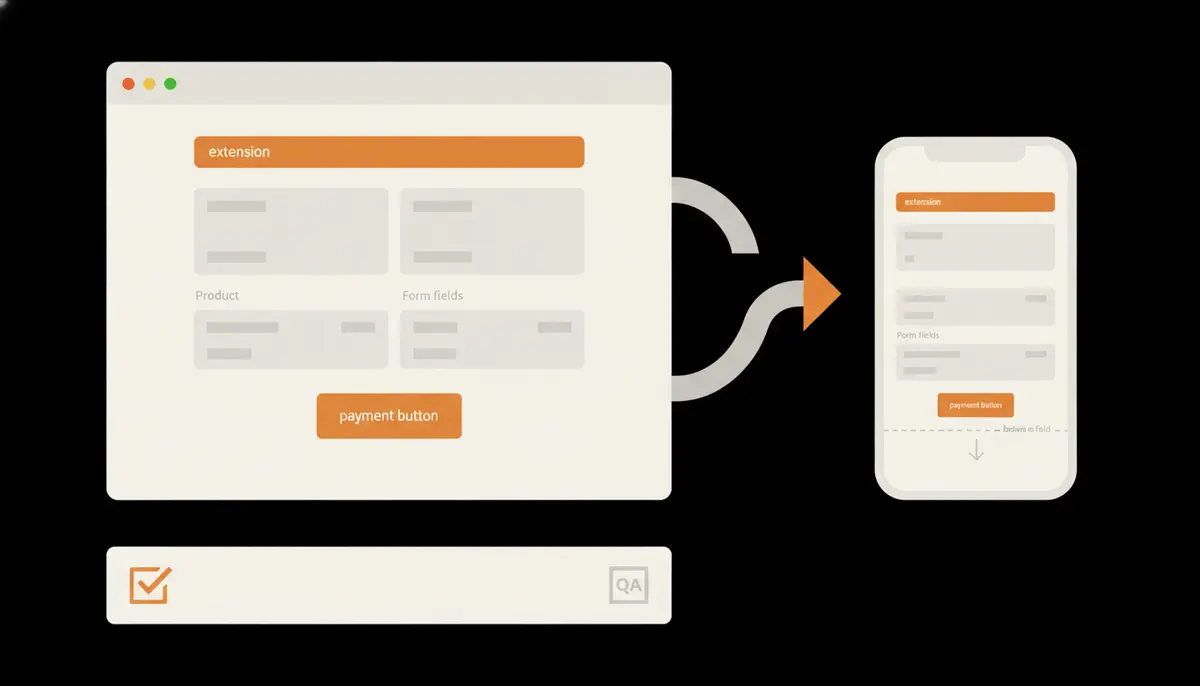
Checklist Before You Migrate
Pre-Migration Checklist
- Full inventory of current checkout.liquid customizations, scripts, and third-party injections
- Revenue or support-ticket data tied to each customization, ranked by impact
- Confirmed Shopify Plus plan eligibility for native checkout A/B testing
- Staging environment set up with Shopify CLI and test payment gateways configured
- Mobile and desktop QA plan covering at least three device types
- Rollback plan documented per extension before go-live
- Post-launch monitoring plan using GA4 funnel reports and Hotjar or Microsoft Clarity recordings
Teams that skip the revenue-ranking step almost always overbuild. They end up shipping six extensions when two would have covered 90% of the measurable impact, and each extra extension is more surface area for something to break during Shopify’s next checkout release.
Working With a Development Partner
Checkout extensibility work sits closer to application development than theme customization. Functions require understanding GraphQL mutations, deployment pipelines, and Shopify’s extension review process if you’re distributing anything beyond a single store. This is a different skill set than a freelance Liquid developer typically has, and it’s worth confirming a partner has shipped Functions in production, not just UI extensions. If you want this checked against your own store, request a free Shopify CRO audit.
Agencies that also handle broader Shopify Plus development services tend to catch cross-system issues that a checkout-only specialist misses — for example, a shipping Function that conflicts with a Flow automation, or a post-purchase upsell that ignores inventory synced through a separate app. If your store also runs service-based bookings, the same extensibility discipline applies; the Gene Juarez Shopify Plus and Zenoti build is a useful reference for how custom logic and third-party booking systems coexist inside a Plus checkout without breaking on every platform update.
Checkout changes also ripple into retention. If you’re adding gift-note fields or loyalty redemption at checkout, coordinate with whoever owns your lifecycle marketing — see Best Email Marketing for Shopify Stores: What Actually Works for how checkout data feeds into Klaviyo or Omnisend flows. And if part of your checkout strategy includes rewarding repeat purchases, the tactics in Bonus Payment on Shopify: 7 Tactics to Reward Customers Boost Revenue map directly onto post-purchase extension design.
Conclusion
Shopify Plus checkout extensibility isn’t optional anymore, and the merchants who treat it as a scoped engineering project — audit, prioritize, build, test, roll out — get through it in weeks, not months. The ones who wait for a forced migration deadline end up rebuilding under pressure with no room to test. Start with an honest inventory of what your current checkout actually does, rank it by revenue impact, and build only what earns its place in the new framework.





