

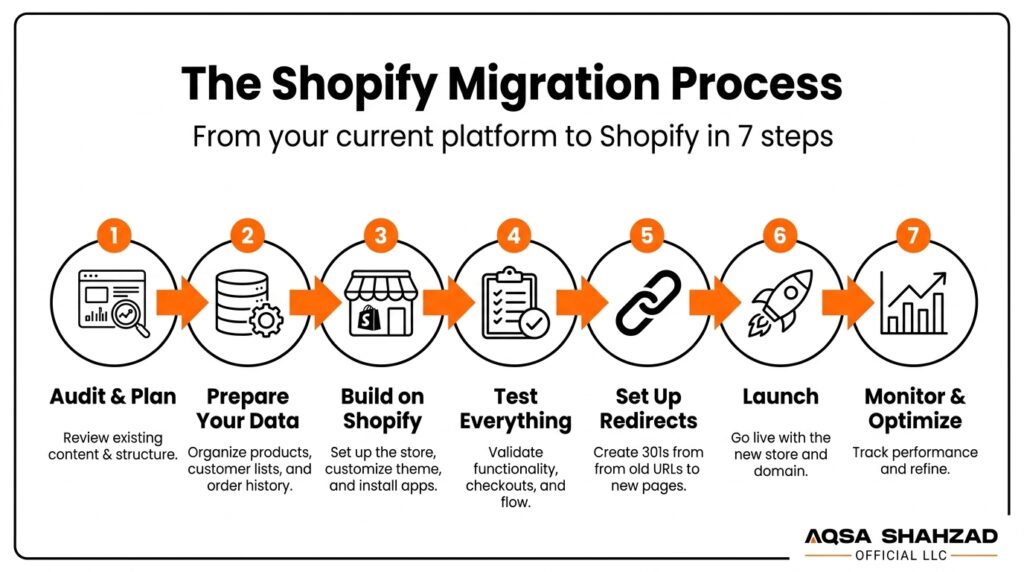
If you’re reading this, you’re probably not migrating to Shopify because it sounds fun. You’re doing it because your current platform is holding you back, and you need to know what you’re actually walking into before you commit.
That’s fair. A platform migration touches everything — your product catalog, your customer data, your order history, your SEO rankings, your checkout, your reporting. Get it wrong, and you can lose weeks of revenue and years of search rankings in a single bad weekend. Get it right, and most customers never even notice it happened.
This guide walks through exactly what a Shopify migration involves, what usually goes wrong, what it actually costs, and how to protect your rankings and revenue through the switch. No fluff, no generic checklists copied from ten other blogs just what we’ve learned from running these migrations for real stores.
Key Takeaways
- A Shopify migration means moving your products, customers, orders, and content from another platform (Magento, WooCommerce, BigCommerce, Wix, or a custom build) onto Shopify or Shopify Plus.
- Most migrations don’t fail because of Shopify. They fail because of rushed redirect mapping, untested data imports, and cutovers scheduled with no rollback plan.
- A well-run migration typically takes 6 to 12 weeks and costs anywhere from $2,000 for a simple store to $100,000+ for a complex, multi-storefront enterprise setup.
- SEO visibility can usually be preserved through a migration, but this depends on redirects, canonicals, and technical setup all being handled correctly before launch not on Shopify itself.
- Customer passwords cannot be transferred to Shopify for security reasons; customers reset their password on first login, and this is normal, not a red flag.
- The right migration path depends heavily on your source platform and your business model — a subscription store, a B2B wholesale account, and a booking-based business all carry different risks.
Why Trust This Guide
This guide is based on our own experience planning and running Shopify migrations including SEO preservation, complex integrations, custom storefronts, B2B commerce, subscriptions, and booking-system handoffs. Where we reference our own process, pricing, or results, it reflects how we actually work, not generic industry advice. You can see one of these migrations in detail in the Gene Juarez case study referenced later in this guide, or look at our migration process directly.
1. What Is Shopify Migration?
A Shopify migration — sometimes called a Shopify store migration or ecommerce platform migration — is the process of moving your online store from another platform onto Shopify or Shopify Plus: products, customers, orders, content, and design included. It typically happens in three stages: preparing and cleaning your data, building and testing the new store on Shopify while your current site stays live, and then a short cutover window where you switch your domain over. Shopify’s own migration documentation covers the platform side of this in more detail.
Done properly, the cutover itself takes minutes, not days. The part that decides whether the whole thing goes smoothly isn’t the migration itself — it’s the planning that happens before anyone touches a “go live” button.
Shopify Migration Methods at a Glance
| Method | Typical Cost | Risk Level | Best For |
|---|---|---|---|
| DIY / Manual | Low (time-intensive) | High | Small catalogs, no real SEO history |
| Migration App/Tool | Low – Medium | Medium | Mid-size stores, straightforward catalogs |
| Migration Partner/Agency | Medium – High | Low | Established SEO rankings, complex integrations, business-critical data |
We break each of these down properly further down, along with a fuller decision framework for your specific situation.
2. Should You Migrate to Shopify?
Most people don’t wake up one day and decide to replatform for fun. Something is actively costing them money or sleep, and Shopify starts to look like the fix.
Signs You’ve Outgrown Your Current Platform
The most common trigger is a developer bottleneck — every homepage banner, every seasonal promo, every small layout tweak requires a developer ticket because the theme is a tangle of custom code nobody wants to touch. That alone eats weeks of marketing calendar time every year.
Performance is the second trigger. If your current site is slow, if checkout has friction your competitors don’t have, or if your hosting can’t handle a traffic spike without falling over, that’s a platform problem, not a marketing problem.
The third is data and tracking chaos. If your GA4 numbers don’t match your ad platform numbers, if attribution is broken across channels, or if basic reporting requires exporting three spreadsheets and manually reconciling them, you’re not short on effort — you’re short on infrastructure.
When Migration Isn’t the Right Move Yet
Not every problem is a platform problem. If your current site is slow because of unoptimized images and bloated apps, that’s often fixable in place for a fraction of a migration’s cost. If your team is already stretched thin, launching a migration on top of a busy sales season is how good migrations turn into bad ones.
And if the real issue is conversion rate, not platform capability, moving to Shopify won’t fix it by itself. It’s worth ruling out a CRO problem before assuming you need a full replatform.
3. What Transfers to Shopify — and What Doesn’t?
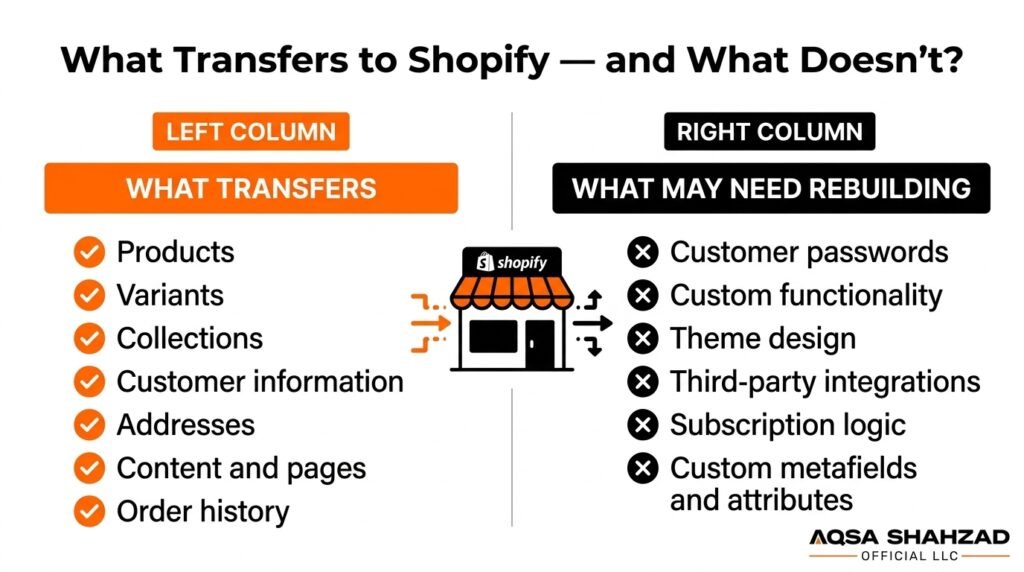
This is the question that causes the most last-minute panic, so let’s be direct about it.
Products, Variants & Collections
Products, variants, images, and collections transfer cleanly in almost every migration — this is the part migration tools handle well, and it’s also documented directly in Shopify’s own product import guide. The failure point is usually metafields and custom attributes that don’t have a matching field in Shopify, which is why a proper migration audit maps this out before import, not after.
Customer Accounts & Passwords
Customer accounts, names, emails, addresses, and order history all transfer, and Shopify documents the customer import process here. Passwords do not, and this isn’t a bug or an oversight — it’s a security standard across the industry, since passwords are stored as one-way hashes that can’t be reversed and re-encrypted for a new system. Customers simply reset their password the first time they log in after the switch, and with a short heads-up email, this causes far less friction than store owners expect.
Order History & Historical Data
Full order history, including refunds and fulfillment status, can transfer to Shopify — this matters for accounting continuity, customer service, and any loyalty or subscription logic tied to purchase history. This is one of the areas where cutting corners causes real damage later, since reconstructing historical order data after the fact is far harder than migrating it correctly the first time.
4. Shopify Migration Methods: DIY vs Tools vs Agency
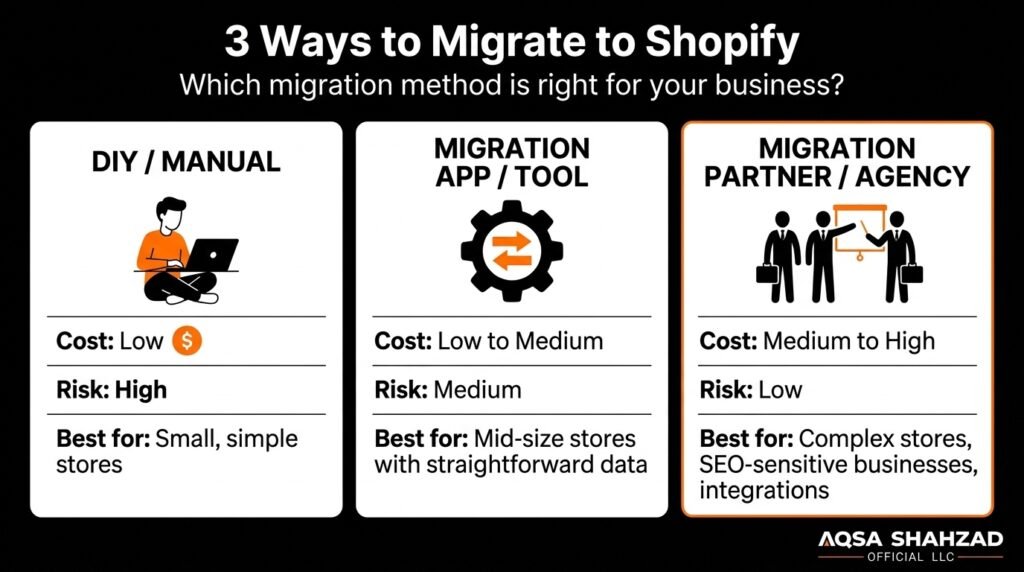
There are really only three paths here, and each one trades cost for control differently.
DIY / Manual Migration
You export your data as CSV files and import them into Shopify manually, rebuild your theme from scratch, and handle redirects and testing yourself. It’s free in terms of cash outlay, but it costs an enormous amount of time, and it’s where most of the horror stories come from — flattened product variants, missing metafields, and redirect maps built the night before launch.
This can work if you’re running a small catalog with simple data and someone on your team genuinely understands ecommerce SEO. For most established stores, it’s a false economy.
Migration Apps & Tools
Tools built specifically for platform-to-platform data transfer (this category includes apps like Matrixify, LitExtension, and Cart2Cart) automate the CSV export/import process and handle a lot of the tedious data mapping for you. They’re a reasonable middle ground for catalog and customer data.
What they generally don’t handle well: custom theme rebuilding, SEO redirect strategy, complex integrations, and the judgment calls that come up mid-migration when something doesn’t map cleanly.
Hiring a Shopify Migration Partner
This is the highest upfront cost and the lowest risk. A migration partner handles data reconciliation, theme development, redirect mapping, and testing as one coordinated process, with someone accountable if something breaks. For any store with real order history, existing SEO rankings worth protecting, or business-critical integrations, this is usually the option that actually protects the business rather than just moving the data.
Decision Framework: Which Path Fits Your Store
| Your situation | Likely best path |
|---|---|
| Small catalog, no real SEO history, simple store | DIY or a migration app |
| Mid-size catalog, some SEO traffic worth protecting | Migration app + freelance QA, or a smaller agency engagement |
| Established SEO rankings, complex integrations, B2B/subscription logic, or a launch date you can’t afford to miss | A dedicated migration partner |
If you’re in that last row and want to see exactly how a professional migration is structured end to end, our platform migration process walks through each stage in detail.
5. Migrating From WooCommerce, Magento, BigCommerce & Wix
The core process is similar no matter where you’re coming from, but the risks and complexity shift depending on your source platform.
WooCommerce to Shopify
WooCommerce stores usually export product and customer data cleanly since WordPress data structures are relatively open, but plugin-dependent functionality — custom fields, subscription plugins, membership logic — rarely transfers automatically and needs to be rebuilt natively in Shopify. WooCommerce sites also often have deep, plugin-generated URL structures, so redirect mapping tends to involve more URLs than store owners expect. Complexity is typically low to medium unless the store leans heavily on custom plugins.
Magento to Shopify
Magento migrations tend to be the most complex on this list, particularly for Magento 1 stores approaching or past end-of-life. Magento’s flexible attribute system and multi-store setups often don’t have a clean one-to-one match in Shopify, so product data usually needs real mapping work, not just an export/import. Magento stores also frequently carry large, aged URL footprints with meaningful organic traffic, which makes redirect planning a higher-stakes exercise here than on most other platforms. Complexity is typically medium to high.
BigCommerce to Shopify
BigCommerce migrations are usually more straightforward since both platforms share a similar ecommerce data model — products, variants, and customers map over with fewer surprises. The parts that need attention are custom checkout customizations and B2B-specific features, which don’t move automatically and need to be rebuilt on Shopify’s own B2B or Plus tooling. Complexity is typically low to medium.
Wix to Shopify
Wix stores are often smaller and simpler, which keeps the data migration itself fast, but Wix’s page-builder structure means design and content don’t transfer directly — expect to rebuild the storefront rather than import it. SEO risk is usually lower here simply because Wix stores tend to have less accumulated organic history, though this isn’t a given and should still be checked, not assumed. Complexity is typically low.
Custom-Built Platforms to Shopify
Custom platforms are the hardest to generalize about, because there’s no standard export format to rely on. This is where a proper discovery phase matters most — nobody can honestly fix-price a system they haven’t read. Expect a dedicated audit stage before any cost or timeline estimate is realistic. Complexity ranges from medium to high depending entirely on what was actually built.
6. The Shopify Migration Process, Step by Step
Here’s what a properly run migration actually looks like, stage by stage: audit, data mapping, staging build, QA, redirect testing, launch, and monitoring. Each stage exists to catch a specific category of failure before it becomes a customer-facing problem.
Pre-Migration Audit
Before anything moves, someone needs to catalog what actually exists: how many products and variants, which URLs are currently indexed and ranking, which integrations are business-critical, and where the data is messy. This stage is easy to rush and expensive to skip — most redirect and data disasters trace back to an audit that wasn’t done properly.
Staging Build & Data Import
The new Shopify store gets built on a staging environment while your current site keeps running normally. Products, customers, and content get imported and the theme gets built out here, completely invisible to your customers until you’re ready.
Data Verification & QA
This is the row-by-row reconciliation step: does every product that existed before still exist now, with the right price, the right variants, the right images? Does checkout actually work, end to end, with real payment methods and shipping rules? This stage is where a rushed migration gets caught — or doesn’t.
Cutover & Go-Live
The actual switch — pointing your domain at the new Shopify store — should take minutes, not days, and should happen mid-week, early in the day, never on a Friday. Why does the day matter? Because if something unexpected surfaces, you want your team available to fix it immediately, not scrambling over a weekend with support lines closed.
Post-Launch Monitoring (First 30 Days)
The migration isn’t done at launch. The weeks right after cutover are when redirect issues, tracking gaps, and indexing problems actually surface — this is when you watch crawl errors in Search Console, confirm conversion tracking is reporting correctly, and keep an eye on organic traffic trends rather than assuming everything worked because the site loads.
7. How to Protect Your SEO During a Shopify Migration
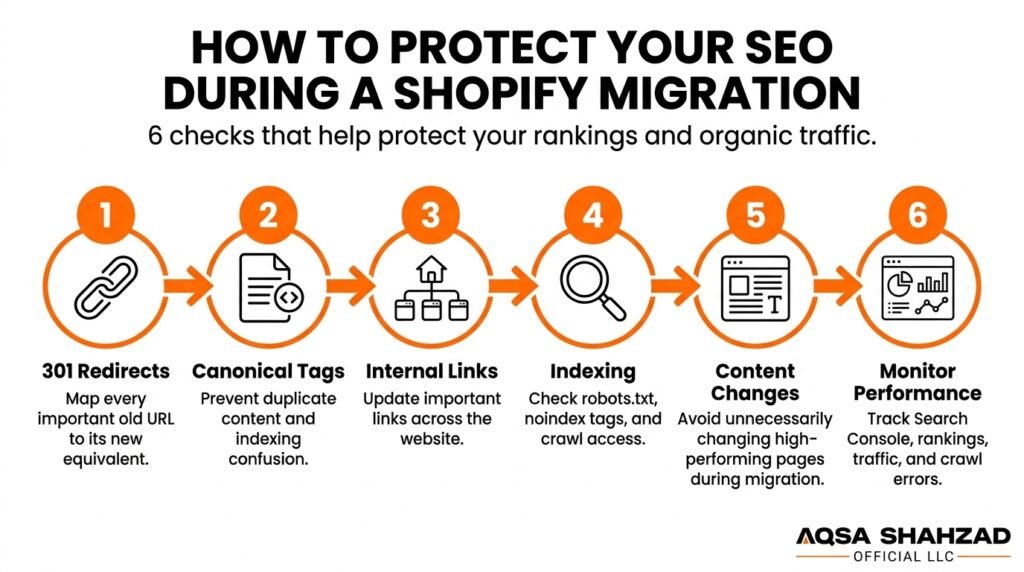
This is the section that determines whether your migration is a non-event or a six-month traffic recovery project.
301 Redirect Mapping
Every URL that’s currently indexed and ranking needs a 301 redirect pointing to its new Shopify equivalent, and this map needs to be built and tested before launch, not assembled in a panic after rankings start dropping. Redirect mistakes are one of the most common causes of ranking losses during a migration, alongside problems with canonicals, internal linking, indexing settings, content changes, and general technical implementation — it’s rarely just one thing.
Google’s own guidance on site moves with URL changes confirms this directly: redirects need to be in place at the time of the move, not added afterward, or you risk losing the accumulated authority those URLs had built up. When data is properly mapped and redirects are implemented before launch, most businesses can meaningfully reduce disruption to their SEO visibility and keep the historical performance they’ve already earned.
Canonicals, Sitemaps & Search Console Resubmission
Beyond redirects, your canonical tags need to point to the correct new URLs, your XML sitemap needs to be rebuilt and resubmitted, and Search Console needs a change-of-address signal so Google understands this is the same business, not a new one. Skipping this step doesn’t break your site, but it slows down how quickly Google re-indexes your new URLs — which means a longer dip before rankings recover, even if the redirects themselves are correct.
8. Common Shopify Migration Problems (and How to Avoid Them)
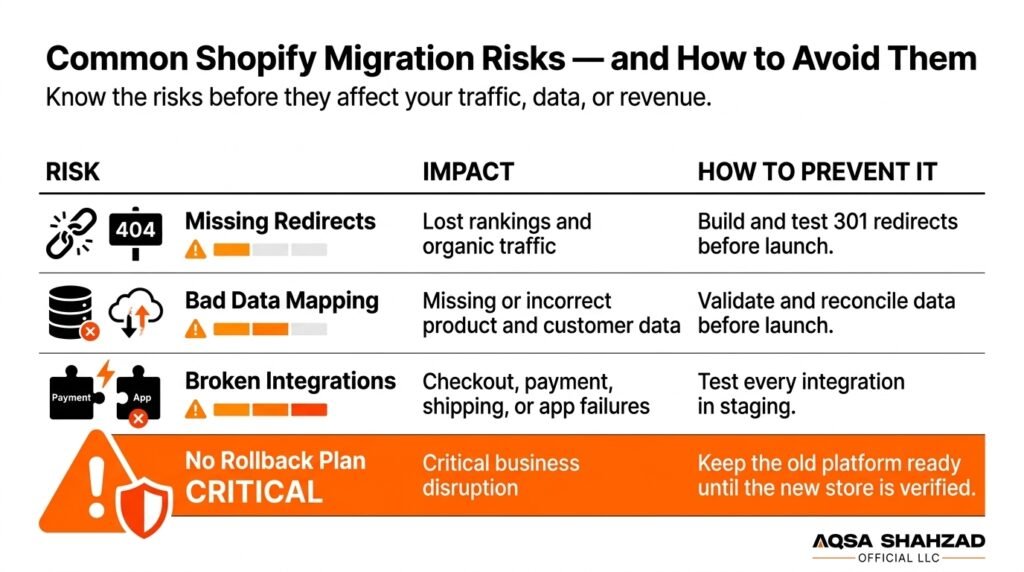
Most migration problems aren’t caused by Shopify itself. They’re caused by decisions made — or skipped — well before launch day.
The Most Common Migration Mistakes
The single most common mistake is treating redirects as a post-launch task instead of a pre-launch requirement — by the time someone notices organic traffic dropping, the damage is already visible in Search Console. A close second is skipping proper data reconciliation and assuming an import “probably worked” instead of verifying it row by row. Launching on a Friday, or during a peak sales period, is another classic error, since it removes your safety margin for fixing anything that surfaces. And underestimating how integrations behave post-migration — payment gateways, tax settings, shipping rules, loyalty apps — is what turns a clean data migration into a broken checkout on day one.
If your migration is anywhere near a peak selling period, it’s worth running through our free BFCM 2026 readiness checklist first, since many of the same technical checks apply.
What a Real Rollback Plan Looks Like
A genuine rollback plan means your old platform’s DNS settings stay intact and untouched until the new store has been verified in production — not just on staging — so you can point traffic back within minutes if something critical breaks. It also means monitoring specific, named metrics in the first 24 to 48 hours after cutover rather than just “watching to see if anything looks wrong.” Most agencies talk about redirects and data. Fewer talk honestly about what happens if the cutover itself goes sideways — and that’s usually the gap that costs stores the most when it isn’t planned for.
Migration Risk Matrix
| Risk | Impact | Prevention |
|---|---|---|
| Missing or incomplete redirects | High — direct ranking and traffic loss | Pre-launch redirect map, tested before cutover |
| Bad or incomplete data mapping | High — lost or corrupted product/customer data | Row-by-row data reconciliation before go-live |
| Broken integrations (payments, tax, shipping, apps) | High — broken checkout, lost sales | End-to-end QA testing on staging before launch |
| No rollback plan | Critical — no way to recover if cutover fails | Old platform DNS left untouched until new store is verified live |
9. What a Shopify Migration Really Costs
Costs vary a lot depending on catalog size, integration complexity, and how much custom design work is involved. Here’s a realistic breakdown by complexity tier.
Pricing by Complexity Tier
| Tier | Typical Range | What’s Included |
|---|---|---|
| Essential | $2,000 – $6,000 | Core data migration, redirect map, structured data, working with your existing design |
| Standard | $8,000 – $25,000 | Everything in Essential, plus a custom theme build on Online Store 2.0 |
| Complex | $25,000 – $50,000 | Everything in Standard, plus large or messy catalogs and custom integrations |
| Enterprise | $50,000 – $100,000+ | Everything in Complex, plus B2B logic, multi-storefront setups, or custom checkout requirements |
What Actually Drives the Price Up or Down
The two biggest cost drivers are catalog complexity (thousands of SKUs with heavy variant structures cost more to reconcile than a few hundred simple products) and integration count (every third-party system — your ERP, your loyalty program, your booking software — adds discovery and testing time). Custom design work is usually the third factor, and it’s the one most within your control: keeping your existing design in the first migration phase and upgrading it separately afterward is a legitimate way to control cost.
If you want to see where your own store likely falls, this price calculator gives a quick, tier-based estimate based on your catalog and requirements.
10. Specialized Shopify Migrations
Generic migration checklists tend to assume a simple product catalog with straightforward transactions. If your business model is more specific, so are your risks.
Subscription & Recurring-Revenue Stores
Migrating a subscription business means more than moving products — it means preserving active billing cycles, customer payment methods, and subscription status without interrupting recurring charges or triggering unwanted cancellations. This is one of the areas where a generic migration app falls short, since subscription logic usually needs to be rebuilt intentionally rather than imported as a side effect of a product CSV. If subscriptions are core to your revenue, our subscription commerce work is built specifically around this kind of continuity.
B2B & Wholesale Stores
B2B and wholesale stores carry extra weight during migration: custom price lists, net payment terms, customer-specific catalogs, and approval workflows all need to map correctly, and Shopify’s B2B capabilities have changed meaningfully over the past year, which affects how this gets structured. Getting this wrong doesn’t just create a data problem — it can mean a wholesale customer seeing retail pricing on day one. Our B2B commerce team handles this specific migration path regularly.
Booking & Service-Based Businesses (Salons, Spas, Studios)
If your business runs on bookings — a salon, spa, or studio — your migration isn’t just an ecommerce data problem, it’s an integration problem between Shopify and your booking system. The handoff between browsing, booking, and checkout needs to stay fast and reliable, or you lose customers at exactly the point of conversion. Our Zenoti-Shopify integration work is built around exactly this kind of unified retail-and-booking migration.
11. Real-World Example: A Service-Based Brand’s Shopify Migration
Gene Juarez, a 13-location salon and spa group in the Pacific Northwest, is a useful example of what specialized migration challenges actually look like in practice. Their existing theme was heavily customized with hard-coded sections, which meant the marketing team couldn’t update a seasonal banner or promotion without pulling in a developer. The booking handoff to their Zenoti system was slow and unoptimized, and their tracking was fragmented enough that Zenoti booking events weren’t showing up correctly across GA4, Meta Pixel, or Google Ads.
The rebuild moved them onto a fully editable Shopify Plus theme, restructured the Zenoti booking handoff for speed, and rebuilt tracking through server-side Google Tag Manager. The result, in their own stated numbers: homepage load time down to roughly 1,200ms, a sub-one-second handoff from landing page to the Zenoti booking interface, and no measurable drop in organic traffic through the transition — while also fixing the attribution gaps that had been undercounting their marketing performance.
You can read the full Gene Juarez case study for the complete technical breakdown.
FAQs
Will migrating to Shopify hurt my SEO rankings?
Not necessarily but it depends on more than redirects alone. Ranking losses during a migration usually come from a combination of missed redirects, canonical issues, indexing problems, and content or URL changes, so all of these need attention, not just one of them. Stores that plan this before launch, rather than reacting after traffic drops, typically come through with minimal disruption.
Can I keep my customers’ passwords when I migrate?
No this isn’t specific to Shopify, it’s true of any platform migration. Passwords are stored as irreversible hashes for security reasons, so they can’t be transferred. Customers simply reset their password on their first login after the switch, and a short heads-up email beforehand makes this a non-issue for most stores.
How long does a Shopify migration actually take?
Most migrations take 6 to 12 weeks from initial audit to go-live, depending on catalog size and integration complexity. The cutover itself the actual domain switch —ypically takes minutes, not days.
Should I do the migration myself, use an app, or hire someone?
It depends on what you have to lose. A small store with a simple catalog and no real SEO history can often manage with a migration app. A store with established rankings, complex integrations, or business-critical data (subscriptions, B2B pricing, bookings) is usually better off with a dedicated migration partner who’s accountable for the outcome.
What happens if something goes wrong during the migration?
A properly planned migration keeps your old platform untouched and ready to receive traffic again until the new store is verified live this is what a rollback plan actually means. This is why cutovers should happen mid-week, early in the day, with time and support available if something needs immediate attention.
How much should I expect to pay for a Shopify migration?
Realistic ranges run from around $2,000 for a simple catalog migration up to $100,000+ for an enterprise setup with B2B logic, multiple storefronts, or custom checkout requirements. Catalog size, integration count, and how much custom design work is involved are what actually move the price.
Final Thoughts
A Shopify migration isn’t inherently risky — it’s only as risky as the planning behind it. The stores that come through it without a scratch are the ones that treat redirects, data verification, and rollback planning as the actual work, not as paperwork to rush through before the “real” launch.
If you’re weighing a migration and want a clear-eyed read on what it would actually involve for your store, get in touch and we’ll walk you through it — no pressure, just a straight answer on what your specific migration would take.





