

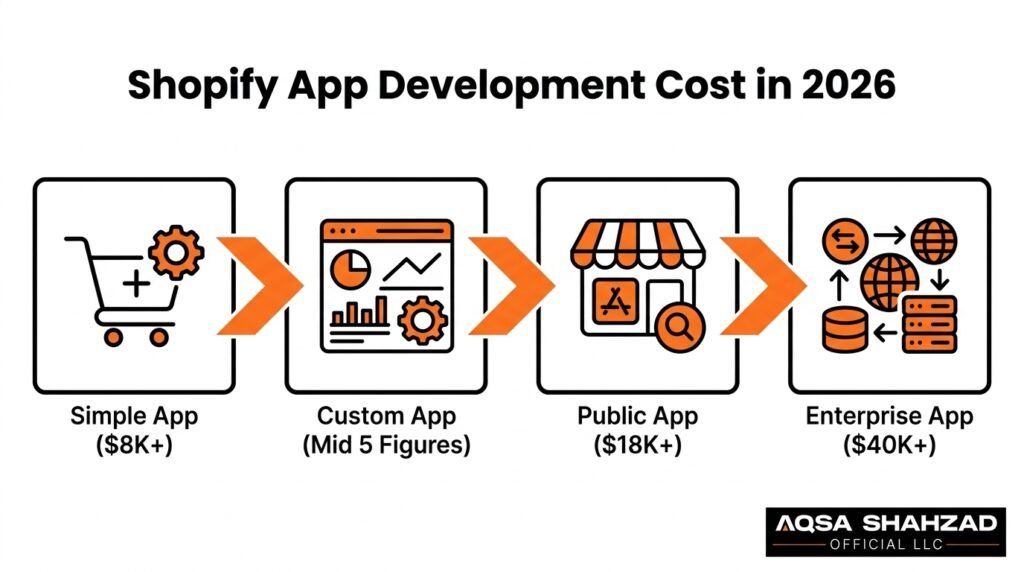
Two merchants can ask a developer to “build a Shopify app” and walk away with quotes $30,000 apart — and both quotes can be fair. One needs a button that hides out-of-stock variants. The other needs an embedded dashboard talking to three APIs, storing its own data, handling subscription billing, and headed for the Shopify App Store. Same word, “app.” Entirely different job.
That gap is why Shopify app development cost questions rarely have a clean one-line answer. This guide breaks down exactly which variables move a project from a four-figure utility to a five-figure product — with real pricing context, real examples, and a simple way to estimate your own project.
Written for US-based Shopify merchants, DTC brands, startups, and Shopify Plus teams trying to figure out what a custom app should actually cost.
Key Takeaways
- There’s no single fixed Shopify app development cost — it depends on complexity, features, integrations, your development team, and ongoing maintenance.
- General starting points: simple apps around $8,000, public/embedded App Store apps around $18,000, enterprise/Shopify Plus suites at $40,000+. Actual cost varies by scope.
- The biggest cost drivers are feature count, API/integration complexity, custom UI, security, testing, and whether the app serves one store or many.
- Real app types — order automation, inventory sync, subscriptions, loyalty, AI recommendations — each carry their own typical range.
- The smartest way to evaluate a Shopify app isn’t price alone — it’s ROI against what the app saves or earns.
Pricing a mobile app for your store rather than an app that runs inside Shopify? App builders charge a monthly subscription instead of a build fee, and our Shopify mobile app builder pricing guide compares seven of them. If you already know what you need built, our Shopify app development agency page shows what each type of app includes.
Shopify App Development Cost in 2026
There’s no single price because “Shopify app” describes five very different categories of work.
Simple, single-purpose apps automate one workflow or add one storefront feature. Minimal UI, narrow API use, light backend. Starting around $8,000.
Medium-complexity custom apps add a real admin dashboard, multiple API interactions, and some automation logic. This is where most internal tools for growing DTC brands land.
Public or multi-merchant apps, built for App Store listing, need to work across store configurations the team doesn’t control, plus a real onboarding flow. Starting around $18,000.
Advanced apps bring in AI features, multi-store sync, or heavier automation — cost scales with that complexity.
Enterprise and Shopify Plus solutions are usually suites, not single apps — built for high order volume, custom checkout logic, and enterprise security. Starting at $40,000+.
| App Category | Typical Scope | Starting Range (USD) |
|---|---|---|
| Simple / single-purpose app | One core feature, single store | ~$8,000 |
| Medium-complexity custom app | Dashboard, multiple integrations | Mid five figures |
| Public / embedded App Store app | Multi-merchant, App Store compliance | ~$18,000 |
| Advanced app (AI, multi-store) | Custom logic, AI, complex data | Upper five figures+ |
| Enterprise / Shopify Plus suite | Multiple tools, high volume | $40,000+ |
These are practical starting points, not industry-wide prices. Any quote that skips your requirements is a guess.
What Determines Shopify App Development Cost?
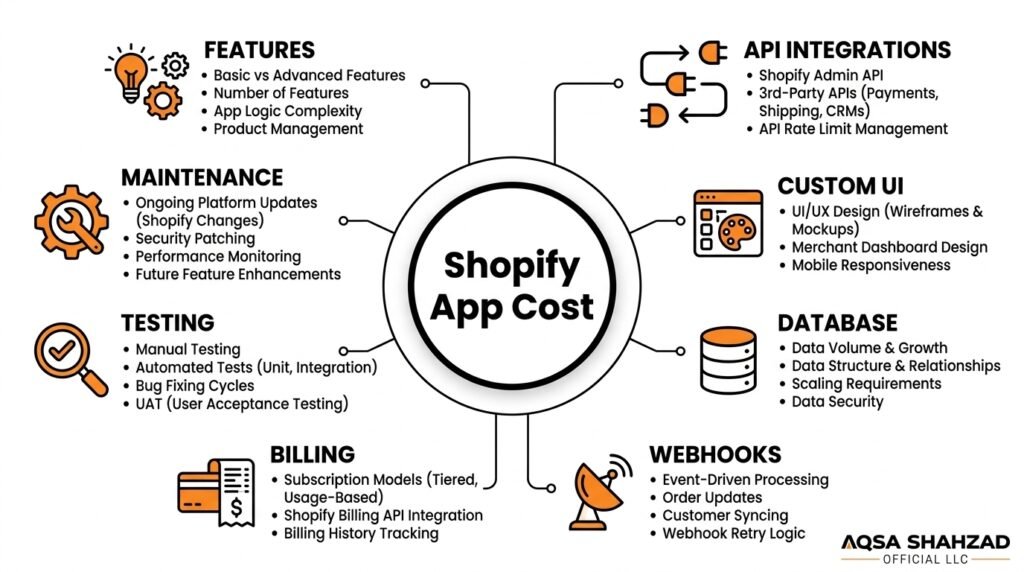
Every quote translates these variables into hours. Here’s the quick-reference version, followed by the ones worth understanding in more depth.
| Factor | Why It Moves the Price |
|---|---|
| Feature count & complexity | Each feature adds build time plus its own testing surface |
| Custom UI/UX | Polished, on-brand admin screens take longer than functional-only |
| Database, auth, dashboards | Needed anytime the app stores its own data outside Shopify |
| Webhooks | Real-time reliability requires solid retry/error logic |
| Billing | Public apps generally must use Shopify’s native billing API |
| Testing, security, hosting | Invisible in a demo, but where reliability actually lives |
| App Store requirements | Adds compliance, documentation, and review-readiness work |
| Maintenance | Not part of build cost — but part of total ownership cost |
API and integration depth
Shopify’s Admin API and GraphQL API are the backbone of any app. How deeply you need to read and write store data — products, orders, inventory, metafields — drives how much integration work is involved. Real-time or bulk operations need more careful query design.Third-party integrations (payment processors, ERPs, CRMs) each bring their own documentation quality and edge cases. One clean integration might take days; a poorly documented one can quietly double a timeline.
Automation and AI
Automated workflows and AI-powered features — Shopify AI app development is one of the fastest-growing categories right now — both depend on external services and need fallback logic for when that service doesn’t behave as expected. That’s real engineering time, not just a feature toggle.Custom admin dashboards fall in the same bucket: they’re effectively small internal tools built on top of your store data, and they carry similar cost logic — the more control and visibility you want, the more UI and logic behind it.
Shopify App Development Cost Calculator
A quick way to estimate your own idea — directional, not a quote:
| Feature or Requirement | Typical Budget Impact |
|---|---|
| Custom admin dashboard | +$3,000–$10,000 |
| Third-party integration (each) | +$2,000–$8,000 |
| Custom database | +$2,000–$8,000 |
| Advanced automation | +$5,000–$15,000 |
| AI functionality | +$10,000–$50,000+ |
| Multi-store support | +$5,000–$20,000 |
| App Store submission readiness | +$3,000–$10,000 |
| Advanced analytics | +$5,000–$20,000 |
The more boxes checked — especially ones that overlap — the higher the tier your project lands in.
Shopify App Development Cost by App Type
The type of app concentrates complexity in different places.
| App Type | What Drives Its Cost |
|---|---|
| Simple utility apps | Narrow data footprint, little ongoing logic |
| Marketing apps (pop-ups, upsells) | Grows fast once personalization or A/B testing is added |
| Analytics/reporting apps | Data-heavy; often needs its own database |
| Automation apps | Only as good as their error-handling on edge cases |
| Custom workflow apps | Shaped entirely by one business’s existing systems |
| Subscription apps | Billing cycles, failed payments, plan changes |
| AI-powered apps | External AI dependency, rate limits, human-review fallback |
| Multi-integration apps | Cost compounds — each integration is its own mini-project |
| Shopify Plus / enterprise apps | Highest tier — volume, security, and checkout complexity combine |
Real cost examples
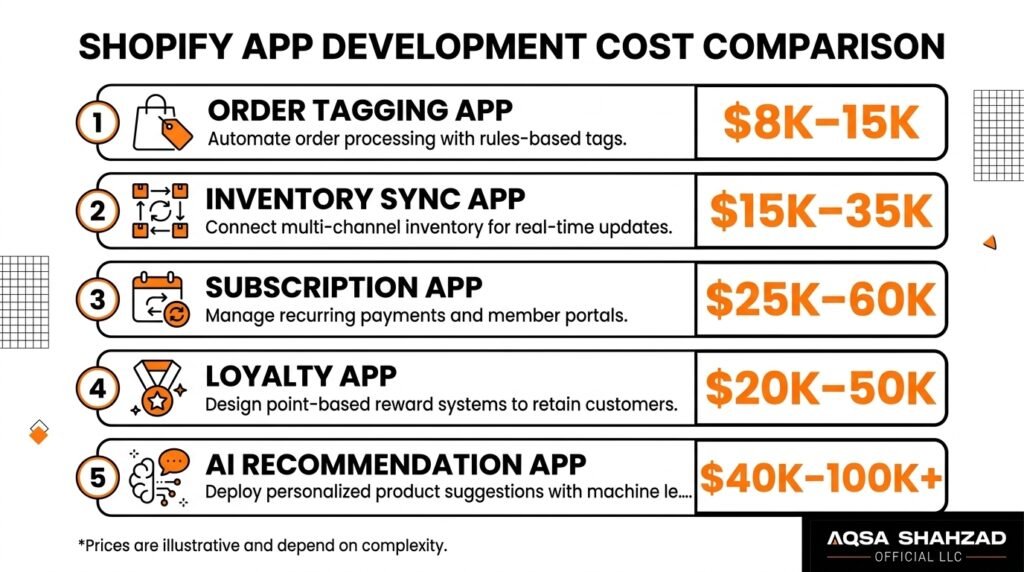
Category pricing is useful; seeing it attached to an actual app idea is more useful. Treat these as illustrative reference points, not fixed quotes:
| App Type | Typical Features | Illustrative Range (USD) |
|---|---|---|
| Order tagging app | Auto tags, basic rules, Admin API | $8,000–$15,000 |
| Inventory sync app | ERP integration, webhooks, dashboard | $15,000–$35,000 |
| Subscription management app | Recurring billing, customer portal, analytics | $25,000–$60,000 |
| Loyalty and rewards app | Points, referrals, customer dashboard | $20,000–$50,000 |
| AI recommendation app | ML recommendations, segmentation, analytics | $40,000–$100,000+ |
The spread within each range comes down to integration count, custom UI, and how much testing and support the business expects post-launch.
Shopify App Development Cost by Development Team
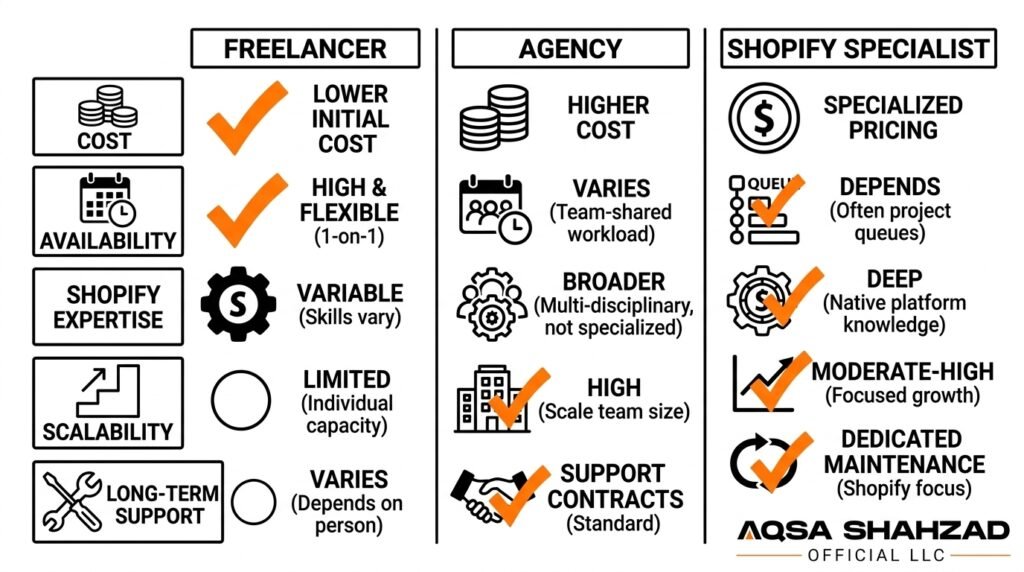
This is one of the most-searched comparisons once merchants understand their rough budget — the same feature list can be quoted very differently depending on who builds it.
| Team Type | Best Fit | Trade-off |
|---|---|---|
| Freelancer | Small, well-defined, single-purpose apps | Lowest cost, but limited long-term availability |
| In-house developer | Ongoing, continuous Shopify dev needs | Full control, salary overhead, possible skill gaps |
| General agency | Broader software projects | Structure and range, variable Shopify-specific depth |
| Specialized Shopify team | Plus, embedded apps, App Store submissions | Higher rate, lower platform-specific risk |
Hourly rates vary widely and any single number is a general market range, not a guarantee: freelancers sit lowest, general agencies mid-to-upper, and specialized Shopify Plus teams highest — reflecting deeper platform expertise. You can see how that expertise plays out in practice in our case studies. The right choice depends on complexity, timeline, and how much long-term support you’ll actually need.
Shopify App Development Tech Stack and Its Impact on Cost
Technology choices affect development time, scalability, and long-term maintenance — not just technical preference.
Most apps interact with Shopify through the Admin API and increasingly the GraphQL API. Teams commonly scaffold and deploy with the Shopify CLI, which speeds setup but still needs sound architecture decisions behind it.
Embedded apps typically use Polaris and App Bridge for a native admin feel — skipping this makes an app feel disjointed, which is a usability cost even if not a technical one. Backend choices (Node.js, Ruby, Python, and others) affect scalability and how easily you’ll find developers later.
If the app stores its own data, it needs a database, and that choice affects both performance and hosting cost as usage grows. Authentication via Shopify’s OAuth flow needs to be right from day one — security issues here are expensive to fix retroactively. Webhooks tie it together by letting the app react to store events in real time, and reliable webhook handling is where less experienced builds most often struggle.
Shopify App Development Timeline
| Stage | What Happens |
|---|---|
| Discovery & requirements | Defining purpose, users, and core features |
| Planning & UI/UX | Architecture and interface design before code |
| Development | The longest phase — includes API/integration work |
| Testing | Functionality, edge cases, security |
| Review & submission | Applies to public apps; timing outside your team’s control |
| Deployment | App goes live |
| Post-launch maintenance | Begins immediately — Shopify’s platform keeps evolving |
As a general guide: a simple app can move from discovery to launch in a few weeks, a medium-complexity app often takes a couple of months, and advanced or enterprise apps can take several months, especially with App Store review cycles involved.
Shopify App Store Submission and Related Costs
Planning to distribute publicly? App Store requirements cover reliability, clean OAuth installation, minimal-necessary access scopes, and TLS encryption. Listings need accurate descriptions, transparent pricing, a demo video, and test credentials for review.
Billing for public apps generally runs through Shopify’s own billing infrastructure rather than external processing. Payment or checkout app categories carry additional compliance requirements on top of the general baseline.
Meeting these requirements means more rigorous testing, careful scope justification for sensitive access, and often a revision round through Shopify’s app review process. On monetization: listing on the Shopify App Store costs a one-time $19 registration fee per Partner account. Under Shopify’s revenue share terms, developers keep 100% of their first $1,000,000 USD in lifetime gross app revenue, counted from January 1, 2025, and Shopify takes 15% above that, plus a 2.9% processing fee on all billing. Custom apps built for a single store need no App Store registration at all. Shopify can change these terms, so check the current policy before you set prices.
Public apps also carry ongoing compliance: Shopify periodically updates API versions and policies, and listed apps need to stay current. This is exactly why Shopify app maintenance cost belongs in the budget conversation from day one.
Does the Shopify API Cost Anything?
No. Shopify does not charge apps for calls to the Admin API or the Storefront API. The cost sits around those calls: hosting the app, storing its data, and engineering it to stay inside Shopify’s rate limits, which are higher on Advanced and Plus stores. Apps that sync large catalogs or orders in real time spend much of their budget here, on webhooks and bulk operations instead of constant polling.
Shopify App Development vs. Custom App Development
A Shopify custom app is built for one business, installed on one store, never publicly distributed. It only needs to work for one configuration — simpler in some ways, but often deeply tailored to that business’s exact workflows.
A Shopify public app needs to work reliably across stores with different themes, data volumes, and setups the team doesn’t control — more investment in testing, onboarding, and documentation.
A Shopify embedded app runs inside the Shopify admin itself via App Bridge — now the standard approach — affecting both frontend choices and authentication.
The intended audience changes architecture (more modular for multi-merchant), scalability planning, testing scope, and support/billing structure. That’s why public apps generally cost more than an equivalent-feature custom app built for one store.
Hidden or Additional Shopify App Development Costs
These aren’t hidden so much as predictable — and often left out of early conversations.
Maintenance and bug fixes are ongoing because no app ships perfectly bug-free. API updates matter because Shopify revises its API versions regularly. Hosting recurs for any app running its own backend, scaling with usage. Third-party services the app depends on often carry their own separate fees.
Monitoring and security updates protect data over time — security isn’t a one-time setup. New features get requested once real usage starts. Ongoing testing is needed whenever Shopify or your app updates. Support takes time even after launch. Compliance and App Store updates apply specifically to public apps.
Treating these as part of total ownership cost — not surprises — leads to far more realistic budgeting.
How to Reduce Shopify App Development Cost Without Sacrificing Quality
- Define an MVP. Build the smallest version that solves the core problem, then expand based on real usage.
- Prioritize essential features over nice-to-haves — be honest about what’s actually blocking your workflow.
- Prepare clear requirements before development starts. Vague requirements are the single biggest cause of scope creep.
- Use existing Shopify APIs and integrations rather than building custom equivalents where one already works well.
- Avoid unnecessary custom functionality where a standard approach performs just as well.
- Plan future features without building everything immediately — architect for growth, not for launch-day completeness.
- Choose the right development model for the project, not just the cheapest hourly rate.
What not to cut: security practices, adequate testing, and proper authentication. A security gap or undertested billing flow costs far more to fix later than to build correctly the first time.
How to Get an Accurate Shopify App Development Quote
Vague requirements produce vague, unreliable estimates. Before requesting a quote, have clarity on: the app’s core purpose, your target users, core features at launch, integrations and APIs, design expectations, admin requirements, expected number of stores/users, billing model, timeline, and maintenance and security expectations.
You don’t need every technical detail figured out — that’s what discovery calls are for. But the clearer your brief, the more comparable your quotes will be. Our price calculator is a useful starting point for narrowing your range before that first conversation, and it’s also worth reading up on Shopify development cost more broadly, since an app is often one piece of a larger technical roadmap.
A Practical Cost Scenario: How Scope Changes the Budget
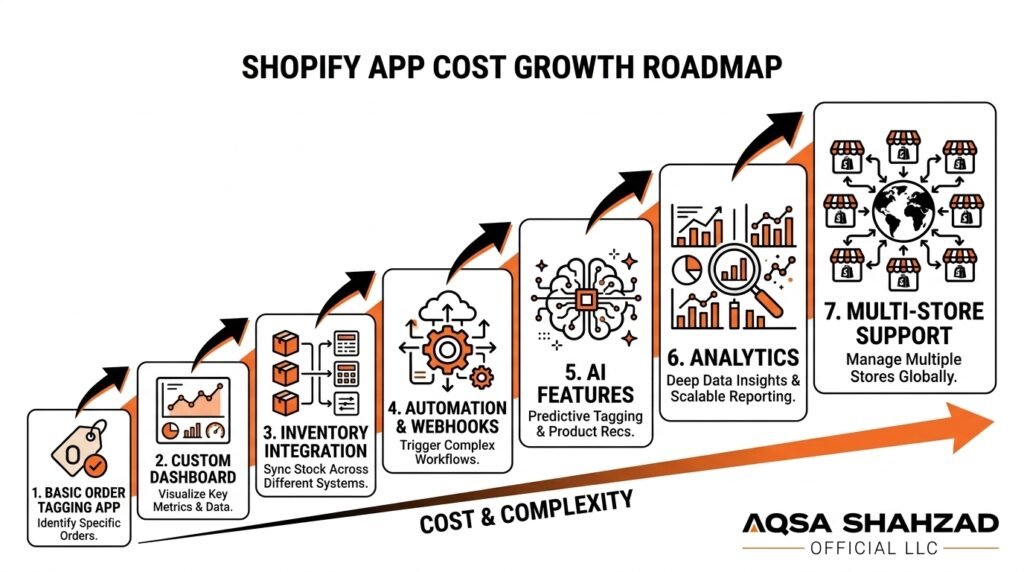
A merchant starts simple: automatically tag orders based on their contents. Reads order data, applies a rule-based tag, writes it back through the Admin API. Lower end of the spectrum.
Add a custom dashboard to adjust rules without a developer — frontend and admin UI work. Add a third-party inventory integration — its own authentication and error handling. Add automation and webhooks so tagging reacts instantly instead of running on a schedule.
Add AI functionality to suggest new tagging categories — now there’s an external AI dependency, a database for historical data, and an authentication layer controlling who can adjust AI suggestions. Add analytics, advanced testing, and eventually multi-store support — and the project has moved from a lower five-figure utility into a considerably larger application.
Nothing about this is unusual. It’s what happens when a good idea keeps growing, feature by feature — which is exactly why understanding this progression matters more than memorizing a single price.
Should You Build a Shopify App?
Worth asking before committing budget:
- Can Shopify’s native functionality already solve this?
- Is there an existing App Store app that covers most of what you need?
- Will it save enough time or manual work to justify the investment?
- Does it create a real competitive advantage, not just a marginal convenience?
- Will it generate revenue, cut costs, or measurably improve the customer experience?
Custom development makes the most sense when workflows are genuinely unique — not simply because a slightly nicer version of an existing tool would be convenient.
ROI example
A merchant invests $20,000 in a custom inventory automation app. If it eliminates 15 hours of manual work weekly at $30/hour, that’s $450 saved weekly — roughly $23,400 a year. The app pays for itself within the first year and keeps saving after that.
This is illustrative, not guaranteed — actual returns depend on real usage and what that time is genuinely worth to your business. But it’s why the strongest Shopify app decisions weigh cost against outcome, not price in isolation. A $40,000 app that saves $80,000 a year beats an $8,000 app nobody uses.
Practical Next Steps for Budgeting Your Shopify App
Place your idea into one of four buckets: a simple custom app (one problem, no stored data), a more advanced custom application (dashboard, integrations, automation), a public App Store application (built for other merchants), or Shopify Plus / enterprise territory (multiple integrated tools, high volume, custom checkout logic).
From there, write your requirements down in plain language before your first developer conversation. An imperfect brief still gets you a far more accurate quote than “how much would an app cost.”
Conclusion
Shopify app development cost comes down to complexity, features, integrations, your development team, and ongoing maintenance — not a single universal number. Simple apps start in the low five figures; public, AI-powered, or Shopify Plus applications can run considerably higher, and both can be the right investment for what they deliver.
The merchants who end up happiest are the ones who walk into development conversations with a clear brief, weigh cost against realistic ROI, and budget for maintenance rather than treating launch as the finish line. Working through your requirements in detail — before you request a quote — is the single best step toward an accurate budget.
Frequently Asked Questions
How much does it cost to develop a Shopify app in 2026?
Simple apps often start around $8,000, public/embedded App Store apps around $18,000, and enterprise or Shopify Plus suites at $40,000+. These are practical starting points, not fixed prices.
How much does a Shopify app developer charge?
Freelancers charge the lowest hourly rates, general agencies sit mid-to-upper range, and specialized Shopify teams — particularly for Plus or App Store work — charge more to reflect platform-specific expertise.
How long does it take to build a Shopify app?
A few weeks for a simple app, a couple of months for medium complexity, and several months for advanced or enterprise apps, especially with App Store review involved.
What increases the cost of Shopify app development?
Feature count, custom UI/UX, third-party integrations, custom databases or authentication, automation or AI functionality, webhook logic, and App Store compliance requirements.
How much does a custom Shopify app cost?
Starts in the lower five figures for simple builds and rises with each added feature, integration, or piece of custom infrastructure — driven by how tailored the specific business requirement is.
Is it worth building a custom Shopify app instead of using an existing App Store app?
Depends on the gap between what existing apps offer and what you need. Off-the-shelf makes sense when it covers most requirements; custom development pays off when workflows are genuinely unique or an existing app creates real ongoing friction.
How much does it cost to list an app on the Shopify App Store?
A one-time $19 registration fee per Partner account. Shopify then takes no revenue share on your first $1,000,000 of lifetime gross app revenue and 15% above it, plus a 2.9% processing fee on billing. Custom apps for one store are not listed and need no registration.
Does the Shopify API cost money?
No. Access to the Admin and Storefront APIs is free. The real costs are hosting, data storage and the engineering needed to work within rate limits as the app grows.





