

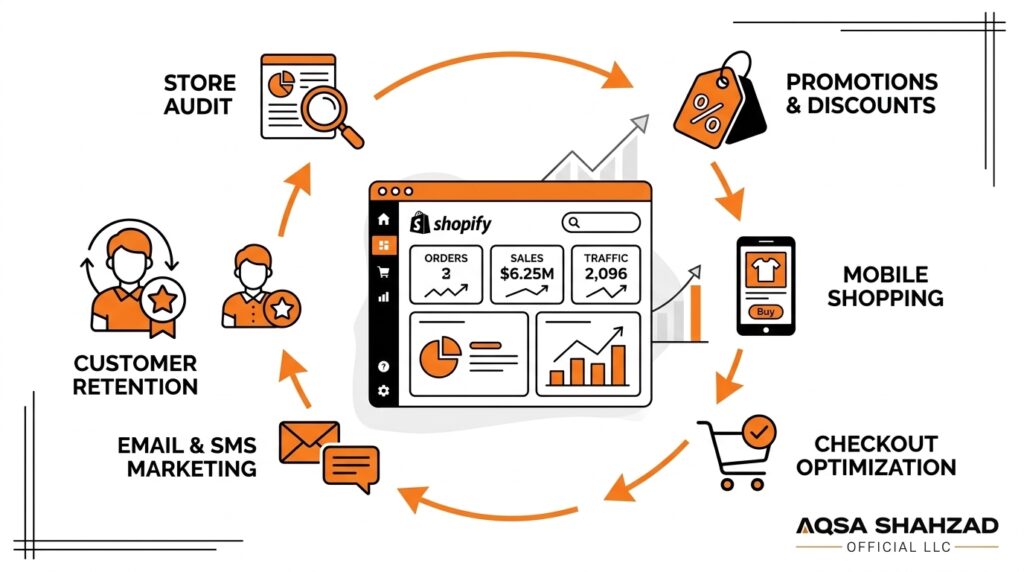
Most Shopify stores that have a disappointing Black Friday had a discount ready. The trouble showed up somewhere else. The homepage didn’t point shoppers to the offer, a discount code clashed with an automatic discount at checkout, a bestseller sold out on Saturday morning, or a slow mobile product page lost visitors before they ever saw the price.
A good Shopify Black Friday campaign covers the whole customer journey: how people arrive, what they see first, how quickly they find the right product, whether the cart and checkout behave as expected, whether you can ship what you sold, and what you do with those new customers once the weekend is over.
This guide is written for Shopify merchants, DTC brands, and ecommerce teams getting ready for Black Friday 2026. It covers the numbers behind last year’s sales weekend, what to prepare and in what order, which apps are worth considering, what usually goes wrong, and how to judge whether the campaign worked.
Key Takeaways
Black Friday success on Shopify comes from preparing the store and the operation behind it, not only from the size of the discount. The 2025 results show how much demand the weekend brings. They also show that most of that demand now comes from mobile shoppers and from people who respond to email and SMS.
- Black Friday 2026 is Friday, November 27, and Cyber Monday 2026 is Monday, November 30. Treat mid-November through early December as one campaign window.
- Demand is large and growing. Shopify merchants sold $14.6 billion over BFCM 2025, up 27% from 2024.
- Mobile comes first. Salesforce found that mobile devices drove 70% of online orders during Cyber Week 2025, so test the mobile store before anything else.
- Email and SMS need to be built early. Klaviyo reported that email and SMS drove 42% of its customers’ total BFCM 2025 revenue.
- Design discount logic on purpose. Decide how automatic discounts, codes, bundles, and free shipping interact, then test every combination.
- Plan inventory and fulfillment weeks ahead. Stockouts and missed shipping promises cost more than lost sales.
- Freeze major changes about a week out. Only make fixes you have tested, and keep a written rollback plan.
What Is Shopify Black Friday?
Shopify Black Friday is the Black Friday sales period as Shopify merchants run it: the promotions, store changes, marketing campaigns, and operational preparation that online stores built on Shopify put in place for the Friday after U.S. Thanksgiving. In practice, it usually runs through Cyber Monday and is often called BFCM (Black Friday Cyber Monday).
For a Shopify merchant, Black Friday means configuring discounts in the Shopify admin, updating themes and collections, preparing apps and integrations for more orders, and coordinating email, SMS, and paid campaigns around a short, high-intent buying window.
Black Friday and Cyber Monday used to be different events. Black Friday was built around in-store doorbuster deals, and Cyber Monday was the online follow-up. Today most ecommerce brands run one continuous BFCM campaign. Many still use Cyber Monday for a final offer, a new product drop, or a last reminder before prices go back to normal.
When Is Black Friday 2026?
Black Friday 2026 is on Friday, November 27, 2026. Cyber Monday 2026 is on Monday, November 30, 2026. Thanksgiving falls on Thursday, November 26, so the full BFCM weekend runs from Thanksgiving through Cyber Monday.
| Event | 2026 Date |
|---|---|
| Thanksgiving | Thursday, November 26 |
| Black Friday | Friday, November 27 |
| Small Business Saturday | Saturday, November 28 |
| Cyber Monday | Monday, November 30 |
The dates matter less than the lead time. Theme changes, bundle setup, app installs, and inventory orders all take longer than merchants expect, and supplier and carrier capacity gets tight in November. The goal is to finish building by mid-November and spend the last week monitoring, not developing.
Shopify Black Friday by the Numbers: What 2025 Tells Us
The figures below come from Shopify’s own results and from large industry trackers covering the 2025 season. The 2026 numbers will be different, but these figures show where demand comes from and which parts of your store deserve the most preparation.
Shopify BFCM Revenue Statistics
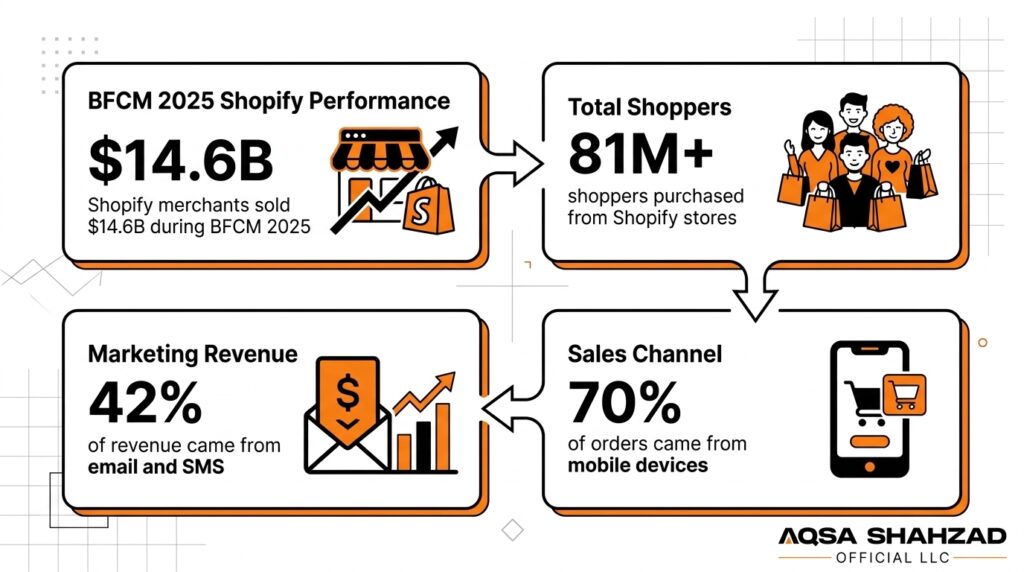
According to Shopify’s official BFCM 2025 results, merchants on the platform sold $14.6 billion over the Black Friday–Cyber Monday weekend, a 27% increase over 2024. Sales peaked at $5.1 million per minute at 12:01 p.m. EST on Black Friday.
| Metric | BFCM 2024 | BFCM 2025 |
|---|---|---|
| Total Shopify merchant sales | $11.5 billion | $14.6 billion |
| Year-over-year growth | 24% | 27% |
| Peak sales per minute | $4.6 million | $5.1 million |
| Shoppers buying from Shopify merchants | 76+ million | 81+ million |
| Average cart price | $108.56 | $114.70 |
| Merchants with their best sales day ever | n/a | 94,900+ |
The number that should matter most to a single merchant is the last one. More than 94,900 merchants had their highest-selling day ever during BFCM 2025. For many stores, this weekend is where operational weaknesses show up first: stock, fulfillment, support, and checkout all face their heaviest load.
Shopify also reported that 32% of BFCM 2025 orders used Shop Pay and that cross-border orders made up 16% of global orders. If you sell outside the U.S., currency display, duties, and international shipping rates belong on your preparation list, and a solid international expansion setup makes those orders much easier to handle at peak volume.
Mobile Commerce Share During BFCM
Mobile is now the default Black Friday shopping device. Salesforce’s Cyber Week 2025 data shows that mobile devices drove 70% of online orders globally and in the U.S. Adobe, which measures spend, not orders, reported that 57.5% of Cyber Monday 2025 online sales came from mobile devices.
The two figures differ because they measure different things, but they point the same way. When you review a Black Friday landing page or product page, look at it on a phone first.
Email and SMS Revenue Share During BFCM
Klaviyo’s BFCM 2025 report found that email and text messages drove 42% of total revenue for brands on its platform over the five days from Thanksgiving to Cyber Monday, rising to 43% on peak days. Klaviyo also reported that text revenue grew 25% year over year and that revenue from repeat customers grew 13.5%.
These numbers come from Klaviyo users, not every Shopify store, so treat them as a direction, not a benchmark to match. The practical point still holds: owned channels and existing customers drive a large share of Black Friday revenue, so your list and your flows need to be ready weeks in advance.
Discount Depth and Conversion Rates
Adobe’s Cyber Monday 2025 data shows that discounts peaked at 31% off for electronics, 28% for toys, 25% for apparel, and 17% for sporting goods. Klaviyo separately reported that discounts dropped 10% year over year across ecommerce in 2025, while the average selling price rose. Shoppers still spent more, even though offers were not deeper.
There isn’t a reliable, widely published benchmark for BFCM-specific conversion rates. For year-round context, Shopify’s ecommerce conversion rate guide cites a global average of 2.66% (based on Dynamic Yield data from 400+ brands), with wide variation by industry: beauty and personal care stores average above 5%, while luxury and jewelry average below 1%. The most useful comparison is your own store: compare your Black Friday conversion rate with your normal November baseline and with last year’s BFCM.
Black Friday 2025 at a Glance
| Source | Metric | 2025 Result |
|---|---|---|
| Adobe | U.S. Black Friday online spend | $11.8 billion (up 9.1%) |
| Adobe | U.S. Cyber Monday online spend | $14.25 billion (up 7.1%) |
| Adobe | U.S. Cyber Week online spend | $44.2 billion (up 7.7%) |
| Adobe | BNPL spend on Cyber Monday | $1.03 billion |
| Salesforce | Global Cyber Week online sales | $336.6 billion |
| Salesforce | Share of online orders from mobile | 70% |
| Klaviyo | Share of revenue from email and SMS (Klaviyo brands) | 42% |
How to Prepare Your Shopify Store for Black Friday
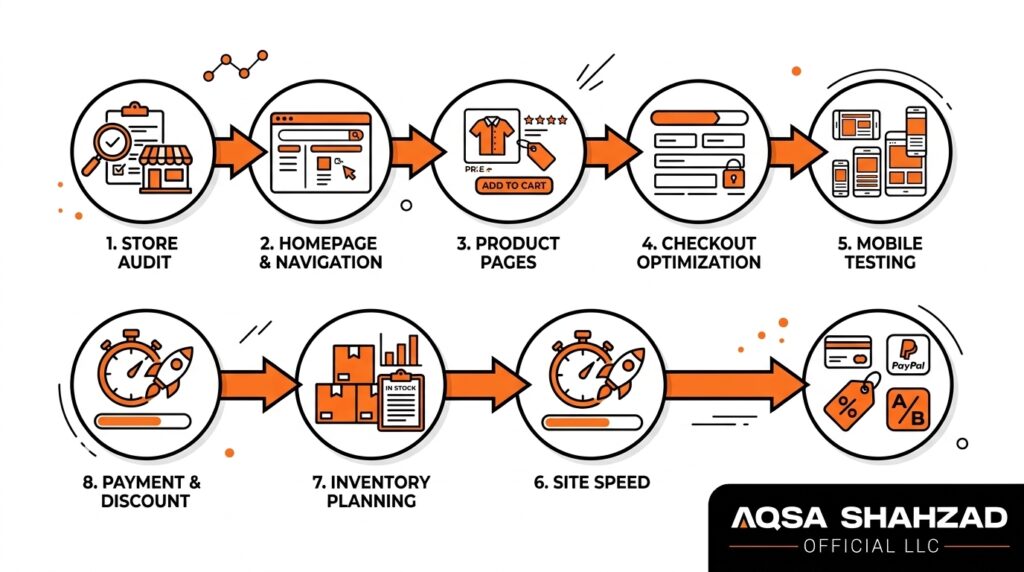
To prepare a Shopify store for Black Friday, audit the storefront and apps, adjust the homepage and navigation around your offers, strengthen product pages, simplify the cart and checkout, test on mobile, check site performance, plan inventory and fulfillment, and verify every payment method and discount combination. Each step is covered below.
Audit Your Shopify Store
Start with a clear picture of how the store works today. Look at the last three to six months in Shopify Analytics: which products get the most traffic, which pages have high exit rates, where the funnel drops between product view, add to cart, and checkout, and how mobile conversion compares with desktop.
Next, review your installed apps. Stores often collect review widgets, popups, upsell tools, and tracking scripts over time, and some of them duplicate each other or are no longer used. Remove anything you don’t need before Black Friday, because every script adds weight to the page and one more thing that can break. Finally, duplicate your live theme so you have a safe copy to build Black Friday changes in and a version to roll back to if something goes wrong.
Optimize Your Homepage and Navigation
Visitors arriving from a Black Friday email or ad should see the offer right away. Update the hero section to state the promotion plainly, for example “25% off sitewide through Cyber Monday” or “Buy 2, get 1 free on all skincare,” and link it to a dedicated collection instead of the full catalog.
Add a “Black Friday” or “Deals” link to the main navigation and the mobile menu. Build smart collections that group discounted products by category or price, so a shopper looking for gifts under $50 can find them in two taps. If your announcement bar shows the offer end date, keep it accurate and update it for each phase of the campaign.
Improve Product Pages
The product page is where shoppers make their decision, and during Black Friday they compare more quickly and more skeptically than usual. Show the original price, the sale price, and the savings clearly. Don’t make people work out the discount themselves.
Keep product information complete: sizing, materials, dimensions, compatibility, whatever your category needs. Use high-quality images that show scale and real use, and make sure reviews appear near the price, not buried at the bottom of the page. Trust signals help too. Say plainly what the shipping cost and estimated delivery window are, what the return policy is (including any holiday-extended return window), and which payment options you accept.
If stock is limited, show it honestly, for example “Only 8 left” when that’s true. A short FAQ block that answers the questions your support team hears most often, such as “Will this arrive before Christmas?” or “Can I return a gift?”, saves customers from leaving the page to find answers.
Optimize the Cart and Checkout Experience
Every extra step between “add to cart” and “order confirmed” loses some shoppers. Check that the cart shows the discount clearly, so a customer who expected 30% off can see it applied before checkout. If you use a cart drawer, make sure it loads quickly on mobile and doesn’t hide the checkout button behind upsell widgets.
Turn on accelerated checkouts such as Shop Pay, Apple Pay, and Google Pay where they suit your audience. With nearly a third of Shopify’s BFCM 2025 orders placed through Shop Pay, returning shoppers clearly value skipping the form. Remove optional fields from checkout, and show shipping costs before the final step so nobody meets a surprise fee there. Shopify Plus merchants can customize more of the checkout; the guide to Shopify Plus checkout extensibility explains what is possible.
Test Mobile Shopping Experience
With most Black Friday orders now placed on phones, mobile needs its own test pass, not a quick look on your own phone. Go through the full journey on at least one iPhone and one Android device: arrive from an email link, browse a collection, filter, open a product, choose a variant, add to cart, apply a code, and complete checkout.
Watch for popups that can’t be closed on small screens, sticky bars that cover the add-to-cart button, variant selectors that are hard to tap, and images that make the page shift while it loads. Do the same test on a slower mobile connection.
Check Site Performance and Speed
If your key templates are still slow after removing unused apps and compressing images, the problem is often in the theme code itself, such as render-blocking scripts, bloated Liquid sections, or poorly loaded fonts. That’s the point where dedicated Shopify speed optimization is worth considering, ideally in October, before the code freeze.
Run your homepage, a main collection page, and your top product pages through Google PageSpeed Insights. Compare the results with the speed report in your Shopify admin, which Shopify explains in its guide to online store web performance. Focus on fixes you can act on, such as compressing images, removing unused apps, and lazy-loading content below the fold. Run every test again after adding Black Friday banners and popups.
Prepare Inventory and Fulfillment
Forecast demand per SKU, not per store. Use last year’s BFCM sales where you have them, then adjust for this year’s offer depth, marketing budget, and email list growth. Place reorders early enough for suppliers to deliver before mid-November.
For every product, decide whether “continue selling when out of stock” should be on or off, and check that setting in the admin. Talk to your 3PL or warehouse team about expected volume and cut-off times. Publish clear holiday shipping deadlines on your site, and keep them up to date as carriers announce their holiday schedules.
Verify Payments and Discount Behavior
Place real test orders with every payment method you offer, including buy now, pay later (BNPL) options, and then refund them. BNPL alone accounted for more than $1 billion of U.S. online spend on Cyber Monday 2025, according to Adobe, so a broken BNPL integration is a real revenue risk. Check that order confirmation emails, inventory updates, and connected systems such as ERP, accounting, or 3PL receive the order correctly.
Shopify lets you control how automatic discounts and discount codes stack. Its guide to combining discounts explains which combinations are allowed and the order in which they apply. Test the edge casShopify Agency in Minneapolis, MNes: a sale item plus a welcome code, a bundle plus free shipping, a gift card payment on a discounted order, and an order that falls just under the free-shipping threshold after the discount.
Shopify Black Friday Promotion Strategies
Shopify Black Friday discounts are set up in the Shopify admin as either automatic discounts, which apply without a code, or discount codes that customers enter at checkout. They can take off a percentage, a fixed amount, or shipping costs, or reward buy X get Y purchases. Choose the structure based on your margins, your average order value goals, and the customers you want to reach.
| Promotion Type | Best For | Main Risk |
|---|---|---|
| Percentage discount | High-margin brands, simple sitewide messaging | Trains customers to wait for sales |
| Fixed-amount discount | Protecting margin, raising order value | Weak appeal on low-priced items |
| Buy more, save more | Consumables, basics, giftable products | Tiers not shown clearly on site |
| Product bundles | Moving slower stock with bestsellers | Inventory sync errors |
| Free shipping | Low average price stores | Margin loss on small orders |
| Gift with purchase | Premium brands avoiding deep discounts | Gift stock running out first |
| Limited-time offers | Driving return visits over the weekend | Fake urgency damages trust |
| VIP / early access | Rewarding existing customers | Leaking codes publicly |
Percentage Discounts
Sitewide or category-wide percentage discounts, such as “20% off everything,” are simple to communicate and work well for brands with healthy margins. The risk is training customers to wait for sales, so many brands keep deep percentage discounts for BFCM only.
Fixed-Amount Discounts
“$25 off orders over $150” protects margin better on lower-priced items and nudges customers toward a higher order value. It works best when the threshold sits a little above your current average order value.
Buy More, Save More
Tiered offers, such as 10% off one item, 20% off two, and 30% off three, suit consumables, apparel basics, and giftable products. Make sure the tiers appear on product pages and in the cart, not only in the email.
Product Bundles
Bundles let you discount a set instead of individual products, which protects the perceived value of your hero items. They also help move slower stock by pairing it with bestsellers. Build bundles early so the inventory syncs correctly.
Free Shipping Offers
Free shipping, or a lower threshold for the weekend, can convert shoppers who hesitate at the cart. It suits stores with low average prices, where a percentage discount wouldn’t mean much.
Gift With Purchase
A free product above a spend threshold keeps your list prices intact and can introduce customers to a product line they haven’t tried. It works especially well for beauty, wellness, and premium brands that avoid deep discounts.
Limited-Time Offers
Doorbusters on specific days, or a Cyber Monday–only offer, give people a reason to come back during the weekend. Keep the deadlines real, and end offers when you said you would.
VIP or Existing-Customer Offers
Early access for subscribers or past buyers rewards loyalty and spreads demand across a longer window, which eases pressure on inventory and fulfillment. Given how much BFCM revenue now comes from repeat customers and owned channels, this is often one of the most profitable offers you can run.
No single promotion type works best for every store. A brand with 70% gross margins and a brand with 25% margins should not run the same offer.
How to Increase Shopify Black Friday Conversion Rates
To increase Shopify Black Friday conversions, make the offer obvious on every page, cut steps from browsing to checkout, show shipping and return terms up front, add social proof near the buy button, and use bundles, upsells, and cross-sells to raise order value without adding friction. More traffic won’t help if the store loses the visitors it already has.
Start with consistent messaging. If an ad promises 30% off, the landing page, product page, and cart should all show 30% off in the same wording. When the message changes along the way, shoppers start to wonder whether the offer really applies.
Next, merchandise with intent. Put your strongest offers and bestsellers at the top of each collection instead of sorting alphabetically or by newest. Add filters for price, size, and category so shoppers can narrow the options quickly.
Use urgency honestly. Real countdown timers tied to a real end date, and accurate low-stock messages, help people decide. Fake timers that reset on reload do the opposite.
Raise average order value through placement, not pressure. A “complete the look” cross-sell on the product page, a small add-on offer in the cart drawer, and a post-purchase upsell after payment each ask for one more decision at a natural moment. Keep them relevant.
For higher-priced items, showing BNPL messaging near the price can reduce hesitation. If you want to know which of these changes actually works for your store, run controlled tests in the weeks before BFCM. This Shopify A/B testing guide covers which experiments to prioritize, and a structured Shopify conversion rate optimization process helps you decide which fixes to ship before traffic peaks.
Shopify Black Friday Marketing Channels
Your channels should work as one campaign with a clear sequence: build anticipation, launch, remind, and close.
Email Marketing
Email usually carries the campaign. In early November, send teasers and early-access sign-up invitations. Launch to VIPs first, then to the full list. During the weekend, send reminders based on what people clicked, not just repeated blasts, and use a “last chance” email on Cyber Monday. Segment by purchase history so past buyers see products that complement what they already own. If your flows and segments haven’t been touched since last year, a proper email and SMS marketing review before November is one of the higher-return preparation tasks.
SMS Marketing
SMS suits short, time-sensitive messages such as launch alerts, early access, and final-hours reminders. Only message subscribers who have given explicit consent, keep the frequency low, and don’t repeat every email by text.
Paid Advertising
Ad costs tend to rise across the BFCM period, so earlier prospecting in October and early November can build audiences more cheaply. During the weekend, put budget behind your strongest offers and warmest audiences.
Organic Social Media
Use organic social to preview offers, show products in use, and answer questions in comments and DMs. Salesforce reported that social media drove 16% of U.S. Cyber Week 2025 traffic, so keep product links, shop tabs, and pinned posts up to date.
Retargeting
Retarget product viewers and cart abandoners with the exact products they looked at and the current offer. Exclude recent buyers so you aren’t paying to reach people who already converted.
On-Site Promotions
Announcement bars, email capture popups offering early access, and in-cart messages such as “You’re $12 away from free shipping” turn existing traffic into sales and subscribers. Use one or two on-site prompts, not five competing ones.
Best Shopify Apps for Black Friday
The best Shopify apps for Black Friday are the ones that fill a clear gap in your store: email and SMS automation, post-purchase upsells, product reviews, bundles, and subscriptions. Install and configure them in October, not November, so you have time to test them and check that they don’t slow the store down.
| App | Category | How It Helps on Black Friday |
|---|---|---|
| Klaviyo | Email and SMS marketing | Segmented campaigns, abandoned-checkout flows, browse abandonment, and post-purchase sequences |
| Omnisend | Email and SMS marketing | Campaigns and prebuilt automations for smaller teams that want email and SMS in one tool |
| ReConvert | Post-purchase upsells | One-click upsells and a customizable thank-you page after payment |
| Judge.me | Product reviews | Collects and displays reviews and photos near the buy button |
| Shopify Bundles | Product bundles | Shopify’s own app for fixed bundles and multipack listings with synced inventory |
| Recharge | Subscriptions | Subscription offers and discounts that turn one-time BFCM buyers into recurring customers |
Klaviyo
Klaviyo is widely used by Shopify brands for email and SMS. Its main strength for Black Friday is segmentation: you can send different messages to VIPs, recent browsers, lapsed customers, and first-time subscribers, and run abandoned-checkout and browse-abandonment flows that reflect the live offer.
Omnisend
Omnisend covers email, SMS, and automation workflows with prebuilt templates. It tends to suit smaller teams that want one tool for campaigns and automation without building everything from scratch.
ReConvert
ReConvert focuses on the post-purchase moment: one-click upsells after payment and a thank-you page that can feature related products, surveys, or a next-order offer. Post-purchase offers don’t add friction before checkout, which makes them a relatively low-risk way to raise average order value during peak traffic.
Judge.me
Judge.me collects and displays product reviews, including photo reviews. During Black Friday, shoppers compare quickly, and seeing reviews near the price helps them decide. Start requesting reviews well before November so your key products have recent social proof.
Shopify Bundles
Shopify Bundles is Shopify’s own app for creating fixed bundles and multipacks. Because it’s built by Shopify, it works with native inventory, which makes bundle stock easier to manage when orders spike.
Recharge
Recharge handles subscriptions. For brands selling consumables, a Black Friday “subscribe and save” offer can turn a one-time deal hunter into a recurring customer, which helps make up for the margin the discount costs.
Whatever you install, check every new app against your page speed and your checkout. It’s better to have fewer apps that you have set up and tested than many you are still learning in the week before Black Friday.
Shopify Black Friday Abandoned Cart and Recovery Strategy
During Black Friday, more visitors add to cart while comparing stores, which means more abandoned carts to recover. Recovery flows need to be adjusted for the campaign, not left on their year-round settings.
Shorten your timing. A reminder sent 24 hours later may arrive after the offer has ended, so consider a first message within an hour or two and a second within the same day. Mention the promotion’s end date in the message, because a real deadline is a strong and honest reason to return.
Check that recovery emails link back to a working cart with the discount still applied, and that they handle stock correctly. Sending someone back for an item that has since sold out is frustrating, so suggest similar products where you can. Use SMS for abandoned checkouts only when the customer has opted in.
Look at recovery flows as a signal too. If many people abandon at the shipping step, the fix is probably clearer shipping costs, not a stronger reminder email. The article on Shopify checkout optimization covers common friction points worth fixing before November.
Shopify Black Friday Checklist
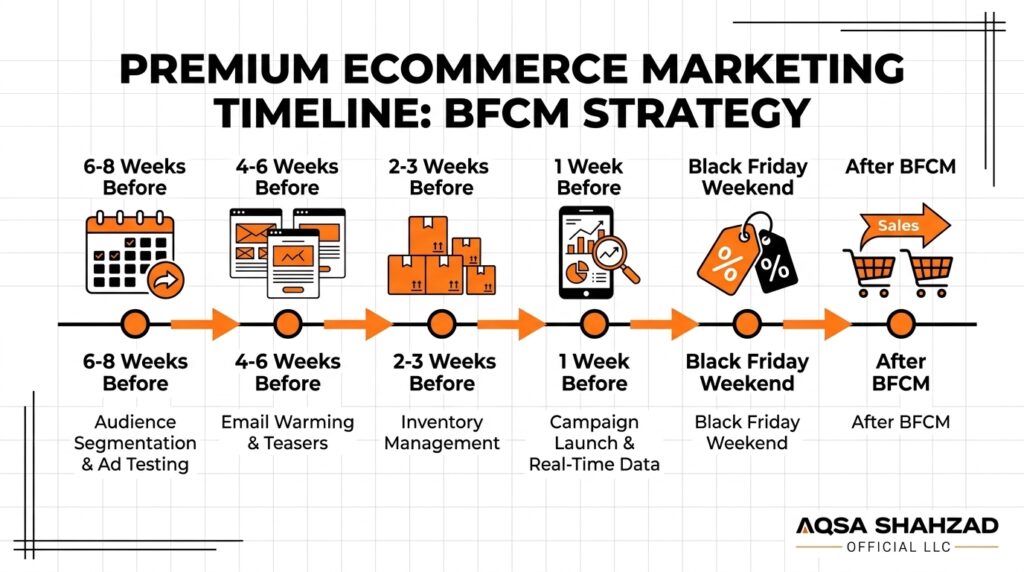
Use this timeline to spread the work out so you aren’t building everything in the final week.
6–8 Weeks Before (Early to Mid-October)
- Review last year’s BFCM data and set revenue, margin, and inventory goals.
- Choose your promotion structure and check margins for each offer.
- Place inventory orders and confirm supplier and 3PL capacity.
- Duplicate the live theme and start Black Friday design changes.
- Audit apps; install and configure any new ones.
4–6 Weeks Before (Mid-October to Early November)
- Build Black Friday collections, bundles, and landing pages.
- Write and design email and SMS campaigns; set up early-access sign-up.
- Update the abandoned-checkout and post-purchase flows for the campaign.
- Confirm analytics, GA4 conversion tracking, and ad pixels are firing correctly.
2–3 Weeks Before (Early to Mid-November)
- Create all discounts in the admin with correct start and end times.
- Test every discount combination and payment method with real orders.
- Run a full mobile test of the journey on multiple devices.
- Check page speed again after adding campaign assets.
- Publish holiday shipping deadlines and updated return policy.
1 Week Before (November 20–26)
- Freeze major theme and app changes.
- Brief customer support with FAQs, macros, and escalation contacts.
- Preview the scheduled theme and check discounts go live at the right time.
- Write down a rollback plan and who can make emergency changes.
Black Friday and Cyber Monday (November 27–30)
- Check the live storefront on mobile first thing each morning.
- Monitor sales, conversion, and top-product inventory in Shopify Analytics.
- Pause ads or hide products that sell out.
- Send planned reminders and adjust messaging based on what’s selling.
After BFCM (December)
- Fulfill orders and communicate shipping status proactively.
- Turn off expired discounts and remove campaign banners.
- Start post-purchase and win-back flows for new customers.
- Review results while details are still fresh.
A Shopify Black Friday Readiness Test
Before you launch, go through these questions honestly. Every “no” or “not sure” should either become a task or be accepted as a known risk.
| Area | Ready When You Can Answer Yes |
|---|---|
| Storefront | The main offer is one tap from the homepage, and every campaign link points to a live page |
| Mobile UX | Someone other than the builder has completed the full journey on iPhone and Android |
| Product pages | Top products show original and sale prices, shipping times, returns, and reviews without much scrolling |
| Promotions | Every discount has been tested alone and in combination |
| Cart | Savings and the free-shipping threshold display correctly after discounts |
| Checkout and payments | A real order has been placed and refunded with every payment method, including BNPL |
| Performance | Campaign banners, popups, and new apps have been speed-tested |
| Inventory | You know which SKUs will sell out first and what happens when they do |
| Fulfillment | Your warehouse or 3PL has confirmed capacity and holiday cut-off dates |
| Customer support | The team has ready answers for shipping, returns, and discount issues |
| Analytics | Purchases record correctly in Shopify Analytics, GA4, and ad platforms |
| Email, SMS, and recovery | All campaigns are scheduled, and recovery messages mention the current offer and end date |
| Post-purchase | A flow is ready to welcome first-time BFCM buyers and bring them back in January |
If several areas are uncertain, focus on checkout, discounts, and inventory first, because problems there cause the most damage.
Common Shopify Black Friday Mistakes to Avoid
Preparing too late. When the work starts in mid-November, testing gets squeezed out. Most Black Friday problems come from changes that were launched without enough testing.
Relying only on discounts. A bigger discount can’t make up for a confusing store. The 2025 data showed shoppers spending more even as discounts became shallower, which suggests that clarity, trust, and convenience count as much as the percentage.
Ignoring mobile UX. Many teams build and review campaigns on desktop monitors, while most orders now come from phones. Problems like a covered add-to-cart button only show up on a real device.
Failing to test checkout and discount rules. Discounts that stack by accident can wipe out margin, and discounts that don’t apply lead to abandoned carts and support tickets.
Underestimating inventory. Selling out of a hero product on Friday afternoon means losing sales for the rest of the weekend, and overselling leads to cancellations.
Unclear shipping timelines. When a delivery date is vague, customers ask support where their order is. When it’s wrong, they ask for refunds.
Ignoring site performance. Stacking new apps and heavy banners onto the store right before launch can slow the pages shoppers visit most.
Forgetting analytics and tracking. If purchase events aren’t recorded correctly, you can’t tell which campaigns worked.
Neglecting existing customers. Repeat customers and owned channels make up a large share of BFCM revenue. Spending the whole budget on acquisition leaves easy sales unclaimed.
Having no post-purchase strategy. BFCM brings in many first-time buyers. Without a follow-up plan, many of them buy once and never return.
How to Measure Shopify Black Friday Performance
Measure against the goals you set in October, and look at the funnel as well as total revenue.
| Metric | What It Tells You |
|---|---|
| Revenue and gross margin | Whether the offer was profitable, not just popular |
| Sessions by channel | Whether marketing brought enough traffic, and from where |
| Conversion rate | How well the store turned traffic into orders |
| Add-to-cart rate | Whether product pages and offers persuaded people |
| Checkout conversion | Where the final steps lost buyers |
| Average order value | Whether bundles, thresholds, and upsells worked |
| Customer acquisition cost | What each new customer cost on paid channels |
| Product-level performance | Which SKUs drove revenue, sold out, or didn’t sell |
| Campaign-level performance | Which emails, SMS sends, and ads led to purchases |
| Repeat purchase rate | How many BFCM customers buy again in 60–90 days |
Read these metrics together. Strong traffic with weak conversion points to a store or offer problem. Good conversion with low order value suggests bundles and thresholds need work. High acquisition cost with poor repeat purchases may mean the campaign bought one-time deal hunters rather than long-term customers.
Shopify Black Friday: What to Do After the Sale
The campaign doesn’t end on Cyber Monday. The next few weeks decide whether BFCM was a short spike or the start of lasting growth.
Fulfillment and customer support come first. Ship on schedule, send proactive tracking updates, and handle delays openly. Prepare for returns and exchanges, which often increase after the holidays, and make the process simple, since a smooth return can still earn a repeat customer.
Then move to retention. Segment BFCM buyers by what they bought and whether they were new or returning. New customers should receive a welcome sequence that explains your brand and products. It shouldn’t just ask for another purchase straight away. For consumable products, a well-timed replenishment reminder or subscription offer in January can bring many of them back.
Finally, analyze the campaign while the details are still fresh. Record which offers performed, which products sold out or didn’t sell, where the store slowed down or broke, and what support heard most often. That document becomes the starting point for next year’s plan.
When Shopify Development Support Makes Sense for Black Friday
Many stores can prepare for Black Friday with built-in Shopify features, a well-maintained theme, and a few reliable apps. Some situations need more technical help, and it’s better to recognize them in October than in the middle of the weekend.
Professional support tends to pay off when your promotion logic goes beyond what native discounts can handle, such as tiered pricing, complex bundles, or customer-specific offers. It also helps when the theme has UX or speed problems that app settings can’t fix, when you need custom functionality on product pages or in the cart, or when integrations with an ERP, 3PL, or subscription platform need to hold up under much higher order volume. Shopify Plus merchants often need help with checkout customization, Shopify Functions, and automation before peak season.
If your store needs improvements before Black Friday traffic arrives, Aqsa Shahzad’s Shopify Plus and ecommerce development services cover theme work, custom functionality, performance, and conversion optimization. For merchants who want ongoing help during the busy season, there is also a Shopify support and maintenance retainer. If you’re unsure what your store needs, you can book a strategy call to go through it before the November deadline.
Frequently Asked Questions
What is Shopify Black Friday?
Shopify Black Friday is the Black Friday sales period as Shopify merchants run it, including the discounts, store updates, marketing campaigns, and fulfillment planning around the Friday after U.S. Thanksgiving. For most stores, it runs through Cyber Monday as a single BFCM campaign.
When are Black Friday and Cyber Monday 2026?
Black Friday 2026 is on Friday, November 27, 2026, and Cyber Monday 2026 is on Monday, November 30, 2026. Many Shopify merchants start early-access promotions in the first half of November, so store preparation should be finished well before that week.
When should I start preparing for Shopify Black Friday?
Start six to eight weeks ahead, which for Black Friday 2026 means early to mid-October. That leaves time for inventory orders, theme changes, app setup, and campaign building before November, and at least two weeks for testing discounts, checkout, and mobile before launch.
What discount percentage works best on Shopify Black Friday?
No single percentage works best for every store. Adobe’s 2025 data showed discounts peaking at roughly 17–31% depending on the category, but the right offer depends on your margins. Many brands protect profit with bundles, tiered discounts, free shipping, or gifts with purchase instead of the deepest possible percentage.
Does Shopify crash during Black Friday?
Shopify’s platform is built for peak traffic. During BFCM 2024, Shopify reported handling up to 284 million edge requests per minute. When a Shopify store has problems on Black Friday, the cause is usually store-level: heavy apps, theme errors, broken discount logic, or third-party integrations, not Shopify’s servers.
How do I create Black Friday discounts in Shopify?
In the Shopify admin, go to Discounts and select Create discount. Choose a type (amount off products, amount off order, buy X get Y, or free shipping), then set it as a code or an automatic discount. Add eligibility rules, set the start and end dates, choose which discounts it can combine with, and test it with a real order before launch.
What are the best Shopify Black Friday apps?
Commonly used options include Klaviyo or Omnisend for email and SMS, ReConvert for post-purchase upsells, Judge.me for reviews, Shopify Bundles for bundles, and Recharge for subscriptions. Choose apps based on a clear gap in your store, and install them early enough to test performance and checkout behavior.
What should I do if my Shopify store needs technical improvements before Black Friday?
Prioritize by risk: checkout, discount logic, and site speed first, then design improvements. Make changes in a duplicated theme, test them thoroughly, and aim to finish by mid-November. If the work involves custom code, Shopify Plus features, or integrations, bringing in an experienced Shopify developer early makes it less likely that something will break during peak traffic.
Final Thoughts
The 2025 numbers show that Black Friday demand on Shopify keeps growing, that most of it comes through mobile devices, and that existing customers and owned channels drive a large share of revenue. A strong Shopify Black Friday comes from a store that is easy to shop, a checkout that works exactly as planned, inventory that matches demand, and a follow-up plan that turns weekend buyers into long-term customers. Start early, test more than seems necessary, and use this year’s results to make Black Friday 2027 easier to run.





