

Black Friday and Cyber Monday 2026 run November 27 through 30, and for most Shopify stores, the six weeks before launch decide more of the outcome than the sale weekend itself. This Shopify BFCM checklist for 2026 walks through what actually needs to happen before, during, and after the event — not a generic list of tips, but the specific technical, marketing, and operational tasks we run through with clients every year.
You’ll find a phased prep timeline, a full store-readiness checklist covering speed, checkout, payments, and inventory, plus two sections most BFCM guides skip entirely: what to monitor once the sale goes live, and how to turn one-time BFCM buyers into repeat customers afterward. Work through it in order, or jump to the section that matches where you are in your prep.
Key Takeaways
- Black Friday 2026 is November 27; Cyber Monday is November 30 — start prep 8–12 weeks out, in early-to-mid September
- Freeze non-critical code changes by November 20 to protect checkout stability during peak traffic
- Enable Shop Pay, Apple Pay, and BNPL options before launch — checkout friction is the single biggest cause of lost BFCM revenue
- Check margin at the actual discounted price on every promoted SKU before the sale goes live, not after
- Assign one owner for real-time monitoring during the sale, and run a one-page postmortem within two weeks after Cyber Monday
What Is BFCM, and When Is It in 2026?
BFCM stands for Black Friday Cyber Monday — the stretch that anchors the start of holiday shopping. Black Friday leads with steep, time-limited discounts; Small Business Saturday shifts attention to independent brands; Cyber Monday closes the weekend with a final push that’s historically skewed online. For the 2025 sales figures, promotion types and cart recovery, see our Shopify Black Friday guide.
2026 BFCM dates:
| Day | Date |
|---|---|
| Black Friday | Friday, November 27, 2026 |
| Small Business Saturday | Saturday, November 28, 2026 |
| Cyber Monday | Monday, November 30, 2026 |
| Cyber Week | November 27 – December 3, 2026 |
If you’re mapping deadlines against these dates for the first time this year, treat Cyber Monday as your hard stop for site changes — the prep timeline below covers what needs to be locked before then.
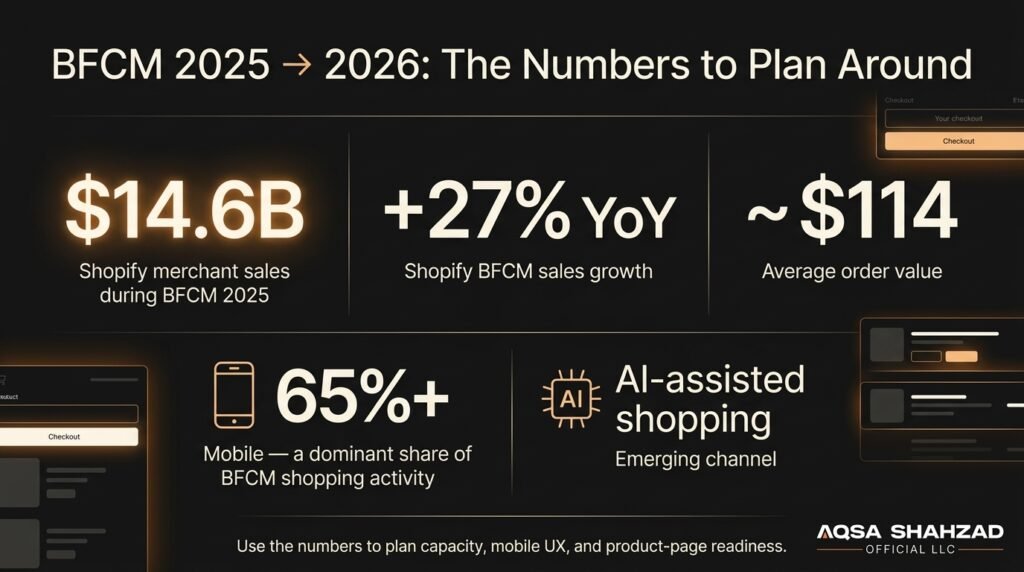
BFCM 2025 set records worth planning around: Shopify merchants generated $14.6 billion in sales over the weekend, up 27% year-over-year, with average order value around $114 (Shopify, 2025 BFCM data). Early signals also point to AI-assisted shopping — chatbots, AI Overviews, agentic checkout — becoming a meaningful discovery channel heading into 2026, which is one more reason product pages need to answer questions clearly rather than assume a human is the only one reading them.
How This Checklist Is Organized
This guide is built around four stages: a prep timeline mapped to weeks out from launch, a full store-readiness checklist you can work through by department, what to do while the sale is live, and what happens after Cyber Monday ends. Skip to whichever stage matches where you are — the timeline tells you roughly when each checklist item should be done.
Your BFCM 2026 Preparation Timeline
| Weeks out | Focus | Key tasks |
|---|---|---|
| 8–12 weeks (before ~Sept 21) | Foundations | Demand forecasting, inventory confirmation, discount and margin planning |
| 6–8 weeks (late Sept–early Oct) | Campaign building | Email/SMS list growth, creative development, landing page build |
| 4–6 weeks (mid–late Oct) | Technical audit | Speed, mobile checkout, CRO review, payment method checks |
| 1–2 weeks (early–mid Nov) | Final QA | Code verification, load testing, support team briefing |
| By November 20 | Code freeze | Stop shipping non-critical theme, app, or checkout changes |
| November 27–30 | Live monitoring | Real-time tracking — see “During BFCM” below |
| First 2 weeks of December | Post-BFCM | Retention sequencing and postmortem — see “After BFCM” below |
The code freeze deadline is worth calling out on its own. After November 20, changes to checkout, payment, or theme code should go through a staging environment first, even if it feels slow. The stores we see lose revenue mid-BFCM are almost never the ones that under-prepared technically — they’re the ones that pushed one more change during launch week.
The Complete Shopify Store Readiness Checklist
Store Performance & Speed
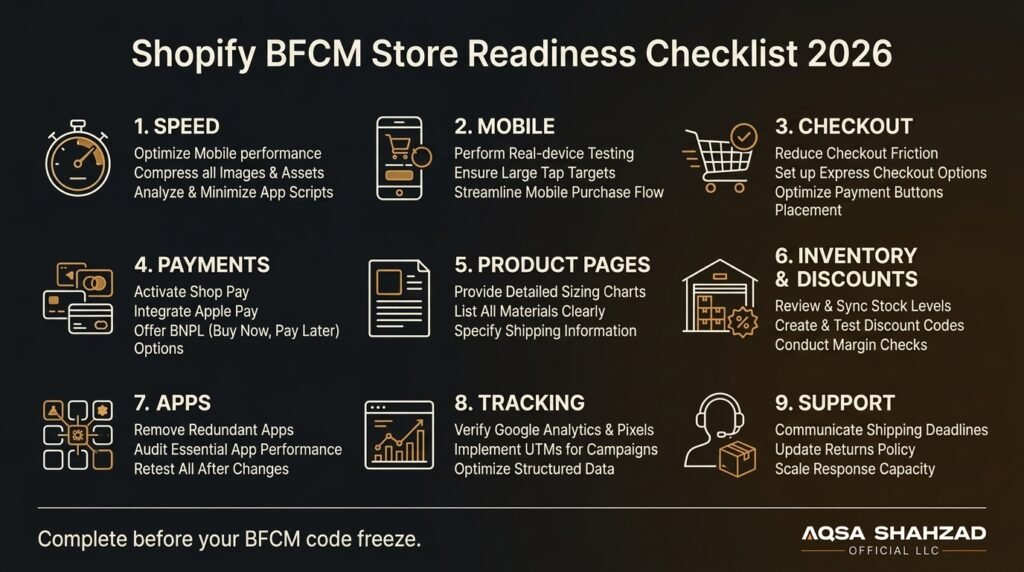
- Run speed tests on your homepage, top collection pages, and top 10 product pages — mobile scores, not just desktop
- Compress images and audit any app scripts loading on every page
- Confirm your theme isn’t carrying unused sections or legacy code slowing render time
A slow page during BFCM doesn’t just lose the sale in front of you — it drags down every page a shopper touches after it. If speed testing turns up more than you can fix in-house before launch, Shopify speed optimization is exactly the kind of pre-BFCM work we do.
Mobile Experience
- Test the full purchase flow on an actual phone, not a resized browser window
- Check font sizes and tap target spacing on product and cart pages
- Re-run your mobile load time check after any theme or app change
Checkout & Payment Methods
- Walk the entire checkout flow yourself and note every point of friction
- Reduce form fields to the minimum Shopify requires
- Confirm Shop Pay, Apple Pay, and any BNPL options (Shop Pay Installments, Klarna, Afterpay) are enabled and tested end to end — a missing express checkout button costs more conversions at BFCM volume than almost anything else on this list
- Test mobile payment buttons specifically; they’re where most abandonment happens
Checkout is where most BFCM revenue is actually won or lost — it’s also the easiest thing to under-test because it “already works” in normal traffic. A free CRO audit is a fast way to get a second opinion on where yours is leaking conversions before launch.
Product Pages
- Put sizing, material, and fit information above the fold on your top sellers
- Reduce the number of clicks needed to answer a common pre-purchase question
- Double-check shipping estimates are accurate for BFCM order volumes, not your normal-season defaults
Inventory, Discounts & Margin
- Confirm stock counts match across every sales channel before launch
- Decide your sellout strategy in advance — waitlist, backorder, or clear sold-out messaging, not silence
- Check margin at the actual discounted price on every promoted SKU — a 30% sitewide discount can quietly turn a thin-margin product into a loss leader if nobody checks
- Test every discount code against a real cart, including stacking rules, before it goes live
Apps
- Do a full audit of every installed app — what it does, whether it’s still needed
- Disable anything redundant or unused before BFCM, not during
- Re-test checkout and page speed after disabling apps to confirm nothing broke
- If a job is still uncovered, pick one app for it from our Black Friday apps comparison and install it by mid-November
Stress Testing & Security
- Simulate BFCM-level traffic against your storefront and checkout, not just the homepage
- Confirm capacity and support-tier details with your hosting provider or Shopify Plus account team
- Load-test any third-party apps involved in checkout or personalization
- Confirm SSL and fraud-filter settings are current — a security warning at checkout during peak traffic is one of the fastest ways to lose a sale
For higher-volume or Shopify Plus stores, load testing and checkout reliability are usually infrastructure problems as much as app problems — our Shopify Plus development team handles this side of BFCM prep directly.
Email, SMS & Abandoned Cart
- Pre-write and schedule your core sequences: launch, VIP early access, and Cyber Monday close
- Use SMS for time-sensitive moments only — last hours, restocks, cart abandonment — not general promotion
- Confirm abandoned cart automation is live and tested with a real test order
Analytics, Tracking & SEO
- Verify conversion tracking and pixels are firing correctly before launch, not after
- Test UTM parameters across every campaign link
- Refresh structured data on key pages and resubmit your sitemap ahead of peak crawl activity, so search engines have an accurate picture of your BFCM pages before traffic spikes
Customer Support & Returns
- Communicate shipping cutoff dates clearly on-site and in confirmation emails
- Prepare saved response templates for the questions you get every BFCM — shipping delays, sizing, order status
- Publish or confirm your BFCM-specific return policy somewhere visible — extended return windows are a real trust signal during high-volume gifting season
- Plan for 3–5x normal support volume and staff accordingly
Marketing & Conversion Tactics That Actually Move BFCM Revenue
Email carries most of the weight during BFCM — it converts relationships you already own, unlike paid channels that get more expensive by the day as competition peaks. Build your sequence around three moments: early access for your list, the launch itself, and a final push as Cyber Monday closes.
SMS works best reserved for genuinely urgent moments — restocks, the final hours of a sale, cart recovery — rather than general promotion. Overusing it burns opt-outs fast during the one period of the year you need the channel most.
Retarget cart abandoners aggressively during BFCM week; abandonment rates climb under high-traffic conditions, and a well-timed reminder recovers real revenue. Bundled offers protect margin better than blanket discounts — pairing a full-price item with a discounted add-on often outperforms a flat percentage off everything.
Don’t neglect existing customers. A loyalty incentive or early-access perk for repeat buyers, paired with a win-back email to lapsed customers, consistently outperforms cold acquisition during a period when ad costs are at their highest all year.
If you want help turning this into a full campaign calendar rather than a checklist, Shopify conversion rate optimization is where we focus most of our BFCM client work.
During BFCM: What to Watch in Real Time
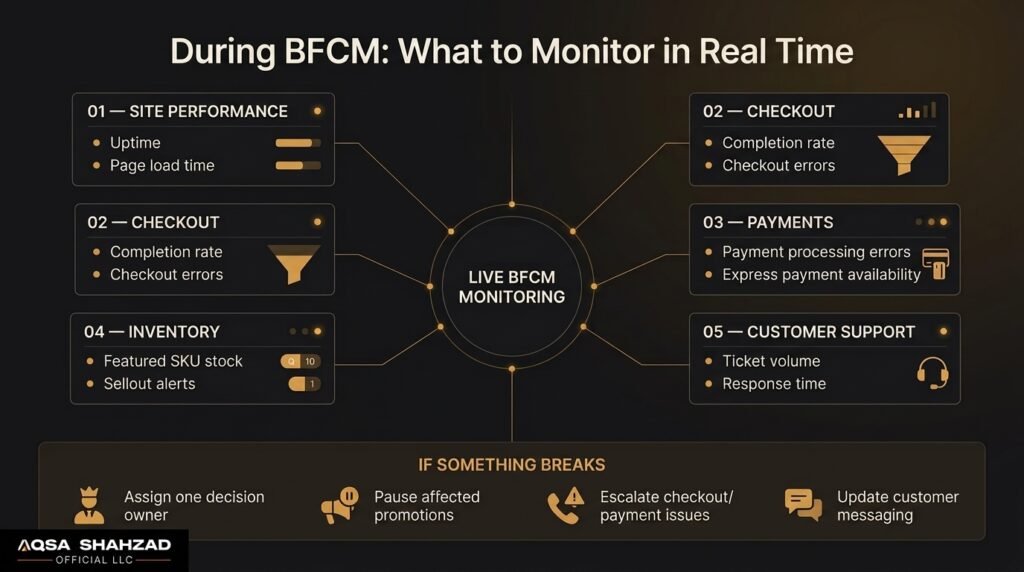
Once the sale is live, shift from prep mode to monitoring mode. Assign one person — not a committee — to own go/no-go decisions if something breaks.
Watch, at minimum: site uptime and page load times, checkout completion rate versus your normal baseline, error rates on payment processing, inventory levels on your featured SKUs, and support ticket volume and response time.
Have a plan for: what happens if a bestseller sells out mid-sale, who can push an emergency fix if checkout breaks, and how quickly your team can update messaging if a discount code needs to be paused. Writing this down before launch — even briefly — is the difference between a five-minute fix and a lost afternoon of sales.
After BFCM: Retention and the Postmortem
The week after Cyber Monday is where a lot of BFCM value gets left on the table. A large share of BFCM shoppers are buying from you for the first time — what happens in the following weeks decides whether that’s a one-time transaction or the start of a repeat customer.
Trigger a post-purchase sequence distinct from your normal flow: a thank-you that doesn’t immediately ask for another sale, a product education email a few days later, and a return-customer incentive timed for the general holiday shopping window in December.
Before you move on, run a short postmortem while the data is fresh: which products and channels actually drove revenue, where checkout or fulfillment friction showed up, what discount codes underperformed or overperformed margin expectations, and what you’d change with three more weeks of lead time next year. Keep it to one page — the goal is a usable record for next November, not an exhaustive report.
Common Shopify BFCM Mistakes to Avoid
- Launching discounts late. Shoppers are comparison-shopping before Thanksgiving; a Friday-morning discount launch misses days of demand.
- Installing too many apps too close to launch. Every new app is an untested variable during your highest-traffic week.
- Slow mobile pages. With mobile carrying the majority of BFCM traffic, a slow product or checkout page on mobile costs more than a slow desktop page ever will.
- Stocking out with no fallback. A sold-out bestseller with no waitlist or substitute recommendation is a lost customer, not just a lost sale.
- Broken or untested discount codes. Test every code against a real cart before it’s live, including stacking behavior with other promotions.
- Thin product page copy on bestsellers. BFCM traffic includes a lot of first-time visitors who need sizing, materials, and shipping answered without searching for them.
- Understaffed support. Support volume climbs 3–5x during BFCM; staffing to your normal-season baseline guarantees slow response times right when patience is lowest.
Frequently Asked Questions
What does BFCM stand for?
BFCM stands for Black Friday Cyber Monday, the shopping period that opens the holiday season.
When is Black Friday and Cyber Monday in 2026?
Black Friday is November 27, 2026, and Cyber Monday is November 30, 2026, with Cyber Week running November 27 through December 3.
When should I start preparing my Shopify store for BFCM 2026?
Most stores get the best return starting 8–12 weeks out — early-to-mid September for a November 27 launch. Starting later isn’t fatal, but it compresses testing time, which is where mistakes creep in.
What’s in a complete Shopify BFCM checklist for 2026?
A complete checklist covers site speed and mobile experience, checkout and payment methods, inventory and discount/margin checks, app and tracking audits, marketing sequencing, real-time monitoring during the sale, and a retention plan for after it ends — see the full checklist above.
What’s the single biggest cause of lost BFCM revenue?
In the stores we audit, it’s almost always checkout friction on mobile — a payment method that isn’t enabled, a form that’s longer than it needs to be, or a page that’s slow enough that someone abandons before completing the purchase.
How many apps should I have installed before BFCM?
As few as actually do something for you. Audit your app list before launch and disable anything redundant — each additional app is another script competing for load time and another potential point of failure during your highest-traffic week.
Should I discount sitewide or run tiered offers?
It depends on margin. Sitewide discounts are simpler to communicate but harder to protect margin on; tiered offers (spend more, save more) or bundles typically protect margin better while still feeling like a deal. Check the math at your actual discount depth before deciding.
Does this checklist apply outside the US?
Yes — the technical and marketing fundamentals apply everywhere Shopify runs. International merchants should also confirm currency display, cross-border shipping estimates, and payment methods relevant to their specific markets are tested ahead of BFCM.
Is speed really connected to conversion during BFCM?
Yes, more so than during normal traffic. Every added second of load time compounds under BFCM’s traffic volume, and mobile users — who make up the majority of BFCM shoppers — are the least patient with slow pages.
Get Your Store BFCM-Ready
Most of what breaks during BFCM was fixable in October. If you want a second set of eyes on where your store stands today, our BFCM 2026 readiness audit walks through this exact checklist against your store and tells you honestly where the biggest opportunity is.





