

Roughly seven out of every ten shoppers who add a product to their cart leave without buying. Baymard Institute puts the average online cart abandonment rate at 70.22%, based on 50 separate studies. That number has barely moved in a decade, even as checkouts have become faster.
For a Shopify store doing $500K a year, that adds up fast. If abandoned carts are worth about the same as completed orders, a 70% abandonment rate means more than $1M in cart value is left behind every year. You’ll never win all of it back, because plenty of those shoppers were never going to buy. The share you can recover is some of the cheapest revenue your store will ever make, because you’ve already paid to bring those people in.
This guide covers the Shopify cart abandonment strategies that matter most in practice. It explains what to fix first, how to set up recovery flows that don’t train customers to wait for a discount, and how to tell whether any of it is working.
Key takeaways
- Unexpected costs are the #1 reason shoppers abandon checkout. Baymard found 40% of checkout abandoners cite them. Fix how you show prices before you build any recovery flow.
- A sequence beats a single reminder. In Klaviyo’s benchmark data, the average abandoned cart email earns $3.65 per recipient. The top 10% of flows earn $28.89. Most of that gap comes from timing, sequencing and how the offer is structured.
- Shop Pay converts up to 50% better than guest checkout, according to a study Shopify commissioned. It costs nothing to switch on.
- Exit-intent popups work when the offer is specific. Generic “Wait, don’t go!” popups mostly annoy people.
- Retargeting reaches the shoppers you can’t email, and on most stores that’s the majority of abandoners.
Why Cart Abandonment on Shopify Costs More Than You Think
Most store owners glance at their conversion rate and move on. The math says they shouldn’t.
Take a store with 10,000 monthly visitors and a $75 average order value. Moving conversion from 2% to 3% means 100 extra orders a month, which is $7,500 in additional monthly revenue, with no increase in traffic spend. That’s why cart abandonment sits at the center of any serious Shopify conversion rate optimization plan.
Cart abandoners are also the warmest audience you have. They found your store, picked a product and got as far as the cart. Bringing back even a small share of them costs a fraction of what it takes to win a new customer through paid social.
Shopify’s built-in abandoned checkout email is a sensible starting point, but it’s the minimum. Klaviyo analyzed more than 143,000 abandoned cart flows. The average flow converted 3.33% of recipients into orders, and the top 10% converted 7.69%. The difference between those two numbers comes down to execution, which is what the rest of this guide is about.
Why Does Cart Abandonment on Shopify Happen?
Before you start fixing things, find out what’s actually driving people away. Baymard asked US online shoppers who had abandoned an order during checkout why they left. The figures below leave out the people who were “just browsing.”
| Reason for Cart Abandonment | % of Abandoning Shoppers | Where to Fix It on Shopify |
|---|---|---|
| Extra costs too high (shipping, tax, fees) | 40% | Pricing transparency / free shipping threshold |
| Delivery was too slow | 20% | Carrier options / delivery date messaging |
| Didn’t trust the site with card details | 19% | Trust signals / reviews / payment icons |
| Site wanted me to create an account | 18% | Guest checkout / Shop Pay |
| Checkout too long or complicated | 17% | Checkout settings / accelerated checkouts |
| Website had errors or crashed | 17% | App conflicts / QA testing / page speed |
| Returns policy wasn’t satisfactory | 13% | Returns policy / visibility in cart |
| Couldn’t see or calculate total cost upfront | 12% | Cart drawer cost display |
| Credit card was declined | 10% | Payment gateway / alternative payment methods |
| Not enough payment methods | 9% | Payment method coverage |
Use this table as your diagnostic checklist before you build any recovery campaign. Three of the top reasons are really the same problem: costs, delivery speed and not seeing the total upfront. In each case the shopper learned something at checkout that they should have known on the product page. Fix that and you knock out several causes at once. For the checkout-side fixes in more depth, see our guide to Shopify checkout optimization.
The Browsing Abandonment Problem
Not every abandoned cart is a lost sale. Baymard found that 42% of US online shoppers had abandoned a cart simply because they were “just browsing” or weren’t ready to buy. Many people use the cart as a wishlist, a price-comparison tool, or a way to check the shipping cost.
That’s why your recovery setup needs to treat two groups differently:
- Checkout abandoners reached checkout and usually entered an email. Their intent is high, and they’re usually stopped by friction such as cost, trust or payment.
- Cart abandoners added items and left. Their intent is medium, and the issue is usually timing.
These two groups need different triggers, messages and levels of urgency. Sending a 15% discount to someone who was browsing on their lunch break mostly just gives away your margin.
What Are Shopify Cart Abandonment Strategies?
Shopify cart abandonment strategies are the technical fixes, automated marketing flows and UX improvements you use to stop shoppers from leaving before they buy, or to bring them back after they’ve gone.
They fall into three buckets:
- Prevention: removing friction before it causes abandonment, through checkout speed, trust signals, payment options and upfront pricing.
- On-site recovery: catching intent before the shopper leaves, through exit-intent popups, cart upsells and a clear cart layout.
- Post-abandonment recovery: re-engaging shoppers after they’ve left, through email, SMS and retargeting ads.
The strongest Shopify stores run all three at once. One of the most common mistakes is treating cart recovery as purely an email problem. Email only reaches shoppers who gave you their address, so it can never recover more than a slice of your abandoners.
How to Fix Shopify Cart Abandonment: 13 Specific Tactics
1. Turn On Shopify’s Native Abandoned Checkout Emails (The Minimum, Not the Goal)
Start here, because it takes five minutes and costs nothing. In your Shopify admin, go to Marketing → Automations, open the abandoned checkout automation, and make sure it’s active. Check the send delay too. For most stores, a reminder within one to two hours works better than one that arrives the next day, while the shopper still remembers what they were buying. Shopify includes the cart contents and a link back to checkout automatically.
Treat this as a stopgap while you build a proper Klaviyo flow. Once your Klaviyo flow is live, turn the Shopify version off. If you run both, customers get two near-identical reminders, which looks careless and hurts trust.
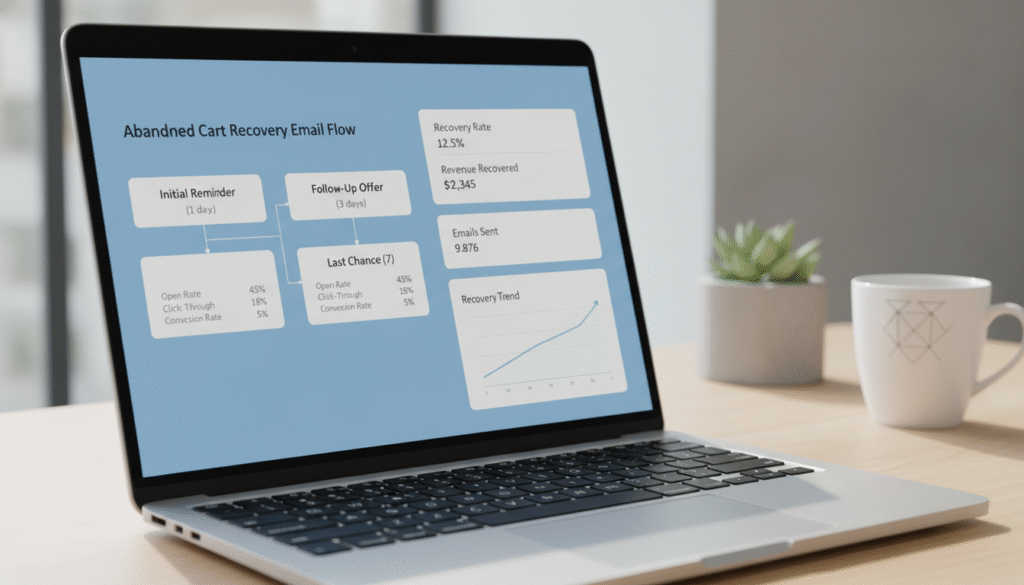
2. Build a 3-Part Klaviyo Abandoned Cart Email Flow
For most Shopify stores, the abandoned cart flow is the highest-earning email automation they have, and it’s often built with a single email and then forgotten. If you’re still choosing a platform, our breakdown of the best email marketing for Shopify stores compares the main options.
Klaviyo offers two versions, and it helps to know the difference:
- Abandoned Checkout is triggered by Checkout Started. It fires once a shopper enters their email at checkout. This is your highest-intent audience, so build it first.
- Abandoned Cart is triggered by Added to Cart. It reaches known subscribers who added items but never started checkout. Their intent is lower, so use softer messaging.
A three-email sequence works well for the checkout flow:
- Email 1, about 1 hour after abandonment: a simple reminder with the product image and no discount. For example: “You left something behind.” This brings back shoppers who simply got distracted.
- Email 2, about 24 hours after: add social proof. Include star ratings from Judge.me or Okendo, a short customer review, and answers to common objections such as shipping times and returns. Still no discount, so you don’t train customers to abandon carts on purpose to get a coupon.
- Email 3, about 72 hours after: add urgency or an incentive. Show low stock only if it’s true (Klaviyo can pull live inventory from Shopify), or offer a 10% code that expires in 24 hours. Use unique, single-use codes from Klaviyo’s Shopify coupon integration rather than one shared code that ends up on coupon sites.
Add a flow filter such as “Placed Order zero times since starting this flow” so anyone who buys drops out right away. Nothing erodes trust faster than a “Did you forget something?” email that arrives after the customer has already paid.
If you’d rather have these flows built and tested for you, that’s exactly what our email and SMS marketing service covers.
3. Add Abandoned Cart SMS via Klaviyo or Postscript
Texts get read quickly, which makes SMS a strong first touchpoint. Send a short message around 30 minutes after abandonment, before the first email, with a direct link back to checkout.
Keep it to two sentences. For example: “Your cart’s still saved. Tap here to finish your order: [link].” Klaviyo lets you add this as an SMS step inside the same flow. Postscript is a good alternative if you want Shopify-specific SMS analytics and compliance tools.
Two rules matter here. First, only text people who have explicitly opted in to SMS. US regulations such as the TCPA are strict, and similar rules apply elsewhere. Second, respect quiet hours. A cart reminder at 11pm is more likely to get you an unsubscribe than a sale. Our SMS marketing page covers how we set up compliant, revenue-focused SMS programs.
4. Enable Shop Pay and Accelerated Checkouts
Go to Settings → Payments and make sure Shop Pay is active under Shopify Payments, along with Apple Pay and Google Pay. Shop Pay lets returning shoppers skip retyping their address and card details, which removes much of the checkout friction behind abandonment.
According to a study Shopify commissioned, Shop Pay lifts conversion by up to 50% compared with guest checkout, and outperforms other accelerated checkouts by at least 10%. Shopify also reports that just having the Shop Pay button visible increases lower-funnel conversion by about 5%, even for shoppers who don’t use it.
While you’re in settings, check Settings → Customer accounts and make sure you aren’t forcing shoppers to sign in before they can check out. Required account creation still drives 18% of checkout abandonment, and it’s one of the easiest causes to remove.
5. Show a Free Shipping Progress Bar in the Cart
Unexpected costs are the biggest single cause of abandonment. A free shipping progress bar in your cart drawer tackles that head-on. When a shopper sees “Add $12.50 more for free shipping,” they’re more likely to add something than to leave. That raises order value and reduces abandonment at the same time.
Many cart drawer apps, such as UpCart or Rebuy’s Smart Cart, include this feature, and some themes have it built in. First, set up the actual free shipping rate in Settings → Shipping and delivery: edit your shipping profile and add a free rate with an order-price condition. Then set the bar in the app to the same threshold. If the numbers don’t match, the shopper sees one promise in the cart and another at checkout, which is exactly the kind of surprise you’re trying to remove.
A practical rule of thumb is to set the threshold modestly above your current AOV, close enough that one extra item gets most customers there.
6. Watch Real Sessions With Hotjar and Map Your Funnel in GA4
Before you change anything else, find out where people actually drop off. Install Hotjar from the Shopify App Store and filter session recordings to visitors who reached the cart but didn’t buy. Our free Shopify audit tools can help you spot obvious issues before you start watching recordings.
Look for rage clicks, form fields people start and abandon, error messages that flash and disappear, and how people behave on mobile specifically. Most problems you won’t find on your own desktop show up on a mid-range phone on a slow connection.
Then build a Funnel Exploration report in Google Analytics 4 (Explore → Funnel exploration) using the ecommerce events Shopify sends:
view_item → add_to_cart → begin_checkout → add_shipping_info → add_payment_info → purchase
Fix the step with the biggest drop-off first. Recordings show you why people leave, and the funnel shows you where.
7. Use Exit-Intent Popups With a Specific Offer
On desktop, exit-intent popups fire when the cursor heads toward the browser’s close button or address bar. They work when the offer is specific and relevant. Generic “Wait! Don’t go!” popups rarely convert and mostly irritate people.
Use OptiMonk or Privy, which both integrate with Shopify, and limit the popup to cart and checkout-bound pages. Show the actual product the shopper was looking at, add real social proof such as a count of recent purchases (only if the number is real), and offer a time-limited 5–10% discount.
Two details make a big difference:
- Mobile has no cursor, so desktop exit intent never fires there. Use mobile triggers such as a fast scroll back up the page, a back-button press, or a period of inactivity.
- Suppress the popup for existing subscribers and anyone who already has a code. Otherwise you end up discounting orders that would have happened anyway.
8. Use Rebuy for Personalized Cart Upsells That Lift AOV
Raising order value at the cart stage changes the abandonment math. A shopper whose cart goes from $38 to $65 can cross your free shipping threshold, which removes the biggest single reason people leave.
Rebuy shows personalized product recommendations in the cart drawer, on the cart page and after purchase. In the Rebuy dashboard, create a widget, place it in the cart, and choose a recommendation rule. “Frequently bought together” and “customers also viewed” usually do the most for AOV.
Keep the cart focused. One well-chosen recommendation tends to beat a carousel of eight, because a cluttered cart gives the shopper more reasons to hesitate.
9. Speed Up Your Store With PageSpeed Insights Fixes
Slow pages lose shoppers before they reach the cart. Google’s research found that as page load time goes from one second to three seconds, the probability of a visitor bouncing rises by 32%. Run your key pages through Google PageSpeed Insights, starting with product pages and the cart, and prioritize the issues flagged in the mobile report.
The Shopify fixes that usually make the most difference:
- Upload images at sensible sizes. Shopify’s CDN handles format conversion, but a 5,000-pixel hero image still costs you. A compression app like TinyIMG can help with a large existing catalog.
- Remove apps you don’t use, and the code they leave behind. Many apps inject JavaScript on every page, and some leave snippets in your theme after you uninstall them.
- Use an Online Store 2.0 theme such as Dawn, Impulse or Prestige. These themes lazy-load images and defer scripts by default, so you don’t have to hand-edit theme files to get those basics.
If your store is carrying years of app debt, a dedicated Shopify speed optimization pass is usually faster than chasing PageSpeed warnings one at a time.
10. Add Trust Signals Directly on the Cart Page
19% of checkout abandoners leave because they don’t trust the site with their card details. Yet most Shopify themes put trust signals in the footer or on product pages, not in the cart, where the buying decision actually happens.
In a 2.0 theme, open the theme editor, switch to the cart template, and add a block or custom Liquid section. You don’t need to edit cart.liquid directly. Include:
- A secure checkout badge. Shopify provides SSL automatically, so make that visible.
- Payment method icons for Visa, Mastercard, Amex, PayPal and Shop Pay.
- A one-line returns summary, such as “Free 30-day returns.” Only include it if it matches your actual policy.
- Your overall star rating from Judge.me or Okendo.
11. Run Dynamic Retargeting Ads on Meta and Google
Email reaches people who gave you their address. Retargeting reaches everyone else, which on most stores is the larger group.
Install Shopify’s Facebook & Instagram sales channel app, connect your Meta account, and set customer data sharing to the highest level. That turns on the Conversions API alongside the Pixel. Server-side tracking has mattered since Apple’s App Tracking Transparency changes, starting with iOS 14.5, reduced how much the browser pixel can see.
In Meta Ads Manager, run Advantage+ catalog ads retargeting people who added to cart but didn’t purchase in the last seven days, so each shopper sees the exact product they left. Exclude recent purchasers, and cap frequency so you stay a reminder rather than becoming a nuisance. On Google, the Google & YouTube app connects your product feed for remarketing through Performance Max.
Retargeting warm cart abandoners usually returns far more than prospecting to cold audiences. Judge it against your own blended numbers rather than a generic benchmark.
12. Close the Cross-Device Gap
Shopify stores the cart in a browser cookie that lasts about 14 days. That works fine until someone adds items on their phone during a commute and opens their laptop that evening. The cart is empty, and many shoppers won’t rebuild it from memory. This is a quiet driver of abandonment that rarely shows up in reports.
The most reliable fix is the recovery link itself. The links in your abandoned checkout emails and texts rebuild the checkout on whatever device the shopper opens them on, which is one more reason to capture email and SMS early.
Accounts help too, as long as you don’t force them at checkout. Shopify’s customer accounts use a one-time code sent by email instead of a password, so signing in is easy. Encourage account creation after purchase, where it adds no friction to the sale.
13. Use Checkout Extensions to Remove Friction
checkout.liquid has been retired. All Shopify checkout customization now runs through the checkout editor and checkout extensions, under Settings → Checkout → Customize.
What you can do depends on your plan:
- Shopify Plus merchants can add app blocks and UI extensions to the information, shipping and payment steps.
- All plans can customize checkout branding and add app blocks to the Thank you and Order status pages.
If you’re on Plus, the most useful additions are:
- A one-line reassurance message at the top of checkout, such as “Free shipping on this order · Free returns · Secure checkout.”
- A delivery date estimate, from an app like Estimated Delivery Date, because slow or unclear delivery accounts for 20% of abandonment.
- A loyalty points balance from LoyaltyLion or Smile.io, reminding shoppers what they’ll earn on this order. For the bigger picture on keeping those customers coming back, see our retention and loyalty service.
We cover the Plus-only options step by step in Shopify Plus checkout extensibility.
If you’re not on Plus, put the same reassurance on the cart page and product pages. Most of the doubt that kills a checkout starts before the shopper gets there.
How to Prevent Cart Abandonment on Shopify Long-Term
Recovery campaigns matter, but prevention pays off more over time. Every abandonment you prevent is one you don’t have to win back through email, SMS or paid ads.
Set a Competitive Free Shipping Threshold
Shoppers now expect free shipping as standard, and your threshold tells them how far they are from getting it. If your threshold is $100 and your AOV is $65, most customers will hit a shipping charge at checkout, so you’re creating friction by design.
Look at your shipping economics and consider three options: lowering the threshold, building part of the shipping cost into product prices, or using tiered thresholds, such as free standard shipping at $35 and free expedited shipping at $75.
Monitor Abandonment in GA4 Every Week
Keep your GA4 funnel exploration saved and check it weekly. The exact number matters less than how it changes over time. If your checkout abandonment jumps well above your usual baseline, something probably broke: a theme update, an app conflict, a payment gateway issue, or a price change nobody mentioned. Catching it within a week rather than a month can save a lot of revenue.
A/B Test Cart Page Copy and Layout
Google Optimize was shut down in 2023. The usual replacements are VWO and AB Tasty, or Shopify-focused tools like Intelligems and Shoplift. Good cart page elements to test:
- CTA copy, such as “Checkout” vs. “Complete My Order”
- Where the free shipping bar sits
- Whether showing an estimated delivery date in the cart reduces abandonment
Run each test for at least two full weeks so you capture both weekday and weekend behavior. Judge the result on conversions per variant, not sessions. A test with a few hundred visitors per side usually can’t detect the small improvements cart changes produce. Calling winners on underpowered tests is how bad decisions get locked in.
For a full list of experiments worth running, see our Shopify A/B testing guide. If you want testing to run continuously rather than as a one-off, our CRO experimentation retainer handles the full cycle, from hypothesis to rollout.
What Is the Average Cart Abandonment Rate for Shopify Stores?
Across ecommerce, the average documented cart abandonment rate is 70.22%, according to Baymard’s aggregate of 50 studies. Shopify stores sit in the same general range, but individual stores vary widely by device mix, price point, product category and traffic source. Mobile-heavy stores and impulse-browse traffic typically see higher abandonment than desktop-heavy stores or stores selling to repeat customers.
Because published industry benchmarks vary so much by source and method, your own baseline is the benchmark that matters most. Measure it properly, then try to beat it quarter by quarter.
The most useful thing you can do is split the number into two:
| Metric | How to Calculate in GA4 | What It Tells You |
|---|---|---|
| Cart abandonment rate | 1 − (purchases ÷ sessions with add_to_cart) | Overall intent and on-site friction |
| Checkout abandonment rate | 1 − (purchases ÷ sessions with begin_checkout) | Friction inside checkout itself |
Checkout abandoners reached checkout but didn’t finish. They have higher intent and are more recoverable, so focus your recovery effort there first.
How to Measure Whether Your Shopify Cart Recovery Is Actually Working
Without measurement, a tactic is just a guess. These are the metrics to track, where to find them, and what they tell you. (For the bigger picture beyond abandonment, see our guide to improving your Shopify checkout conversion rate.)
Abandoned Cart Recovery Rate
This is recovered carts divided by total abandoned carts. In Shopify, Orders → Abandoned checkouts shows which checkouts were later recovered. In Klaviyo, open your flow’s analytics to see placed-order rate and attributed revenue.
For context, Klaviyo’s benchmark data shows an average placed-order rate of 3.33% for abandoned cart emails and 7.69% for the top 10% of flows. If you’re below average, look first at timing, subject lines and whether your flow filters are working.
Flow Revenue per Recipient
This is the average revenue generated per person who enters your abandoned cart flow. Klaviyo’s benchmark puts the average at $3.65 and the top 10% at $28.89, with big differences by industry and price point. It’s the best single number for comparing changes to your copy, timing or offer.
Checkout Funnel Drop-off by Step
Your GA4 funnel shows where people leave. A sharp drop at add_payment_info usually points to a payment method or trust issue. A drop at add_shipping_info usually means shipping cost or delivery speed is the problem.
Cart Page Engagement
Hotjar tells you the qualitative story, and GA4 gives you the numbers. If a large share of people who reach the cart leave without clicking anything, whether that’s checkout, a quantity change or a recommendation, your cart has a clarity or value problem. More reminder emails won’t fix that.
Putting It All Together: Your 30-Day Cart Recovery Action Plan
Running all 13 tactics at once isn’t realistic. Sequence them by impact and effort:
- Week 1 — Quick wins: Turn on Shop Pay and accelerated checkouts, activate Shopify’s abandoned checkout email, install Hotjar, and fix your top three mobile issues from PageSpeed Insights.
- Week 2 — Email and SMS: Build your three-part Klaviyo flow, add an SMS step at 30 minutes if you have opted-in subscribers, then switch off Shopify’s native email. Set up your GA4 funnel exploration.
- Week 3 — On-site UX: Add a free shipping progress bar, put trust signals on the cart page, and set up an exit-intent popup (with a mobile trigger) in OptiMonk or Privy.
- Week 4 — Paid retargeting: Launch Meta catalog ads targeting “added to cart, not purchased” in the last seven days. Check in Events Manager that the Conversions API is firing alongside the Pixel.
By day 30 you’ll have all three layers running together: prevention, on-site recovery and post-abandonment recovery.
What that’s worth depends on your store, but here’s an illustration. A $500K store with a 70% abandonment rate is leaving more than $1M in cart value behind each year. Recovering an extra 2–4% of that works out to roughly $23K–$47K a year, without spending more on ads. Pair that with the prevention fixes and the gains add up.
Frequently Asked Questions About Shopify Cart Abandonment
What is a good cart abandonment rate for a Shopify store?
The cross-industry average is about 70%, based on Baymard’s aggregate of 50 studies, so anything meaningfully below that is a good sign. Rates vary a lot by product category, price point and how much of your traffic is mobile. The most useful benchmark is your own baseline: measure cart and checkout abandonment separately in GA4, then work to bring both down quarter over quarter.
How do I recover abandoned carts on Shopify?
Use three layers. First, send a short email sequence (plus SMS for opted-in subscribers) to shoppers who started checkout. Second, run retargeting ads on Meta and Google for shoppers you can’t email. Third, fix the on-site friction that caused the abandonment, such as surprise shipping costs, missing trust signals or slow pages. Email alone only reaches part of your abandoners.
When should I send abandoned cart emails?
A proven starting point is three emails: about 1 hour, 24 hours and 72 hours after abandonment. The first is a simple reminder, the second adds reviews and answers objections, and the third introduces urgency or an incentive. If you use SMS, send one short text around 30 minutes after abandonment. Test timing against your own data, since stores with longer buying cycles may need wider gaps.
Should I offer a discount in abandoned cart emails?
Not in the first email. Leading with a discount teaches regular customers to abandon their carts on purpose to wait for a code, and it gives away margin on orders you’d have won anyway. Save any incentive for the last email in the sequence, use unique single-use codes, and give it a short expiry. For high-margin or low-competition products, you may not need a discount at all.
Does Shopify have built-in abandoned cart recovery?
Yes. Shopify includes an abandoned checkout email you can turn on under Marketing → Automations. It’s free and quick to set up, but it’s limited to a basic reminder. Most growing stores move to a dedicated tool like Klaviyo for multi-step flows, SMS, segmentation and unique discount codes. When you do, turn off Shopify’s native email so customers don’t get duplicate reminders.
What’s the difference between cart abandonment and checkout abandonment?
Cart abandonment covers anyone who added a product to their cart but didn’t buy, including people who were just browsing. Checkout abandonment covers shoppers who actually started checkout and left before paying. Checkout abandoners have higher intent and are easier to recover, and their drop-off usually points to specific friction such as shipping cost, payment options or trust. Track the two separately.
Can I customize Shopify checkout to reduce abandonment without Shopify Plus?
Partly. All plans can customize checkout branding and add app blocks to the Thank you and Order status pages. Adding custom UI to the information, shipping and payment steps is limited to Shopify Plus. On other plans, put reassurance where you control the page: delivery estimates on product pages, and trust signals, return policy and a free shipping bar in the cart.
Final Thoughts on Shopify Cart Abandonment Strategies
The Shopify cart abandonment strategies that work aren’t complicated. Show costs early, remove friction at checkout, follow up with a well-timed email and SMS sequence, and use retargeting for everyone else. What separates stores that beat the benchmarks is consistency. They fix the fundamentals, check their numbers every week, and keep testing instead of setting things up once and forgetting them.
Start with Week 1 of the action plan today. If you’d like a clear picture of where your store is losing carts before you start, request a free CRO audit. We’ll review your cart, checkout and recovery flows and show you which fixes to prioritize. With peak season coming, our BFCM 2026 Shopify readiness audit is another good place to check your checkout before traffic spikes.





