

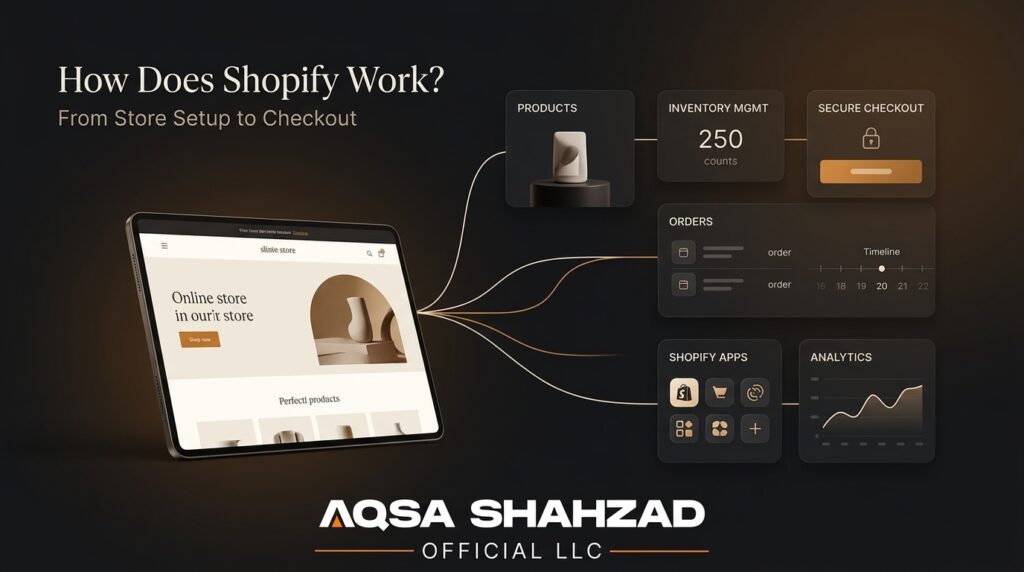
If you’ve spent any time researching how to sell online, you’ve run into the word “Shopify” more times than you can count. What’s harder to find is a straight answer to the actual question: how does it work, mechanically, once you sign up? Is it a website builder? A marketplace like Etsy? Something you need a developer for?
We’ve spent the last several years building and running Shopify stores for other people — everything from small direct-to-consumer brands to enterprise retailers processing serious volume — and this is the explanation we wish existed when we started. No jargon you have to look up, no oversimplified “it’s just drag and drop” hand-waving either.
By the end of this, you’ll understand what Shopify actually is, how the pieces fit together, what it really costs to run a store on it, how it stacks up against alternatives like WooCommerce, Amazon, and Etsy, and how to tell whether it’s the right platform for what you’re trying to build.
Key Takeaways
- Shopify is a hosted SaaS ecommerce platform — Shopify manages hosting, security, and infrastructure, while you control your storefront, branding, and customer data.
- Your admin (back end) and storefront (what customers see) run on shared data but are functionally separate — themes control how it looks, apps control what it does.
- Shopify processed $115.57 billion in GMV in Q2 2026 alone, up 31.6% year-over-year — a useful signal of how much real commerce runs through the platform.
- The subscription price is only part of the cost. Apps, custom theme work, and development are usually the bigger long-term investment.
- Plain Shopify is genuinely enough for most stores. Shopify Plus and custom development make sense once your business has requirements the standard toolkit doesn’t cleanly solve.
So, What Exactly Is Shopify?
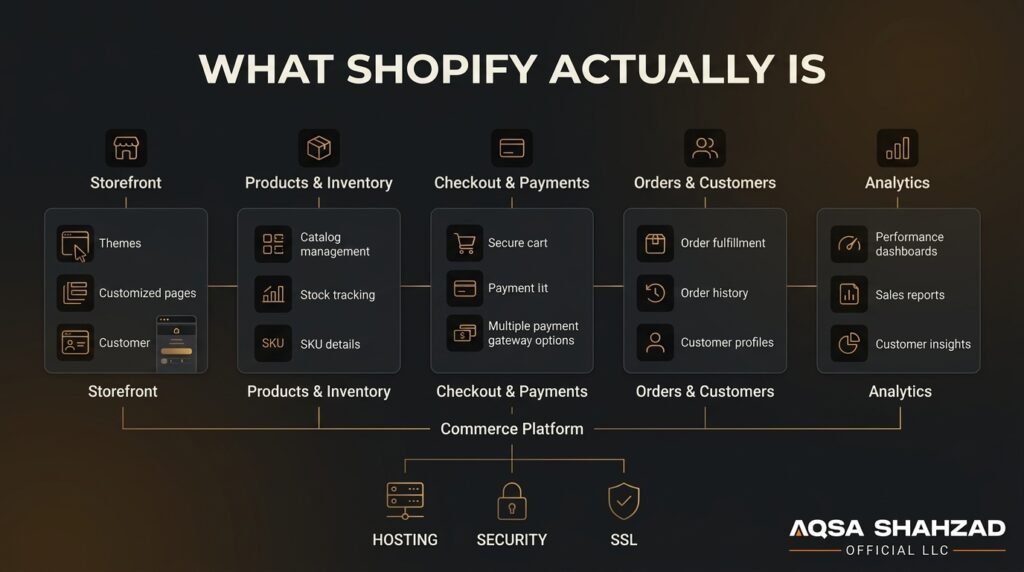
Shopify is a hosted ecommerce platform — meaning it’s software that runs on Shopify’s servers, not something you install or manage yourself. You sign up, and Shopify gives you everything needed to run an online store: a website, a shopping cart, payment processing, inventory tracking, and an admin dashboard to manage all of it. In industry terms, it’s SaaS (software as a service) built specifically for commerce.
That’s a meaningfully different model from something like WooCommerce, which is a plugin you install on your own WordPress hosting and have to maintain yourself, or Amazon and Etsy, which are marketplaces where you’re a seller on someone else’s platform, competing for visibility alongside thousands of other listings. On Shopify, the store is yours. You control the branding, the customer relationships, the data, and the design — Shopify just provides the infrastructure. (We’ll get into exactly how Shopify compares to each of these a bit further down.)
The scale here is worth grounding in real numbers rather than taking on faith:
- Q2 2026 GMV: $115.57 billion processed through the platform in that quarter alone — up 31.6% year-over-year
- Q2 2026 revenue: $3.58 billion, up 33.7% year-over-year
- Active stores: in the millions globally per BuiltWith’s tracking, spanning everything from single-founder startups to household names like Allbirds and Gymshark
That range — a brand-new store and a brand doing billions in aggregate volume, both running on the same core system — tells you a lot about how the platform is built to scale.
Shopify in One Sentence
Shopify is a subscription-based platform that handles the infrastructure, security, and core commerce functions of an online store, so you can focus on products, design, and growth instead of servers and code.
Who’s Actually Building on It
Merchants on Shopify range from first-time founders testing a single product to multi-billion-dollar retail brands, and Shopify Plus stores alone now number in the tens of thousands globally. We’ve worked across a good chunk of that spectrum ourselves from a custom Figma-to-Shopify theme build for a jewelry retailer to a Shopify Plus migration with a custom Zenoti booking integration for Gene Juarez, a multi-location salon and spa group. The mechanics we’re about to walk through are the same ones that power both ends of that range; what changes is how much customization sits on top.
How Does Shopify Actually Work Behind the Scenes?
This is the part most explanations skip, and it’s the part that actually answers “how does it work.”
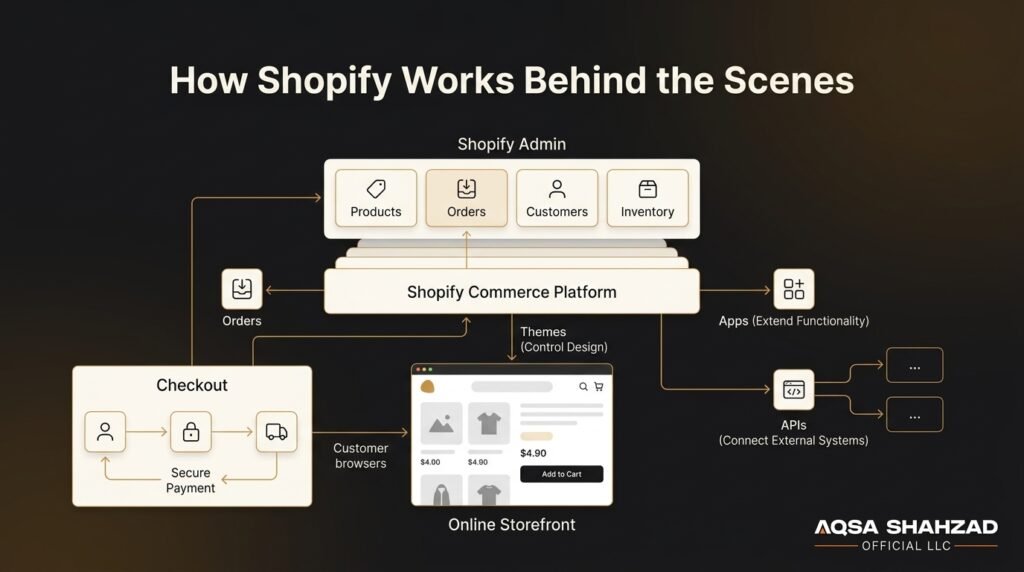
When you log into Shopify, you’re in the admin — a dashboard where you manage products, orders, customers, and settings. Your storefront is the public-facing website your customers actually see and shop on. They’re built on the same underlying data (your products, inventory, pricing), but they’re functionally distinct, which is why you can completely redesign how your storefront looks without touching any of your product or order data.
When you pick a theme from Shopify’s theme store (or have one custom-built), you’re choosing a set of Liquid templates that determine layout, styling, and how product information gets displayed. Shopify’s current theme framework, Online Store 2.0, lets you edit sections and blocks visually through the theme editor without touching code but the flexibility to go deeper with custom theme development is still there if your design needs outgrow what a stock theme can do. This is a big part of why some stores look nearly identical to their theme’s default demo, while others look nothing like a “Shopify store” at all — it comes down to how much custom development sits on top of that Liquid foundation.
Apps extend what Shopify can do beyond its built-in features.
Shopify’s core platform handles the essentials products, checkout, payments, orders but almost every store ends up adding apps from the Shopify App Store to handle things like email marketing, reviews, subscriptions, loyalty programs, or advanced shipping rules. Apps connect into your store through Shopify’s APIs, which is also how custom-built apps and headless setups where the storefront is built separately from Shopify, using something like Hydrogen, and pulls data via API work. You don’t need to think about APIs to run a store, but understanding that this connective layer exists explains why the app ecosystem is so large and why “there’s probably an app for that” is usually true.
Put simply: Shopify handles the infrastructure, security, and core commerce functions; themes handle how it looks; apps handle what it does beyond the basics. That combination is what lets the same platform work for a two-product store and a 10,000-SKU catalog.
From Sign-Up to Your First Sale: What Actually Happens
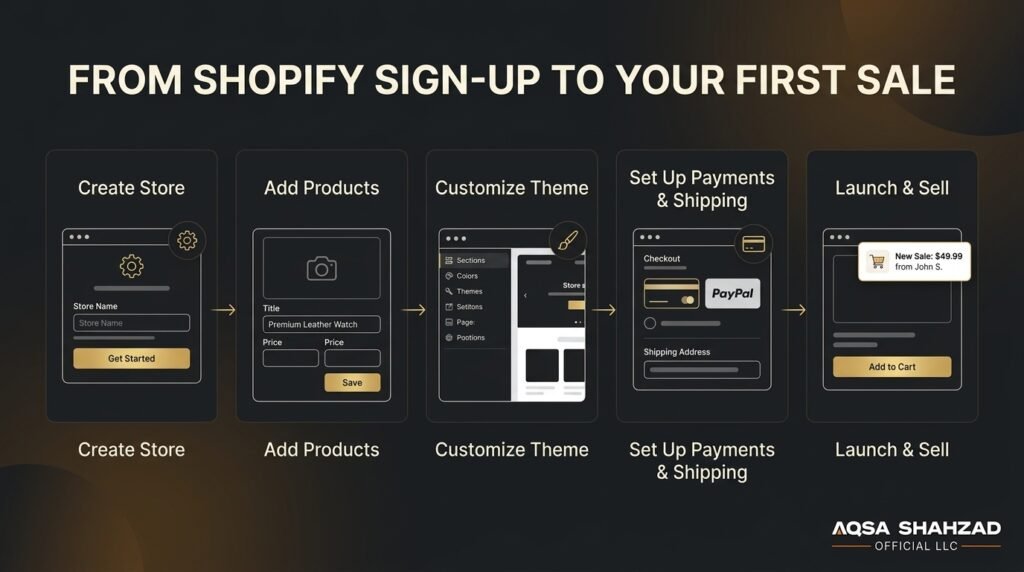
Here’s the practical sequence, without skipping the parts that actually take effort.
Go live. Once products, payments, and shipping are in place, you’re technically ready. In practice, most stores also spend time on email notifications, connecting analytics, and test orders before flipping the switch — a reasonable thing to budget time for rather than rush.
Create your account and store name. This is quick and doesn’t lock you into anything permanently, since store names and domains can be changed later.
Add your products — names, descriptions, prices, images, and variants (size, color, and so on) if you have them. If you’re bringing in a large catalog, this is usually the step that takes the longest, especially if product data needs to be cleaned up or organized first.
Pick and customize a theme. Most merchants start with a free or low-cost theme from Shopify’s theme store and adjust colors, fonts, and layout through the built-in editor — enough for plenty of stores. Others reach a point, usually once they have clear brand guidelines or specific UX needs, where a custom-built theme makes more sense.
Set up payments, shipping, and tax — connecting Shopify Payments or a third-party gateway, and configuring shipping rates and tax settings based on where you’re selling from and shipping to. Tax setup in particular is worth taking seriously; the rules vary by state and country, and getting it wrong is a common source of headaches later.
How Payments and Checkout Really Work
How Transactions Get Processed
When a customer buys something, Shopify’s checkout handles the transaction — collecting payment details, calculating tax and shipping, and processing the charge.
If you use Shopify Payments, Shopify itself acts as the payment processor, which means one less third party to manage and generally lower fees than using an external gateway. If you use a different processor (PayPal, Stripe, or others, depending on your country), Shopify supports that too, though historically Shopify has charged an additional transaction fee on non-Shopify-Payments transactions, so it’s worth checking current terms for your plan.
Shop Pay and Checkout Speed
Shopify also offers Shop Pay, an accelerated checkout that stores customer payment and shipping details so returning shoppers — on your store or any other Shop Pay-enabled store — can check out in a couple of taps. This isn’t just a nice-to-have: Shopify’s own data on Shop Pay shows real impact:
- Lifts conversion by up to 50% compared to guest checkout
- Outperforms other accelerated checkout options by at least 10%
- Surpassed $400 billion in lifetime GMV as of mid-2026
- Quarterly Shop Pay GMV grew 53% year-over-year
Buy-now-pay-later options are also available through Shop Pay Installments in supported regions, letting customers split payments without you having to integrate anything separately. If checkout friction is something you’re actively trying to fix, our breakdowns on Shopify checkout conversion rate benchmarks and reducing cart abandonment go deeper than we can here.
What Fees Actually Look Like
Fees are one of the areas where “it depends” is the honest answer — they vary by plan tier, country, and payment method. Rather than quoting specific numbers here that may shift, the reliable move is to check Shopify’s current pricing page for your country before finalizing your plan choice, since transaction and card fees are a real part of your ongoing costs, not just the monthly subscription.
Where You Can Actually Sell (Not Just Your Website)
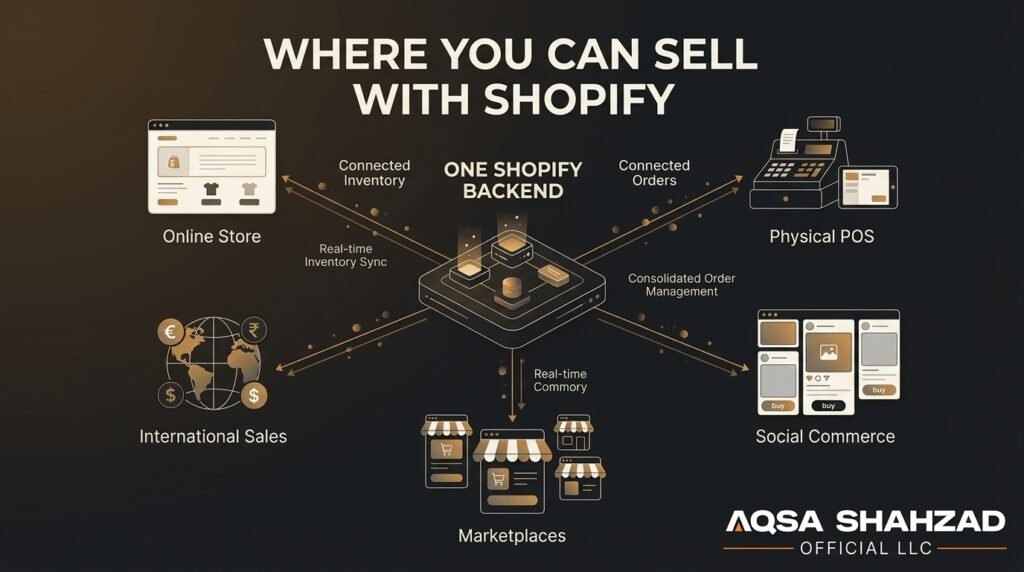
A lot of people think of Shopify purely as “the platform my website runs on,” but the storefront is only one of several sales channels available through the same backend.
Shopify POS lets you sell in person at a retail location, market, or pop-up using a card reader connected to the same system that runs your online store, so inventory and sales data stay in sync across both. Social selling is built in too: you can connect your catalog to Instagram, TikTok, and Facebook to sell directly through those platforms, and to marketplaces like Amazon or eBay, depending on your setup. For merchants selling beyond their home country, Shopify Markets helps manage localized pricing, currencies, and duties for international customers without needing a separate store for each region Shopify’s Q2 2026 results showed international GMV growing 37% year-over-year, faster than North America’s 28%, which reflects how much cross-border commerce now runs through the platform.
The practical upshot is that “how does Shopify work” isn’t just about the website — it’s about one inventory and order system that can power a website, a physical register, a handful of social shops, and international storefronts simultaneously, which is a big part of why it scales well for growing brands.
What Shopify Really Costs in 2026
The Official Plans
Shopify’s plans are tiered, generally starting with a lower-cost tier aimed at new or small stores and scaling up through mid-tier plans for growing businesses to Shopify Plus, which is built for high-volume and enterprise merchants and priced accordingly — often thousands of dollars a month, but bundled with advanced automation, dedicated support, and infrastructure that can handle major traffic spikes. If you’re weighing Advanced against Plus specifically, we’ve laid out that decision in Shopify Plus vs. Shopify Advanced.
Exact pricing changes periodically, so treat any specific number you see (including in older articles) as something to verify on Shopify’s official pricing page rather than as fixed — our pricing calculator can help you estimate a more realistic total based on your actual store requirements.
The Real Cost Beyond the Subscription
The part that’s easy to underestimate is everything beyond the subscription:
- App subscriptions — email marketing, reviews, subscriptions, upsells — individually cheap, but they add up fast
- Custom theme development — a real cost that varies widely depending on design complexity
- Custom app or platform development — for functionality Shopify and its apps don’t cover out of the box, like custom checkout logic, unique integrations, or B2B pricing rules
None of this means Shopify is expensive relative to alternatives; it usually isn’t. It just means the subscription price is the floor, not the total, and it’s worth budgeting with that in mind rather than being surprised later.
Shopify’s AI Tools: Magic and Sidekick, Explained
Shopify has been building AI directly into the platform. Shopify Magic is a set of AI-assisted content tools — generating product descriptions, email copy, and similar content from a short prompt — which is genuinely useful for saving time on the repetitive parts of store setup, though the output still generally benefits from a human edit pass before it goes live. Sidekick is Shopify’s AI commerce assistant, built into the admin to help with tasks like store setup guidance, generating reports, or answering questions about your own store’s data conversationally instead of digging through menus.
These tools are evolving quickly, so specifics about what they can do will keep expanding — worth checking Shopify’s own documentation for the current feature set rather than relying on a snapshot from any single article, including this one.
Is Shopify Secure?
Shopify handles PCI DSS compliance (the security standard for processing card payments) at the platform level, meaning individual merchants don’t need to manage that certification themselves it’s baked into using Shopify Payments and Shopify’s checkout. SSL certificates are automatically provisioned for every store, and Shopify includes fraud analysis tools that flag suspicious orders before they’re fulfilled. For most merchants, this is one of the genuine advantages of a hosted platform over a self-managed one: a meaningful chunk of security and compliance work is handled for you rather than being your responsibility to configure and maintain.
Shopify vs. WooCommerce, Amazon, and Etsy: How Does It Compare?
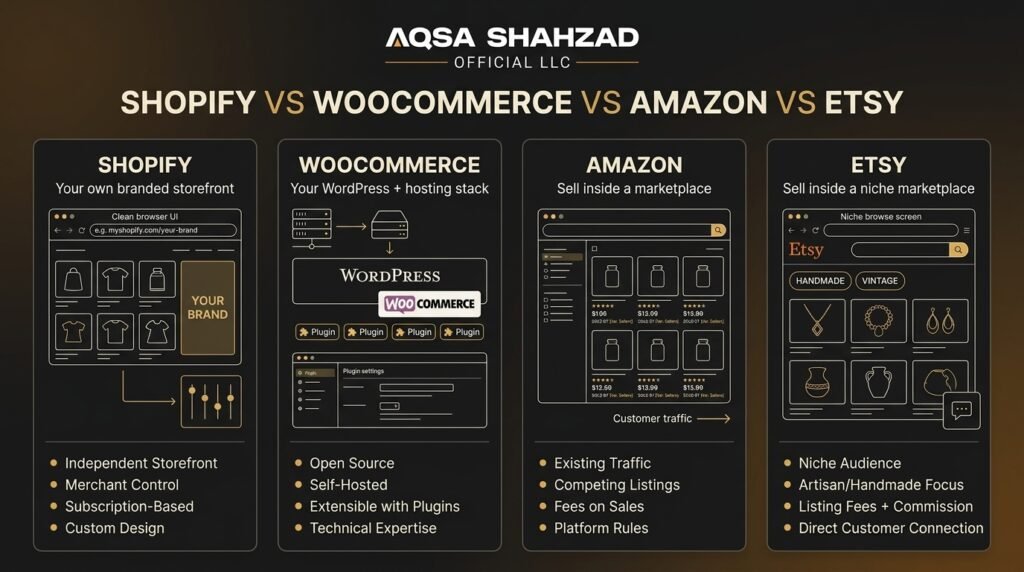
Understanding how Shopify works only answers half the question most people are actually asking — the other half is how it stacks up against the alternatives they’re also considering.
Shopify vs. WooCommerce
| Shopify | WooCommerce | |
| Hosting | Fully hosted by Shopify | Self-hosted — you manage your own web hosting |
| Setup & maintenance | Shopify handles updates, security, uptime | You (or a developer) handle updates, backups, and security |
| Cost structure | Predictable monthly subscription | “Free” plugin, but hosting, security, and premium extensions add up |
| Technical skill needed | Minimal for standard setups | More — server management and WordPress familiarity help |
| Market presence | Roughly 1 in 5 ecommerce software installs, by some measures | One of the most widely installed ecommerce plugins on the web, largely due to WordPress’s overall footprint |
WooCommerce’s appeal is flexibility and cost control if you already know WordPress and don’t mind managing your own hosting stack. Shopify’s appeal is trading some of that flexibility for a system that just works without you having to be your own IT department. If you’re actively comparing the two platforms for a migration decision, our Shopify vs. Magento comparison covers similar trade-offs for merchants weighing self-hosted platforms more broadly.
Shopify vs. Amazon
| Shopify | Amazon | |
| Store ownership | You own the storefront and brand | You’re a seller within Amazon’s marketplace |
| Customer data | You own the customer relationship | Amazon owns most of the customer relationship |
| Competition | You control what customers see | You compete directly against other sellers, including Amazon’s own private-label products |
| Built-in traffic | You have to drive your own traffic | Amazon brings existing shopper demand |
| Fees | Subscription + payment processing | Referral fees, fulfillment fees, and category-specific charges |
The honest trade-off: Amazon gives you access to existing demand immediately, at the cost of brand control and thinner margins. Shopify gives you full control and better margins, but you’re responsible for bringing your own traffic. Plenty of brands run both — Amazon for reach, Shopify for the owned, branded relationship. If you’re specifically moving a business off Amazon and onto your own store, we’ve covered that transition directly in Amazon to Shopify.
Shopify vs. Etsy
| Shopify | Etsy | |
| Store ownership | Independent, branded store | Listing within Etsy’s marketplace |
| Best suited for | Any product category, any scale | Handmade, vintage, and craft-supply goods specifically |
| Discovery | You build your own audience | Etsy’s internal search brings buyers to you |
| Branding | Fully customizable | Limited — your shop lives inside Etsy’s design and rules |
| Growth ceiling | Scales to enterprise volume | Works well at small-to-mid scale within its niche |
Etsy is a strong starting point specifically for handmade or vintage sellers who want built-in discovery without building a brand from zero. It becomes limiting once you want more control over design, pricing flexibility, or a product range that doesn’t fit Etsy’s niche — which is usually the point where sellers move to Shopify.
Switching to Shopify From Another Platform
If you’re coming from WooCommerce, Magento, BigCommerce, or another platform, “how does Shopify work” also means understanding what changes in the move. Product data, customer records, and order history typically need to be migrated — Shopify has built-in import tools for straightforward cases, and more complex catalogs (large product counts, custom fields, historical order data) usually benefit from a more hands-on migration process to avoid data loss or broken SEO from URL changes. We’ve covered the process in more depth in our guide to Shopify migration.
The bigger shift is often structural rather than technical: workflows that were built around your old platform’s quirks — how discounts worked, how inventory synced, how a particular integration behaved — don’t always translate directly, and rebuilding those processes on Shopify’s logic is usually where migration projects take longer than expected. It’s rarely just “export and import”; it’s re-platforming your operations, not just your website.
What About Dropshipping on Shopify?
Dropshipping works on Shopify through apps that connect your store to suppliers — when a customer orders, the supplier ships directly to them, and you never hold inventory yourself. It’s a legitimate way to start selling with lower upfront investment, but it’s worth going in with realistic expectations: margins tend to be thinner than stocking your own inventory, shipping times are often longer since you’re dependent on the supplier, and product quality control is largely out of your hands. It’s a valid starting point for testing a market, but most successful long-term stores either move toward holding some inventory or work with more tightly vetted suppliers as they grow.
The Honest Pros and Cons — From People Who’ve Built 400+ of These
Where Shopify Genuinely Shines
- Hosting, security, PCI compliance, and uptime during traffic spikes are all handled for you
- The app ecosystem means most features you’d need already exist as an install rather than a custom build
- It scales — the same platform that works for a first-time founder also runs enterprise brands, so you’re not forced to migrate to a different system as you grow, just move up a tier
Where It Falls Short
- Out-of-the-box customization has real ceilings; stock themes only flex so far before you need custom development for a genuinely differentiated design or UX
- Relying on too many apps for core functionality can slow your storefront down — see Shopify speed optimization techniques — and adds ongoing costs that compound
- Checkout offers less deep customization than some competitors on lower tiers; Shopify Plus opens this up, but it’s a real consideration below that
None of this makes Shopify a bad choice — for the large majority of stores, the trade-offs favor it clearly. It just means going in with accurate expectations about where the platform’s built-in flexibility ends and where custom work begins.
Is Shopify Right for You? DIY vs. Bringing in Help
For most new and growing stores, plain Shopify on one of its standard plans is genuinely enough. If you’re selling a reasonably sized catalog, don’t have unusual operational requirements, and can work within what themes and apps offer, you can build a fully functional, professional store without ever needing custom development.
Where that changes is when your business has requirements the standard toolkit doesn’t cleanly solve — complex B2B pricing structures, high-volume international operations, a checkout experience that needs deep customization, or a design vision that off-the-shelf themes genuinely can’t deliver. That’s usually the point where Shopify Plus and custom development start to make sense, not because plain Shopify is inadequate in general, but because your specific situation has outgrown what it’s built to handle by default. It’s also often the point where working with an established Shopify development partner saves more time and money than it costs, simply because the mistakes are more expensive at that scale.
If you’re not sure which side of that line you’re on, it’s a reasonable thing to get a second opinion on before committing significant budget either way.
Not sure if plain Shopify is enough for your store, or if you’re already at the point where you need Shopify Plus and custom development?
Get a Free Shopify CRO Audit →
Frequently Asked Questions
Is Shopify free to start?
Shopify offers a free trial period, after which you’ll need an active paid plan to keep selling. There’s no permanently free tier for running a live store.
Do I need to know how to code to use Shopify?
No. You can build and run a fully functional store using themes and apps without touching code. Coding knowledge (or hiring a developer) becomes relevant if you want custom design or functionality beyond what themes and apps provide.
What’s the difference between Shopify and Shopify Plus?
Shopify Plus is the enterprise tier, built for high-volume merchants. It includes higher checkout customization limits, more automation, dedicated support, and infrastructure designed to handle large traffic spikes — priced accordingly higher than standard plans.
How is Shopify different from selling on Amazon or Etsy?
Amazon and Etsy are marketplaces — you’re one seller among many on their platform, and they control the customer relationship to a large degree. Shopify is your own independent store; you own the branding, the customer data, and the design, and you’re not competing for visibility within someone else’s marketplace listings.
How long does it actually take to launch a Shopify store?
A simple store with a stock theme and a small catalog can go live in days. Stores with larger catalogs, custom design work, or complex integrations typically take weeks to a few months, depending on scope.
Is Shopify actually growing, or is that just marketing?
It’s genuinely growing. Shopify’s Q2 2026 results showed $115.57 billion in GMV processed in a single quarter, up 31.6% year-over-year, marking the platform’s fifth consecutive quarter of GMV growth above 30%. That’s not a projection — it’s what already moved through merchant stores.
Bottom Line
Shopify works by combining hosted infrastructure, a theme layer for design, and an app ecosystem for functionality into one system that scales from a single-product store to enterprise retail without requiring you to manage servers, security, or compliance yourself. That combination, backed by real and growing transaction volume, is why it’s become the default choice for so many merchants. But “it’s popular” isn’t the same as “it’s automatically right for your specific store.” The platform gives you a strong foundation either way; how far you take it stock theme or custom build, plain Shopify or Plus, DIY or built with help depends on what your business actually needs, not on what any single guide tells you to do.





